


Brian Rau
Associate III
September 6, 2022
Solved

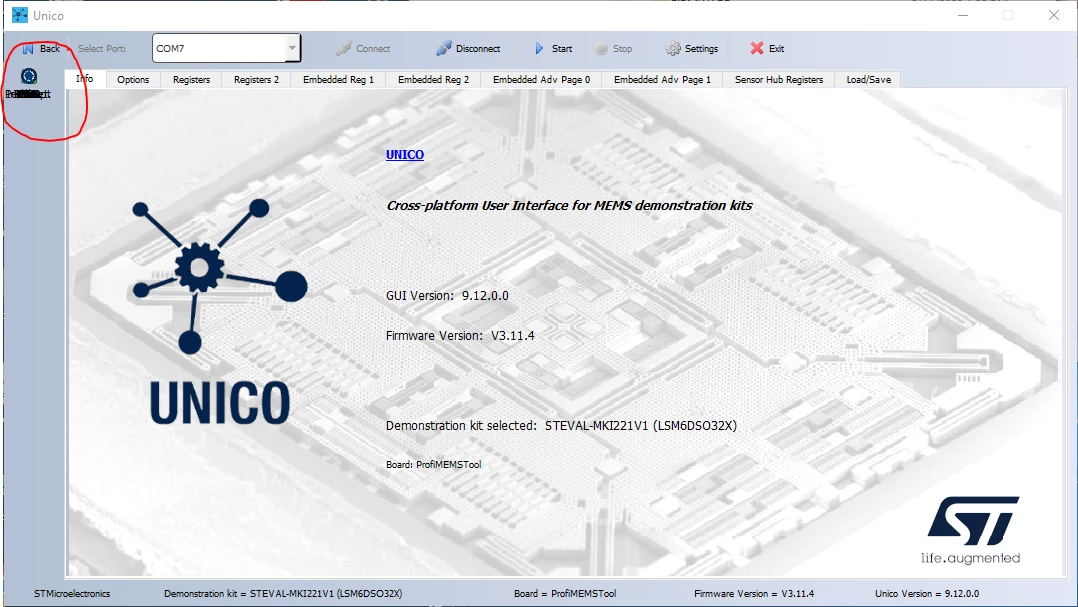
Unico-GUI tools bar - icons showing up on top of each other

Well, the Unico-GUI software was working fine, and one day all of the tools (bars, plot, data, etc) started getting drawn on top of one another, and the last one (pedometer) is the one on "top" and the only one I can now select. Any idea how to fix this? I uninstalled/reinstalled and it's still doing this...
0693W00000SucYeQAJ.pngBrian

    This topic has been closed for replies.
    Brian Rau
    Brian RauBest answer
    Associate III
    September 6, 2022

    My solution: Uninstall Unico-GUI, reboot the PC (Windows 10), then re-install from scratch. That fixed it. An uninstall/reinstall without the reboot didn't.

    3 replies

    Eleon BORLINI
    ST Employee
    September 6, 2022

    Hi Brian @Brian Rau​ ,

    Did you changed the Operating System in the meantime?

    And do you see same issue starting Unico "offline"?

    0693W00000SucnyQAB.png 

    -Eleon

    Macneacail
    Associate III
    September 6, 2022

    it is annoying I will grant you that, but it usually goes away on a restart the program.

    Brian Rau
    Brian RauAuthorBest answer
    Associate III
    September 6, 2022

    My solution: Uninstall Unico-GUI, reboot the PC (Windows 10), then re-install from scratch. That fixed it. An uninstall/reinstall without the reboot didn't.