Associate
June 24, 2026
Solved

STEVAL-MKI109D programming firmware suing stm32 cubemx

  • June 24, 2026
  • 3 replies
  • 50 views

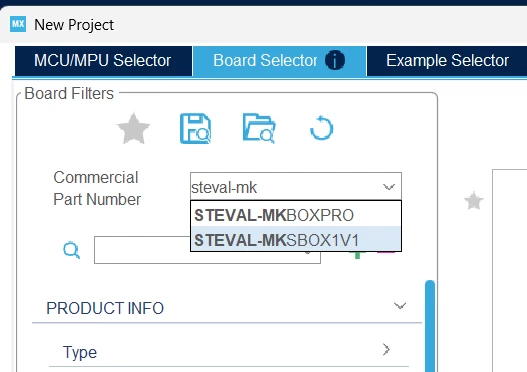
In the stm32 cubeMX Board selector menu I cant find board MKI-109D.

How can I develop the board firmware?


Best answer by Andrew Neil

The STEVAL-MKI109D is not exposed as a standard CubeMX board target for custom application firmware development. It is primarily intended as an evaluation motherboard / bridge platform for MEMS sensor daughterboards.

Thanks for confirming!


If your goal is to evaluate the sensor and verify the communication path, the recommended workflow is to use MEMS Studio rather than starting from a bare CubeMX board project

@Sucheta If you do want to go for a “bare board” project, there will be firmware examples on the Product Page(s) for the sensor(s) in question; eg, see

https://www.st.com/en/embedded-software/drivers-for-mems.html

In particular: C-Drivers-MEMS and X-CUBE-MEMS1


3 replies

Andrew Neil
Super User
June 24, 2026

I’m not sure that the STEVAL-MKI109D is really intended for user firmware development?

It seems to me that the main idea is to use MEMS-Studio to do that:

https://www.st.com/resource/en/product_presentation/steval-mki109d-quick-start-guide.pdf

See also:

https://www.st.com/resource/en/user_manual/um3420-stevalmki109d-professional-mems-tool-motherboard-for-mems-adapter-boards-stmicroelectronics.pdf#page=15


You can always treat it as a “custom” board, and work from the schematics:

https://www.st.com/en/evaluation-tools/steval-mki109d.html#cad-resources

(also at the end of UM3420)


A complex system that works is invariably found to have evolved from a simple system that worked.A complex system designed from scratch never works and cannot be patched up to make it work.

Federica Bossi
ST Technical Moderator
July 8, 2026

Hi ​@Sucheta ,

The STEVAL-MKI109D is not exposed as a standard CubeMX board target for custom application firmware development. It is primarily intended as an evaluation motherboard / bridge platform for MEMS sensor daughterboards.

If your goal is to evaluate the sensor and verify the communication path, the recommended workflow is to use MEMS Studio rather than starting from a bare CubeMX board project. MEMS Studio is designed to talk to the board using the ST-provided bridge firmware and gives access to:

  • sensor register read/write
  • WHO_AM_I verification
  • ODR / full-scale configuration
  • FIFO control and data logging
  • interrupt / pin configuration
  • live sensor plotting and acquisition
In order to give better visibility on the answered topics, please click on 'Best answer' on the reply which solved your issue or answered your question.
Andrew Neil
Andrew NeilBest answer
Super User
July 8, 2026

The STEVAL-MKI109D is not exposed as a standard CubeMX board target for custom application firmware development. It is primarily intended as an evaluation motherboard / bridge platform for MEMS sensor daughterboards.

Thanks for confirming!


If your goal is to evaluate the sensor and verify the communication path, the recommended workflow is to use MEMS Studio rather than starting from a bare CubeMX board project

@Sucheta If you do want to go for a “bare board” project, there will be firmware examples on the Product Page(s) for the sensor(s) in question; eg, see

https://www.st.com/en/embedded-software/drivers-for-mems.html

In particular: C-Drivers-MEMS and X-CUBE-MEMS1


A complex system that works is invariably found to have evolved from a simple system that worked.A complex system designed from scratch never works and cannot be patched up to make it work.
SuchetaAuthor
Associate
July 13, 2026

Thank You!

