Hi, I’m running the ST BLE Sensor app on an iPhone and when I attempt to change the profile from beginner to expert, it does not take. The result is that many options are grayed out. Am I doing something wrong? Is there a work-around? I don’t have access to an Android device.
I’m sorry, I misunderstood your original request started here:
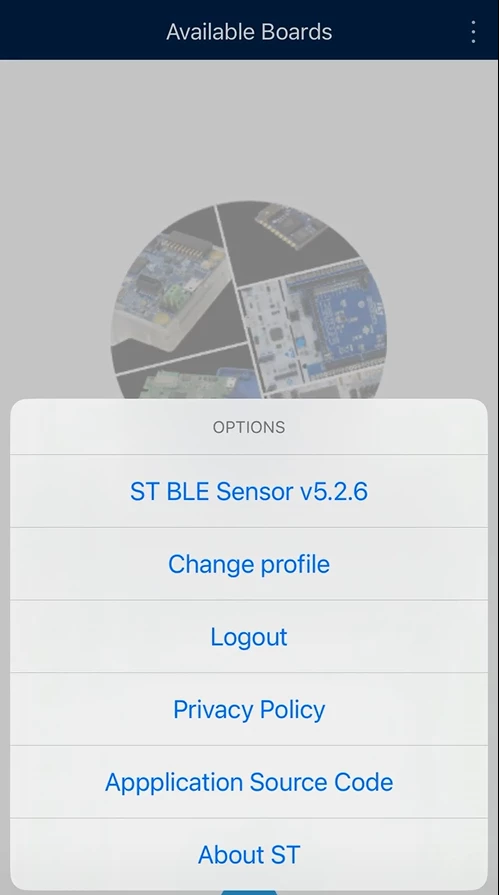
The known issue refers to a specific bug: while setting the Expert mode, you should enable some advanced features in the options menu (3 dots in the upper-right corner). Unfortunately, in this version the menu doesn’t change. Both in Beginner and Expert mode you should see the very same content I’m sharing here:
This is the issue I was referring originally: when the next maintenance release will be available some further options will appear in this menu.
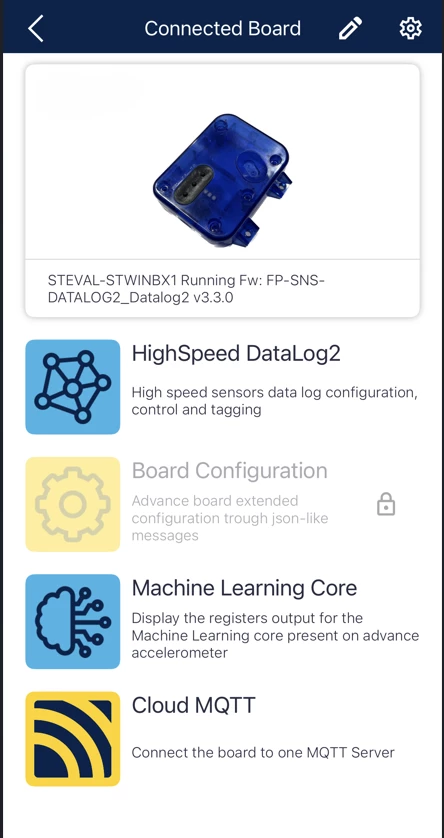
The unique demo that is not available in Beginner Mode is the Board Configuration. Here the expected view in Beginner Mode
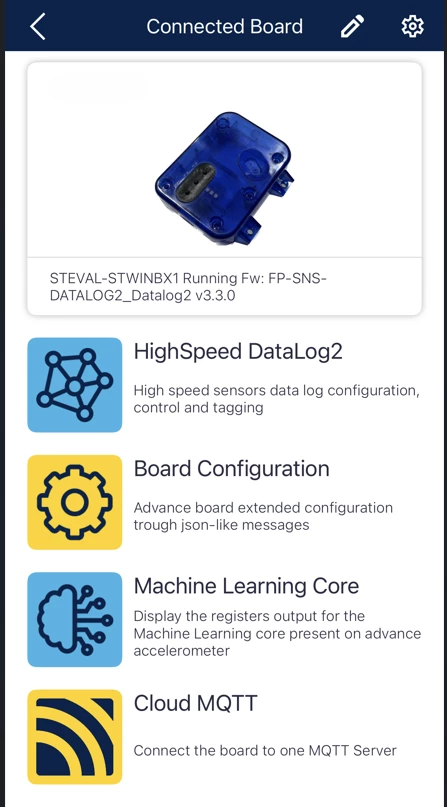
Here instead the view in Expert Mode
Board Configuration is the view you shared before. So, you’re setting Expert Mode correctly. It’s a generic demo used by different firmware from ST. DATALOG2 is not exposing all those features by design. In general, a firmware using BLESensor app can use and expose each of those commands freely; we’re providing firmware demo that implements all the commands and others that implements only a subset as we’re doing in DATALOG2.
I wish my explanations can solve your doubts.
If not, please ask for further support.
Best regards,
Simone
In order to give better visibility on the answered topics, please click on 'Best answer' on the reply which solved your issue or answered your question.
When you open the Change Profile tab on iOS in the v5.2.6 it automatically will show the Beginner as selected as the default option. if you choose Expert and then Firmware Developer programmer you should see the options being enabled.
When you try this, what options are staying grayed out?
Another thing you could try is to delete the app and all the data and download it again choosing Expert / Firmware Developer from the beginning.
Let me know!
In order to give better visibility on the answered topics, please click on 'Best answer' on the reply which solved your issue or answered your question.
Ahh, so it has the Beginner box checked even though you are or may be in Expert?
I captured the options before and after setting Expert, and also deleted the app and set Expert as the initial configuration, and all three screens have the same grayed out options (attached). I did ask this in another category and it sounds as if it’s a known issue and is being worked on.
Yes, currently the Beginner box is checked by default even though you are or may be in Expert when you want to change the profile.
The gray options that you are showing in the screenshot are correct because this options are not available in the firmware.
In order to give better visibility on the answered topics, please click on 'Best answer' on the reply which solved your issue or answered your question.
I’m sorry, I misunderstood your original request started here:
The known issue refers to a specific bug: while setting the Expert mode, you should enable some advanced features in the options menu (3 dots in the upper-right corner). Unfortunately, in this version the menu doesn’t change. Both in Beginner and Expert mode you should see the very same content I’m sharing here:
This is the issue I was referring originally: when the next maintenance release will be available some further options will appear in this menu.
The unique demo that is not available in Beginner Mode is the Board Configuration. Here the expected view in Beginner Mode
Here instead the view in Expert Mode
Board Configuration is the view you shared before. So, you’re setting Expert Mode correctly. It’s a generic demo used by different firmware from ST. DATALOG2 is not exposing all those features by design. In general, a firmware using BLESensor app can use and expose each of those commands freely; we’re providing firmware demo that implements all the commands and others that implements only a subset as we’re doing in DATALOG2.
I wish my explanations can solve your doubts.
If not, please ask for further support.
Best regards,
Simone
In order to give better visibility on the answered topics, please click on 'Best answer' on the reply which solved your issue or answered your question.
Thank you. I was seeing very little or no changed functionality in Datalog2 between the different modes. I now see how to determine which mode I am in. A flag or at least have the checked box in the profile-change screen indicate the current mode would help, imho.
i’ll work on getting Datalog2 to play nicely with the app now.