Reading a MKI109V3 with a MKI210V2K module using C# from a console program.
If I deploy this accelerometer into the field, say a long way from anyone it needs to be a simple start on reboot of the computer. UNICO GUI and LITE are not easy reboots.
UNICO GUI does not provide a time stamp on records nor a record count, so one cannot use the TXT output file for FFT - no idea of the timestep.
Plus there are existing methods that have a common CSV file format for data. In the development of montoring for major infrastructure this is critical.
I used the C# UNICO LITE to understand how to code a console project. But your UNICO LITE is a long way from complete, it does not read the accelerometer at all.
In my code, I can get the standard calls like *ver to work, and I have followed the instructions in your PDF files but even getting whoami to work is impossible for me. In UNICO LITE you have to hit two buttons to get the 68 response, *start and then *write. It is less than intuitive.
How do I get the time, temperature, tilt, gyro and accelerometer values? I am doing something wrong but three days of playing have not shown me my mistake on writing and reading from registers.
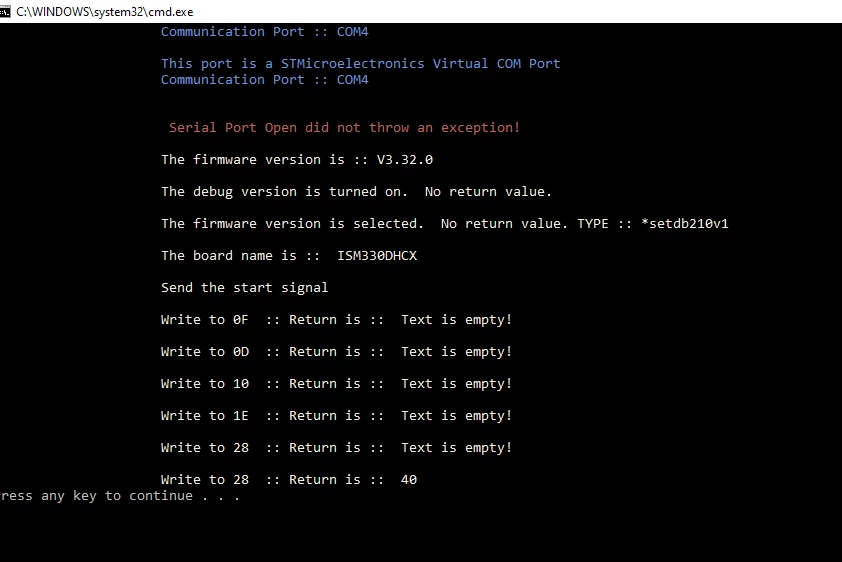
Here is the C# solution folder and a sample of the output.
sp.WriteLine(writeWA3 + "\n\r");
text = sp.ReadExisting();
if (text == "")
{
text = "Text is empty!";
}
Console.WriteLine("\n\r Write to 1E :: Return is :: " + text, Color.Linen);
Anything but ReadExisting hangs the code.
A sample of the output.
I have written a lot of code in C# for accelerometers, this is the hardest so far.