Hardwariano
Associate III
May 12, 2020
Solved

Problems with VL53L0X GUI, X-NUCLEO-53L0A1 and NUCLEO-L476RG. Expansion board not detected

  • May 12, 2020
  • 6 replies
  • 5469 views

Hello all,

I have a problem when I try to use VL53L0X GUI application: it doesn't recognize the NUCLEO-L476RG board.

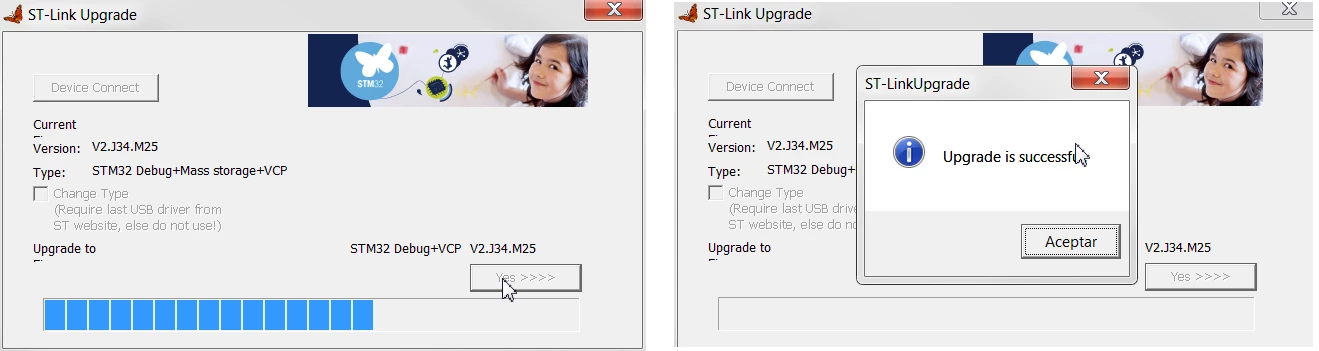
First, I install STSW-LINK007 and STSW-LINK009 as manual says.
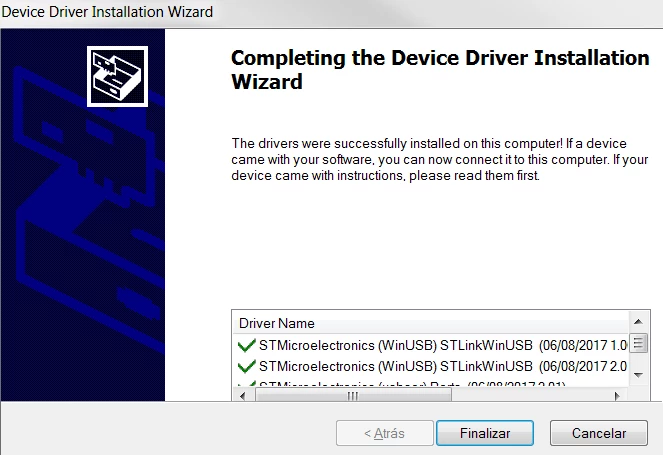
0693W000000XFTxQAO.png

0693W000000XFU7QAO.png

Then I connect X-NUCLEO-53L0A1 + NUCLEO-L476RG to my USB port, start the application and get the next error:
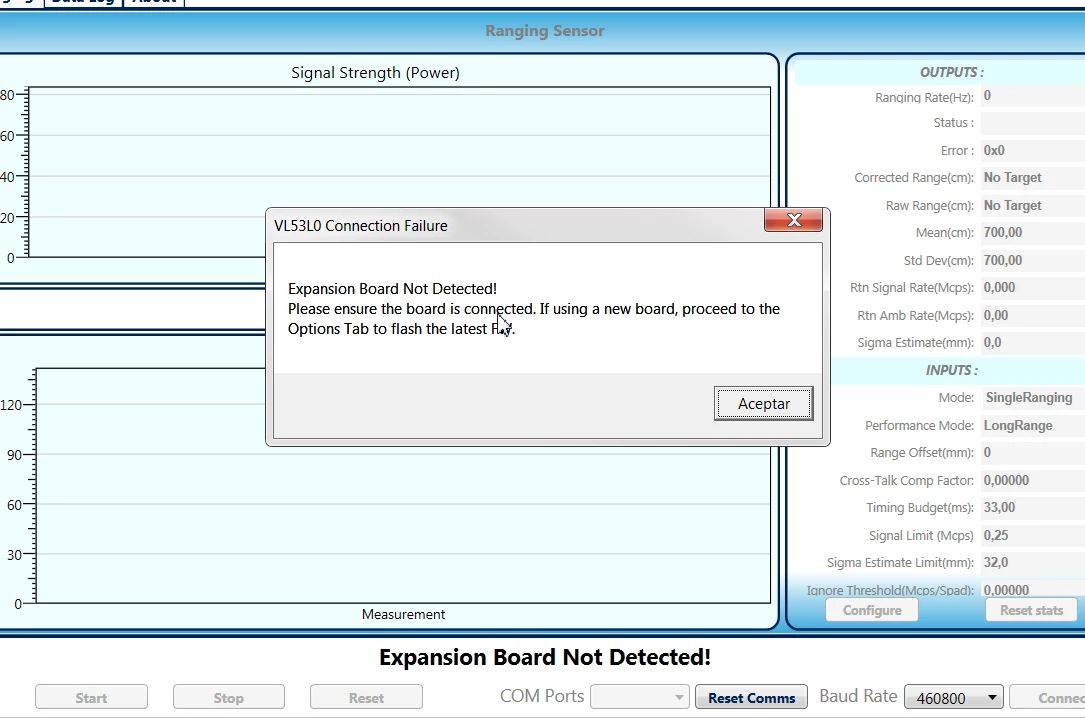
0693W000000XFURQA4.png

Why is this happening? Does VL53L0X GUI only works with NUCLEO-F401RE but not with NUCLEO-L476RG?

Note: I know my NUCLEO-L476RG and my X-NUCLEO-53L0A1 aren't damaged because I can download the VL53L0X examples and they work well:
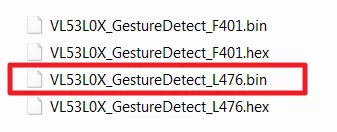
0693W000000XFeRQAW.png

Thanks in advance.

Regards.

This topic has been closed for replies.
Best answer by John E KVAM

Unfortunately we have only written the GUI to support the STM32F401 Nucleo-64 board.

So nothing is broken and you did everything correctly, but you need a different MCU board.

Good news is that they are only about $10, and quite available from Mouser, Digikey or wherever you bought your original kit.

Sorry about that.

  • john

6 replies

John E KVAM
John E KVAMBest answer
ST Employee
May 12, 2020

Unfortunately we have only written the GUI to support the STM32F401 Nucleo-64 board.

So nothing is broken and you did everything correctly, but you need a different MCU board.

Good news is that they are only about $10, and quite available from Mouser, Digikey or wherever you bought your original kit.

Sorry about that.

  • john
If this or any post solves your issue, please mark them as 'Accept as Solution' It really helps. And if you notice anything wrong do not hesitate to 'Report Inappropriate Content'. Someone will review it.
Hardwariano
Associate III
May 12, 2020

Hello John

thanks for confirming what I suspected. I'll buy STM32F401 Nucleo-64 board then.

As a suggestion, please clearly specify in the manual that the only compatible PCB is F401 to avoid confusion. I though NUCLEO-L476RG was compatible with the GUI because there were some examples developed for VL53L0X and NUCLEO-L476RG.

Regards

DHall.3
Visitor II
February 3, 2021

I have the same issue, and it's a 401 board. Device manager says everything's OK (it shows the BAUD rate as 9600), the FW update finds it fine (I've done it twice), but when I open the GUI it says "Expansion board not detected". I've tried changing the baud rate to 115200 in both dev mgr and the GUI, but that just makes it fail faster. Mine is an older board (the expansion board doesn't have a display). NUCLEO board shows NUCLEO-F401RE and MB1136 C-04. Has something changed that would make this board no longer work?

Duane Hall

John E KVAM
ST Employee
February 3, 2021

The expansion board can be 'not detected for a couple of reasons. The most common one for me is that the Teraterm was left open.

Tera Term is a good way to check that you are getting character however.

Another failure mode is that STSW_LINK009 or STSW_LINK007 was not run.

The 009 software converts the USB to an RS-232 emulation. The 007 updates the code in your STM32 link processor.

download them from ST.com

To verify that your STM32 is correctly identified by the PC, plug it in.

You should see a disk drive called NODE-F401 (D: ) in your file explorer

You should also see in your device manager:

STMicroexectronics STLine Virtual Com Port (COMxx)

(Tera term can also find this if it's there.)

On occation, killing the GUI, pulling the USB and starting over works.

On really rare occations it takes a reboot.

Good luck,

  • john

If this or any post solves your issue, please mark them as 'Accept as Solution' It really helps. And if you notice anything wrong do not hesitate to 'Report Inappropriate Content'. Someone will review it.
DHall.3
Visitor II
February 9, 2021
John,
I apologize for the late answer - had some work things I had to take care of.
The board shows up in Explorer, and I can open in and see the .TXT and .HTM 'files'.
[image: image.png]
It also shows up in Device Manager:
[image: image.png]
When I connect with TerraTerm at 460800 BAUD, I get nothing. When I press
the ENTER key, I get this error message:
ERRORu-boot> ERRORu-boot> ERRORu-boot> ERRORu-boot> ERRORu-boot>
(one error with each ENTER keypress).
I have re-downloaded to the board multiple times, started and stopped the
app, and re-booted my computer.
My computer is up to date with the latest windows 10 updates, running
version 2004.
[image: image.png]
Where should I go from here?
Duane
John E KVAM
ST Employee
February 10, 2021

It says "expansion board not detected" and it's not kidding.

You don't have the VL53L0X expansion board.

It's something else.

I'm going to guess it's the VL53L3 the L1 or maybe an L4.

I'm going to doubt it's an L4 as they are not out yet.

But we've screwed up like this before.

The L1X and the L1CB have gold squares on top of the chip.

So look at the expansion board very carefully.

I don't know of any L0X expansion boards that do not have the 4-digit display, so I don't think you have what you think you have.

Compare the sensor to the data sheet picture? Are they identical?

Compare the silkscreen on the board to find the VL53L0X.

There is a PCB number on the board somewhere?

What does that say?

  • john
If this or any post solves your issue, please mark them as 'Accept as Solution' It really helps. And if you notice anything wrong do not hesitate to 'Report Inappropriate Content'. Someone will review it.
DHall.3
Visitor II
February 10, 2021
Here's the board.
John E KVAM
ST Employee
February 11, 2021

Duane -

On a whim, I started putting the expansion board on several different Nucleo F401RE boards. Some of which I have abused quite badly.

I found 1 that had your symptom

So try this:

Use Tera Term, use 406800 as a baud rate. issue the command: (commands will NOT echo, backspace does not work)

sensors

You should get "sensor PE"

enable

You should get a lot of data.

help - lots of text

But based on your symptoms, I think you need a new NucleoF401RE board.

sorry about that.

(Actually I've only heard of one failure. It's very rare."

The enable command should generate data.

If this or any post solves your issue, please mark them as 'Accept as Solution' It really helps. And if you notice anything wrong do not hesitate to 'Report Inappropriate Content'. Someone will review it.