Snara.21
Senior
August 31, 2021
Solved

In Cube MX there are two software packages (XcUBE-BLE1 and XCUBE - BLE2) which to use for the Sensortile.Box and Sensortile Development Kit. STEVAL - MKSBOX1 has SPBTLE and STLKV101 has BLUE NTG Chip .

  • August 31, 2021
  • 1 reply
  • 989 views

..

This topic has been closed for replies.
Best answer by Eleon BORLINI

Hi @Snara.2​ ,

consider that the X-CUBE-BLE1 includes drivers for BlueNRG-MS/BlueNRG-M0 Bluetooth low energy devices, so it is suitable for the STEVAL-STLKT01V1.

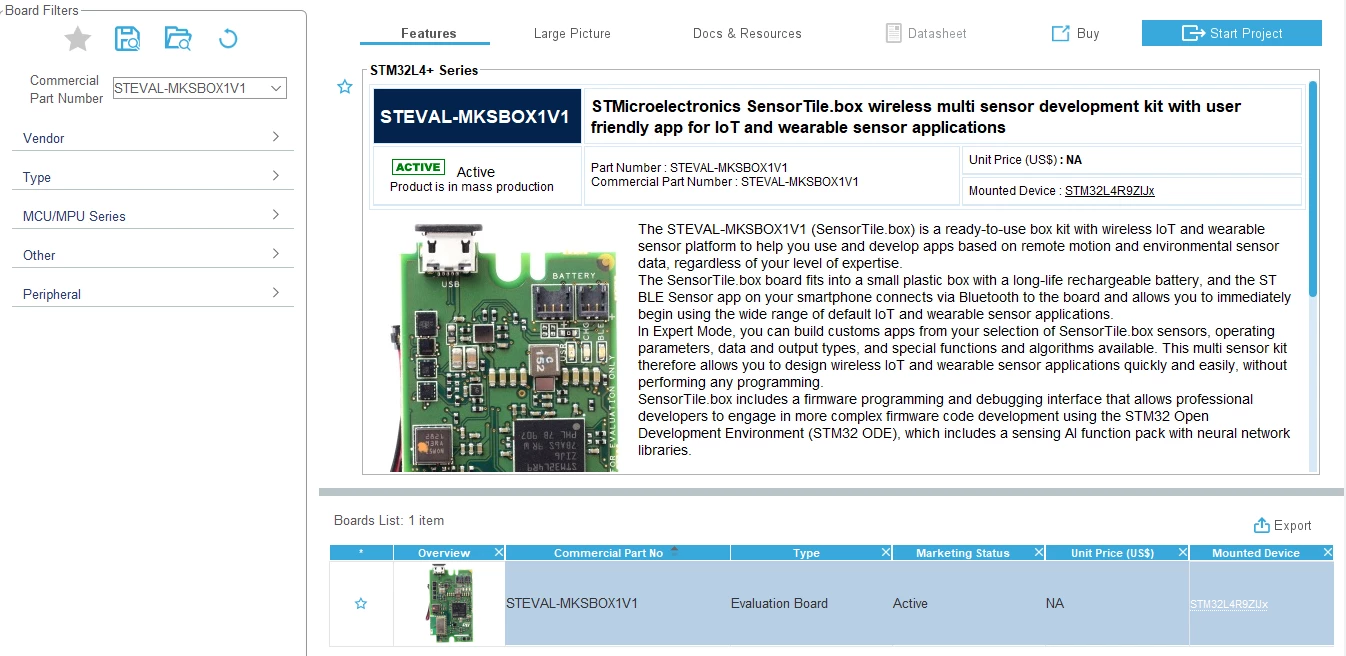
On the other side, the X-CUBE-BLE2 will be ok when the Sensortile.box will host the BlueNRG-M2 module, but for now you should use the FP-SNS-STBOX1, that and includes the drivers for the STPBLE-S1. In this case, if you want to start from scratch with the CubeMX, you can access the board selector and select the SensorTile.box tool.
0693W00000Dm5hmQAB.png 

If my reply answered your question, please click on Select as Best at the bottom of this post. This will help other users with the same issue to find the answer faster.

-Eleon

1 reply

Eleon BORLINI
Eleon BORLINIBest answer
ST Employee
September 3, 2021

Hi @Snara.2​ ,

consider that the X-CUBE-BLE1 includes drivers for BlueNRG-MS/BlueNRG-M0 Bluetooth low energy devices, so it is suitable for the STEVAL-STLKT01V1.

On the other side, the X-CUBE-BLE2 will be ok when the Sensortile.box will host the BlueNRG-M2 module, but for now you should use the FP-SNS-STBOX1, that and includes the drivers for the STPBLE-S1. In this case, if you want to start from scratch with the CubeMX, you can access the board selector and select the SensorTile.box tool.

0693W00000Dm5hmQAB.png 

If my reply answered your question, please click on Select as Best at the bottom of this post. This will help other users with the same issue to find the answer faster.

-Eleon