Lmile.1
Associate
March 10, 2021
Solved

How do I get the STEVAL-MKI168V1 IIS2dh accelerometer DEMO to run in I2C mode instead of SPI. I need to evaluate transfer speeds using I2C. Is there a way of telling the UNICO software to run the sensor in I2C? Thank You!

  • March 10, 2021
  • 5 replies
  • 2769 views

..

    This topic has been closed for replies.
    Best answer by Eleon BORLINI

    Hi @Lmile.1​ ,

    I just got the answer from our experts and well... it's possible at GUI level!

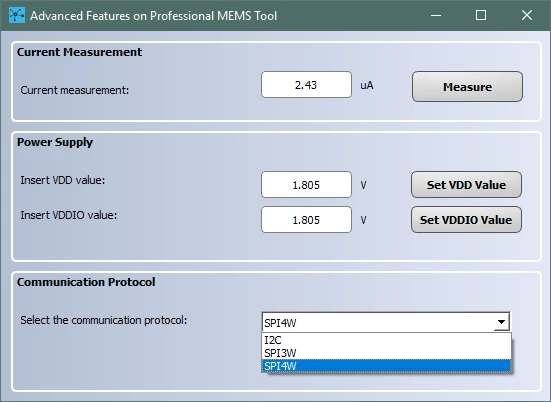
    For many devices, IIS2DH included, in the "Option" tab you can find a button “Advanced Features for Profi�?, that allows (also) the communication protocol change. 

    Please check the picture below for a guide:

    0693W000008wsmgQAA.png0693W000008wsmqQAA.pngIf my reply answered your question, please click on Select as Best at the bottom of this post. This will help other users with the same issue to find the answer faster. 

    -Eleon

    5 replies

    Eleon BORLINI
    ST Employee
    March 12, 2021

    Hi @Lmile.1​ ,

    the STEVAL-MKI109V3 is "hardware compatible" for the I2C communication on motion sensors, but the Unico GUI has been implemented with the SPI communication.

    While I'm internally checking for the availability of an high-level routine that enables the I2C communication with the sensors, you could exploit the capability of Unico Lite GUI, which is provided together with the source code (STSW-MEMS034:( with some effort you could implement this way the I2C communication.

    Of course, if you are using a motherboard different from the STEVAL-MKI109V3, you have to evaluate case by case accordingly to your MCU, and you could get help from STM32CubeMX configurations.

    -Eleon

    Eleon BORLINI
    Eleon BORLINIBest answer
    ST Employee
    March 15, 2021

    Hi @Lmile.1​ ,

    I just got the answer from our experts and well... it's possible at GUI level!

    For many devices, IIS2DH included, in the "Option" tab you can find a button “Advanced Features for Profi�?, that allows (also) the communication protocol change. 

    Please check the picture below for a guide:

    0693W000008wsmgQAA.png0693W000008wsmqQAA.pngIf my reply answered your question, please click on Select as Best at the bottom of this post. This will help other users with the same issue to find the answer faster. 

    -Eleon

    Brian Rau
    Associate III
    August 17, 2022

    Eleon, perhaps you can answer this - it appears that UNICO-GUI first must connect to the board using SPI, only then can you change to I2C, is this correct? I was hoping to use UNICO-GUI to collect data from and program an LSM6DSO32X in our design that's configured for I2C communications, but connecting the STEVAL-MKI109V3 board to our I2C bus, UNICO-GUI won't even find the LSM6DSO32X, so I can't proceed any further to tell it to communicate over I2C.

    Brian

    Eleon BORLINI
    ST Employee
    August 25, 2022

    Hi Brian @Brian Rau​ ,

    please have a look to this thread.

    -Eleon

    Lmile.1
    Lmile.1Author
    Associate
    March 19, 2021

    Hi Eleon,

    Thank you for answering my question. My Unico user interface doesn't have that "advanced option"

    Where do I buy or get this better version of software you have demonstrated?

    Thank you again!

    Larry

    Eleon BORLINI
    ST Employee
    March 22, 2021

    Hi @Lmile.1​ ,

    you should be able to find it in Options --> Advanced features as shown in the picture below:

    0693W000008xX3mQAE.png 

    -Eleon

    Lmile.1
    Lmile.1Author
    Associate
    March 22, 2021

    Hi Eleon,

    My demo kit doesn't seem to have the right side menu as yours does?

    My software version is the newer 9.9.0.0, how do I download your version. I am trying to

    use STEVAL-MKI168V1 (IIS2DS) yours is STEVAL-MKI196V1, a gyroscope? Maybe my accelerometer

    doesn't have that menu? Thank you for helping me! Larry

    Eleon BORLINI
    ST Employee
    March 22, 2021

    Hi Larry,

    that's strange, I'll check better... But it could be related to the fact you are using a IIS2DH (I was checking with an LSM6DSO), and should check if this feature is device-dependent (I supposed it was not indeed...).

    You can however try downloading the previous version of Unico (for Windows, for example) from the st.com page:

    0693W000008xYe6QAE.png 

    -Eleon

    Brian Rau
    Associate III
    July 1, 2022

    A further question: Can the I2C address be configured somewhere in the GUI? It appears that the STEVAL-MKI109V3/STEVAL-MKI221V1 combination uses I2C address 0x6B, and of course in my design I set the address to 0x6A before I discovered this. I'd like to be able to use the STEVAL-MKI109V3 and GUI to test my design with I2C address 0x6A...

    Eleon BORLINI
    ST Employee
    July 5, 2022

    Hi @Brian Rau​ ,

    please refer to this thread for the topic.

    -Eleon