NMart.1
Associate II
March 28, 2021
Solved

getting timestamp on tilebox

  • March 28, 2021
  • 1 reply
  • 1050 views

Hello

I know that tilebox has a RTC module, so I realise it is psoible to get current time for generating timestamp for data. Is it posible to do it? Is there any implementation of that in given project examples?

Thank you

This topic has been closed for replies.
Best answer by Eleon BORLINI

Hi @Nicolás Martinez​ ,

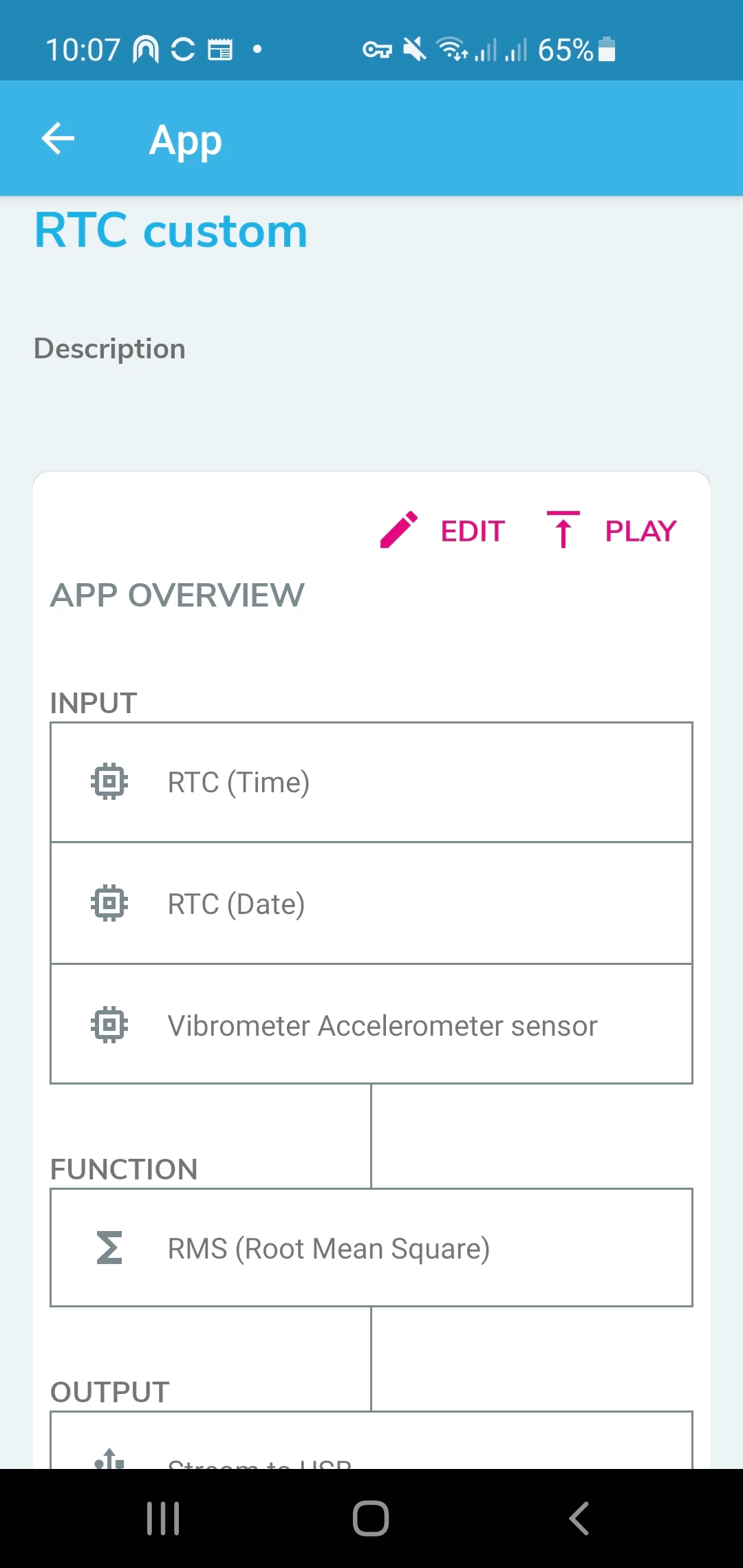
I believe that the easiest way to acquire the timestamp is to configure the related input in the Expert mode option of the smartphone app ST BLE Sensor, as shown in the picture below:
0693W000008yFthQAE.jpg 

If you otherwise want to set the board by code programming, you can use the DataLogExtended application that you can find in the FP-SNS-STBOX1 in the Projects folder (\Projects\STM32L4R9ZI-SensorTile.box\Applications\DataLogExtended:( it allows also the acquisition of the data and the timestamp with the Unicleo-GUI (via USB or BLE). The driver dedicated to the RTC is in the Drivers folder (\Drivers\STM32L4xx_HAL_Driver).

If my reply answered your question, please click on Select as Best at the bottom of this post. This will help other users with the same issue to find the answer faster.

-Eleon

1 reply

Eleon BORLINI
Eleon BORLINIBest answer
ST Employee
March 30, 2021

Hi @Nicolás Martinez​ ,

I believe that the easiest way to acquire the timestamp is to configure the related input in the Expert mode option of the smartphone app ST BLE Sensor, as shown in the picture below:

0693W000008yFthQAE.jpg 

If you otherwise want to set the board by code programming, you can use the DataLogExtended application that you can find in the FP-SNS-STBOX1 in the Projects folder (\Projects\STM32L4R9ZI-SensorTile.box\Applications\DataLogExtended:( it allows also the acquisition of the data and the timestamp with the Unicleo-GUI (via USB or BLE). The driver dedicated to the RTC is in the Drivers folder (\Drivers\STM32L4xx_HAL_Driver).

If my reply answered your question, please click on Select as Best at the bottom of this post. This will help other users with the same issue to find the answer faster.

-Eleon