OBaha.1
Associate
February 16, 2021
Solved

Can't operate MKI207v1 with MKI109v3.

  • February 16, 2021
  • 1 reply
  • 684 views

I am trying to run MKI207V1 with MKI109V3, it does not work because MKI207V1 does not appear in the list of devices.

I know I have no problem with MKI109V3 because I can run MKI159V1.

I would not complain, but appears on the company website that MKI207V1 can be activated using MKI109V3.

https://www.st.com/content/st_com/en/products/evaluation-tools/product-evaluation-tools/mems-motion-sensor-eval-boards/steval-mki207v1.html

Can anyone tell me what mistake I made in operating?

Thank you.

This topic has been closed for replies.
Best answer by Eleon BORLINI

Hi @OBaha.1​ ,

you should first check you have downloaded a recent version of the Unico GUI, and uploaded the FW on the MKI109V3 ProfiMEMS board.

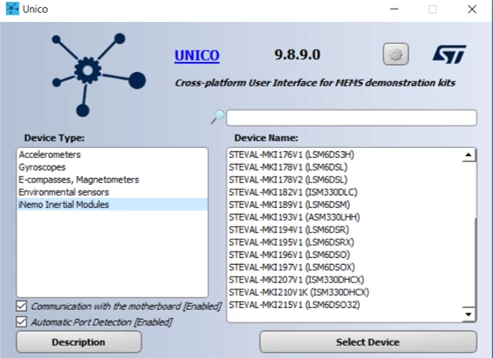
If you select "iNemo Inertial Modules" from the left menu, you will see the MKI207V1 board as one of the last options of the right list.

Please check the picture below for more help:

0693W000008GO3DQAW.png 

If this answered to your question, please select it as "best".

-Eleon

1 reply

Eleon BORLINI
Eleon BORLINIBest answer
ST Employee
February 17, 2021

Hi @OBaha.1​ ,

you should first check you have downloaded a recent version of the Unico GUI, and uploaded the FW on the MKI109V3 ProfiMEMS board.

If you select "iNemo Inertial Modules" from the left menu, you will see the MKI207V1 board as one of the last options of the right list.

Please check the picture below for more help:

0693W000008GO3DQAW.png 

If this answered to your question, please select it as "best".

-Eleon