


How to use hardware accelerators in the ISPU 2.0 of IIS3DWB10IS
Summary
This article outlines the hardware accelerators that are available when programming on the ISPU 2.0 core. It first provides a general overview of the available prebuilt functions that use the acceleration features. It then gives an example to illustrate their value and use. Finally, it examines the hardware accelerators and the compiler flags in more detail.
1. Prebuilt ISPU DSP library
The intelligent sensor processing unit (ISPU) 2.0 DSP package provides a solid set of ready-to-use signal processing functions. The library is divided into six modules that cover the most common needs in embedded applications, as shown in the image below.
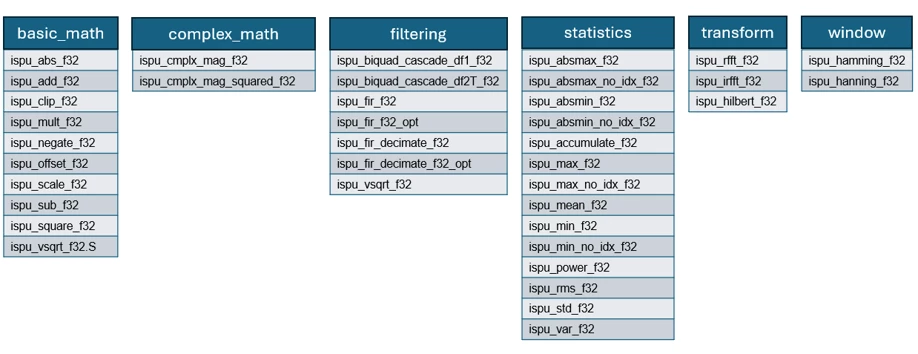
All these functions are implemented in assembly and use the hardware acceleration features described later. In practice, these algorithms are more efficient in power consumption and processing speed than standard raw C versions.
These functions are also easy to use in a typical application. In the st-mems-ispu repository, a wide range of examples shows how to use these functions on the ISPU 2.0.
To use these functions, add the ispu_dsp folder to the project root and include the ispu_dsp.h header file. This approach provides access to these functions without requiring knowledge of their assembly implementation. The application can call them as standard C functions declared in the header file.
2. Practical example: How hardware acceleration can be 21x faster than standard C code
A common, simple approach to find the maximum value in an array is to iterate through each element, compare it with the current maximum value, and update the maximum value if necessary. The C implementation is shown in the get_max_value() function below. An array of float values (src) is passed to the function. The function computes the maximum value by iterating through all elements (n) and stores the result at the specified address (res).
void get_max_value(const float *src, float *res, uint32_t n)
{
    float max = src[0];
    for (uint32_t i = 1; i < n; ++i) {
        if (src[i] > max) {
            max = src[i];
        }
    }
    *res = max;
}
When an ISPU program runs on the IIS3DWB10IS sensor, the execution time of a given algorithm can be measured. To do this, first enable the ISPU sleep signal with the following command in conf.txt:
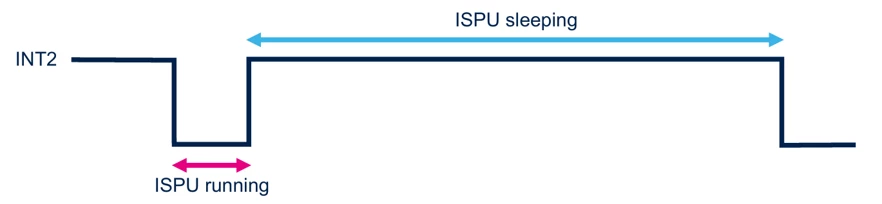
ispu_sleep_int2 enableAfter that, the INT2 pin of the IIS3DWB10IS sensor reflects the current state of the ISPU: running or sleeping. Because the default value of INT_ACTIVE_LEVEL is 0, a digital level HIGH level indicates that the ISPU is sleeping. A digital level LOW indicates that the ISPU is running, as shown in the image below.
The execution time can be estimated by using a logic analyzer, an oscilloscope, or a timer on an external microcontroller to measure the duration of the LOW pulse on the INT2 pin.
If an oscilloscope is not available, or if a dedicated board with a programmable microcontroller and IIS3DWB10IS is not available, time measurements can be performed with ST hardware and software.
The easiest way is to use the Professional MEMS tool evaluation board (STEVAL-MKI109D), add the small 24-pin daughterboard with IIS3DWB10IS (STEVAL-MKI253KA). Connect to a PC via USB and launch MEMS Studio, a graphical user interface (GUI) that lets the user configure the sensor, program the ISPU, and take power and time measurements. For more information about MEMS Studio, see UM3233.
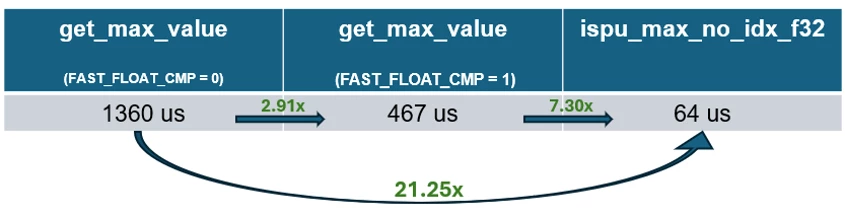
The baseline time measurement for the execution of the get_max_value() function on a vector of 250 floats is 1360 us.
The first optimization to improve the performance, is to enable a compiler flag in the Makefile. The ISPU-Toolchain includes the FAST_FLOAT_CMP flag, which speeds up comparisons between two floats by using dedicated instructions in the instruction set. This optimization is important because get_max_value() performs many comparisons between floating-point values: the array elements are compared with the current maximum value. When the FAST_FLOAT_CMP flag is set to 1, benchmarking of the ISPU program already shows a significant improvement: the execution time decreases from 1360 us to 467 us, which makes the program approximately three times faster.
The real optimization and improvement, however, comes when the dedicated ISPU DSP functions are used. These functions exploit not only the optimized instruction set but also other hardware accelerators.
In the GitHub examples for the IIS3DWB10IS, one example shows the use of the ispu_max_no_idx_f32(). This function behaves exactly like the get_max_value() described above, but it uses optimized assembly instructions and hardware accelerators. The ispu_max_f32() function can also be used. In addition to the maximum value, it returns the position, or index, in the array. For simplicity, the following text uses the ispu_max_no_idx_f32() function, which returns only the maximum value.
When the recommended ispu_max_no_idx_f32() function is called, the execution time drops dramatically. The ISPU now takes 64 us to execute this algorithm, which makes it approximately 21.25x faster.
The figure shows the INT2 trace captured with an oscilloscope when an array of 250 floating-point values is processed by standard C code (left) or by the dedicated function in the ISPU DSP package (right). INT2 low indicates the ISPU runtime.
The short pulses, with a duration of 4.5 µs, correspond to the ISPU capturing the accelerometer samples and storing them in the array. The long pulse corresponds to the execution time of the function that computes the maximum value. This function is called only after the array is filled with 250 samples.
In addition to reducing the execution time by more than 21x, using the ISPU digital signal processing (DSP) function also reduces the overall binary size.
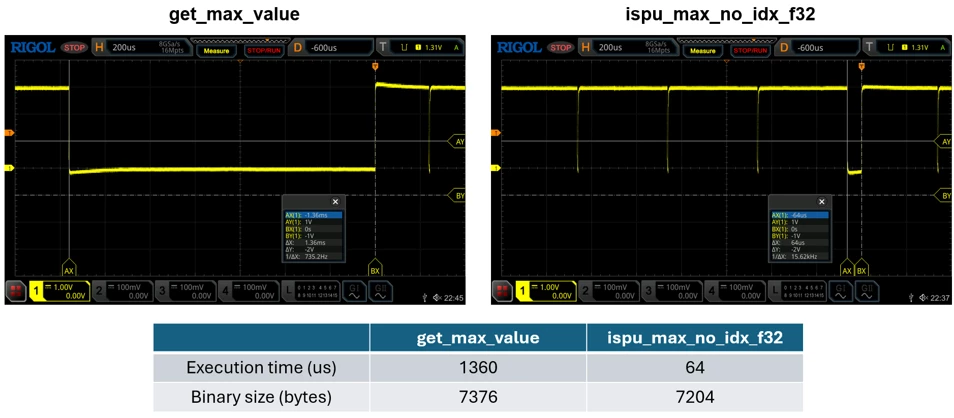
In conclusion, the ispu_max_no_idx_f32() function and the other DSP functions exploit the optimized instruction set as well as the hardware accelerators available in the ISPU 2.0. These features provide faster execution and a smaller code memory footprint.
This section describes these hardware accelerators and explains how to use them to optimize intelligent sensor processing unit (ISPU) programs. Refer to application note AN6497.
3. Hardware accelerators and compiler flags
3.1 Zero-overhead loop
The zero-overhead loop (ZOL) accelerator supports code loops without their inherent overhead. When the ZOL is used, the processor does not need to explicitly count completed iterations, compare the current count with the required total, or branch back to the start of the loop. This approach increases execution efficiency and simplifies loop handling.
An example on GitHub shows how to use the zero-overhead loop accelerator. In this example, the ZOL is used during the L1 norm computation of the 3 axes of the accelerometer.
The L1 norm is implemented in a separate assembly file, l1_norm.S, by using appropriate zero-overhead loop ISPU registers: ISPU_LOOP_START, ISPU_LOOP_END and ISPU_LOOP_CNT.
3.2 FFT (fast Fourier transform)
The fast Fourier transform (FFT) accelerator supports a radix-2 Cooley-Tukey FFT algorithm. It accelerates operations by reducing the cost of data access in memory. The implementation uses three accelerators:
- Bit-reversed address accelerator: accelerates the first stage of the algorithm, in which data moves to the bit-reversed address.
- Butterfly operation accelerator: accelerates the other stages of the algorithm by automatically incrementing and decrementing the data pointers that access the real and imaginary parts of the inputs and outputs of all butterfly operations in a sub-FFT.
- Twiddle table accelerator: accelerates the other stages of the algorithm by automatically incrementing and decrementing the pointer that accesses the twiddle factor that each butterfly operation needs.
An example on GitHub shows how to use the ispu_rfft_f32() function of the ISPU DSP package. By calling only the C function, the user can run the optimized FFT without directly managing the accelerator-specific assembly implementation.
3.3 Circular buffer
The circular buffer accelerator supports the implementation of a circular buffer without the need to explicitly manage an index or pointer to the current element. The circular buffer can be 4096 bytes long – 1024 elements at the most.
An example on GitHub shows how to use the circular buffer hardware accelerator by implementing a delay line for the accelerometer.
3.4 Square root
The square root accelerator computes the square root of a single-precision floating-point number.
An example on GitHub shows how to use the square root hardware accelerator to compute the norm of the three axes of the accelerometer.
If the FAST_FLOAT or FAST_SQRT flag is enabled in the Makefile of an ISPU template, any C code that calls the sqrtf() function uses this accelerator.
3.5 Accumulate and multiply
The accumulate and multiply (ACMS) instruction performs two parallel operations in a single clock cycle: it multiplies two inputs and adds the previous multiplication result to an accumulator.
This GitHub example shows how to use the ACMS hardware instruction by implementing the dot product computation between the current and previous measurements of the accelerometer.
Besides the hardware accelerators described above, other optimizations can also be enabled during compilation. In the Makefile of the ISPU template, four flags are available:
- FAST_FLOAT: Enables all optional optimizations for float operations
- FAST_SQRTF: Enables the hardware-accelerated sqrtf
- FAST_DIVF: Enables optimized float division
- FAST_FLOAT_CMP: Enables optimized comparison on floating-point numbers
The FAST_FLOAT is a shortcut for these optimizations. When this flag is enabled, the other three flags are also enabled.
FAST_SQRTF is fully IEEE-standard compliant. The function does not compromise on the accuracy of the result.
In contrast, note that FAST_DIVF is not 100% accurate. For example, the maximum absolute relative error is 3.5e-7 when the numerator and denominator are in the range of 1e-5 to 2e6.
With the ISPU-Toolchain, the usual optimizers available in the GNU Compiler Collection (GCC) compiler can also be enabled by using the -O flags to balance execution speed and binary size. The table below summarizes the available optimization levels.
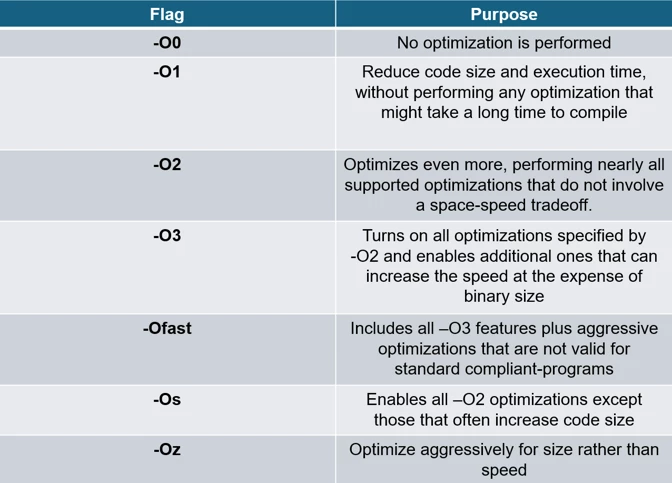
The recommended optimizer in the ISPU-Toolchain is the -O3 flag, which is set by default in all Makefile examples. The -Ofast flag does not ensure that the IEEE standard is respected. Therefore, use it only for experimental and testing purposes. To reduce binary size, use the -Os flag.
Conclusion
STMicroelectronics MEMS sensors enable developers to run algorithms at the edge. ISPU 2.0 provides hardware accelerators that optimize algorithm performance.
Explore the ISPU-Examples available on GitHub and start to optimize the performance of the application.
Related links
- Explore the ISPU-Examples on the GitHub repository
- Download MEMS Studio for development with MEMS sensors
- Start your evaluation with STEVAL-MKI253KA (IIS3DWB10IS evaluation kit)
- Watch a webinar showing ISPU in IIS3DWB10IS
- Read application note AN6497 - IIS3DWB10IS: ISPU (intelligent sensor processing unit)