


idolezal
Associate II
Aug 1, 2022 5:33 PM UTC
Question

WiSE Studio does not connect to J-Link
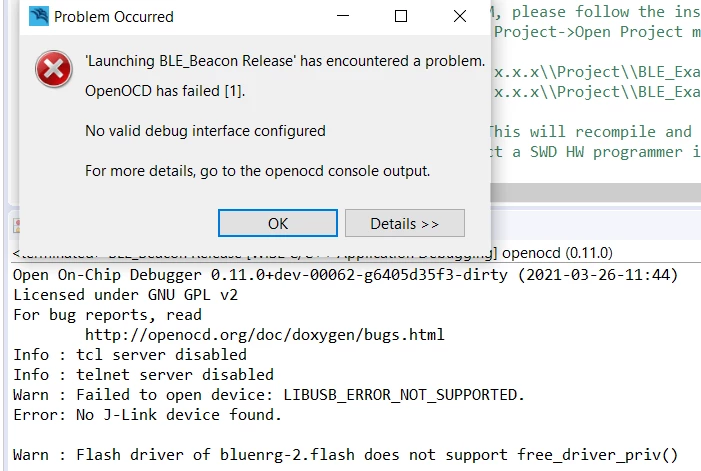
0693W00000QMd9UQAT.pngWiSE Studio does not connect to Segger J-Link, although Atollic TrueStudio and J-Link Commander do. Could it be in a different driver? Why different?

I am evaluating the BlueNRG-2 eval board that is working under TrueStudio (that cannot compile an SDK example), but I stopped at non-connecting J-Link.

This topic has been closed for replies.

7 replies

Pavel A.
Aug 1, 2022 7:27 PM UTC

Before starting debugger in "Wise studio", disconnect from the J-LINK in Atollic,

idolezal
idolezalAuthor
Associate II
Aug 1, 2022 10:08 PM UTC

Of course, both TrueStudio and J-Link Commander were closed when the connection in Wise was tested.

Pavel A.
Aug 1, 2022 11:14 PM UTC

How does it look in device manage? Any 3rd party filter drivers in the device stack?

See https://stackoverflow.com/questions/17350177/libusb-open-returns-libusb-error-not-supported-on-windows-7

idolezal
idolezalAuthor
Associate II
Aug 2, 2022 7:35 AM UTC

Thanks, Pavel.

Although I did not fully understand your answer, the link pointed me to Zadig I used once. Switching to WinUSB driver has solved the problem.

Another issue is that J-Link within WiSE setting is not able to halt CPU (any reset mode option) so download/debugging does not work.

Khojah
Visitor II
Aug 9, 2022 8:54 AM UTC

build your project then use a flasher to flash your hex file through UART that the best solution for me

idolezal
idolezalAuthor
Associate II
Aug 11, 2022 10:26 AM UTC

Yes, it works, but debugging/stepping is not possible without JTAG/SWD adapter.

Pavel A.
Aug 11, 2022 8:29 PM UTC

Well, since that "WiSE studio" is ST software, let's tag this as bug report.