


Wolfgang Reinig
Associate
Jan 7, 2018 2:06 AM UTC
Solved

SPBTLE-1S - How to get a BLE connection?

Posted on January 07, 2018 at 03:06

Hi,

I just got the EVAL-IDB007V1M with the spbtle-1s (based on bluenrg-1 and installed the STSW-BLUENRG1-DK (v2.5.0) on my Windows PC. The BlueNRG-1 Navigator recognizes the EVAL-IDB007V1M and I can 'Flash & Run' the basic examples and the BLE demonstration and test applications.

They seem to run on the EVAL-IDB007V1M - at least they to something when I press the buttons but I get strange results.

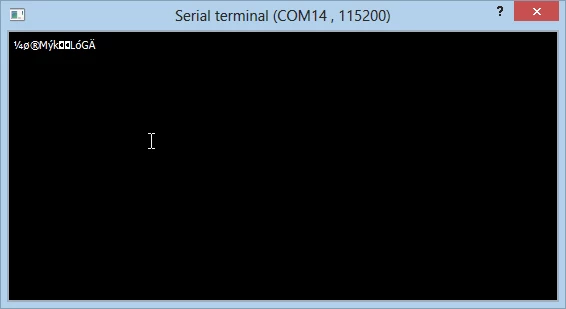
First, when I 'Flash & Run' the BlueNRG-1 Hello World from the basic examples I get this output:
0690X00000609NSQAY.png

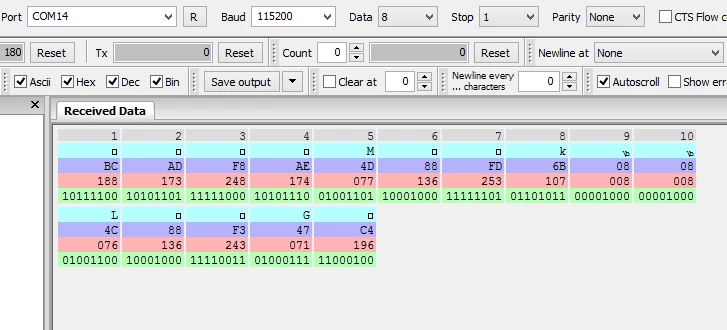
With another terminal program it looks like this:
0690X00000609NXQAY.png

I expected Hello World... What's wrong?

Second problem (and more severe in my case): When I flash and run the BLE demonstration and test applications I would expect to be able to establish a connection to the EVAL-IDB007V1M from my Android smartphone. I tried to use the Apps STM32 BLE Profiles, BlueNRG and (sorry for that) nRF Connect. But I couldn't get any connection to the  EVAL-IDB007V1M. I tried several demo applications, e.g. BLE Beacon.

The Apps and the BLE stuff on my smartphone works in general and I can connect to other BLE devices.

Again: What's wrong?

TIA

Wolfgang

#stsw-bluenrg1-dk #steval-idb007v1m #spbtle-1s #bluenrg-1

    This topic has been closed for replies.
    Antonio Vilei
    Antonio VileiBest answer
    ST Employee
    Feb 9, 2018 10:36 AM UTC
    Posted on February 09, 2018 at 10:36

    Dear

    wreinig

    ,

    if you're using the EVAL-IDB007V1Mboard, you have to change the setting for the 32 MHz crystal used in the SPBTLE-1S module. The BlueNRG-1 navigator is preconfigured for the EVAL-IDB007V1 board, which has another crystal (16 MHz).

    Please make sure that in your project settings you use this setting:

    HS_SPEED_XTAL=HS_SPEED_XTAL_32MHZ

    The default configuration in all the projects that you have tried was fora 16 MHz crystal (HS_SPEED_XTAL_16MHZ)and that's why you were not able to make it work with your board.

    I don't have anyEVAL-IDB007V1M board to test it myself. Please let me know if this works for you.

    Best regards,

    Antonio

    10 replies

    Antonio Vilei
    ST Employee
    Jan 9, 2018 2:18 PM UTC
    Posted on January 09, 2018 at 15:18

    Hi Wolfgang,

    please keep into account that STSW-BLUENRG1-DK  provides you with different applications. They define different proprietary profiles and require their specific counterpart app on the phone/tablet.

    In order to test the BLE functionality, I suggest to run the BLE_SensorDemo application on your EVAL-IDB007V1M. In this case, you will need to use the BlueNRG app on your Android phone.

    If you want to build and flash the BLE_SensorDemo project, the relative path within your SW package is:

    Project\BLE_Examples\BLE_SensorDemo

    If you want to use a pre-built binary, instead, you can find it here:

    Firmware\BLE_Examples\BlueNRG-1\BLE_SensorDemo

    Your current configuration for the terminal program (115200, 8N1, no flow control) is OK.

    Best regards,

    Antonio

    Wolfgang Reinig
    Associate
    Jan 9, 2018 9:33 PM UTC
    Posted on January 09, 2018 at 21:33

    Hi Antonio,

    thank you for your fast answer. I already used 'Flash & Run' in 'BlueNRG-1 Navigator' to flash the BLE_SensorDemo. The LED DL1 is flickering a little bit but I got no BLE Connection with my smartphone (Samsung Galaxy S7) and with three different apps from different suppliers: BlueNRG, nRF Connect and BLE Scanner.To make sure BLE on my smartphone works as it should I used a BLE HRM belt which was recognized by all three apps.

    With your answer I used the 'BlueNRG-1 Flasher' utility to flash the Firmware\BLE_Examples\BlueNRG-1\BLE_SensorDemo.hex file again. Same behaviour: DL1 is flickering but no BLE connection to any of the three apps (BLE HRM belt works fine)...

    This is a screenshot after flashing BLE_SensorDemo.hex:

    0690X00000609H6QAI.png

    Do you have any further ideas what I could do?

    best regards

    Wolfgang

    Antonio Vilei
    Antonio VileiBest answer
    ST Employee
    Feb 9, 2018 10:36 AM UTC
    Posted on February 09, 2018 at 10:36

    Dear

    wreinig

    ,

    if you're using the EVAL-IDB007V1Mboard, you have to change the setting for the 32 MHz crystal used in the SPBTLE-1S module. The BlueNRG-1 navigator is preconfigured for the EVAL-IDB007V1 board, which has another crystal (16 MHz).

    Please make sure that in your project settings you use this setting:

    HS_SPEED_XTAL=HS_SPEED_XTAL_32MHZ

    The default configuration in all the projects that you have tried was fora 16 MHz crystal (HS_SPEED_XTAL_16MHZ)and that's why you were not able to make it work with your board.

    I don't have anyEVAL-IDB007V1M board to test it myself. Please let me know if this works for you.

    Best regards,

    Antonio

    SA.12
    Visitor II
    Jan 4, 2019 5:21 AM UTC

    Hi Aontonio,

    i am using the EVAL-IDB007V1M board and Keil V5.

    as per your previous discussion ,i change 32 Mhz and it works for "hello World" example.

    here, i modify "system_bluenrg.h" file.

    But BLE programs are loaded to EVAL-IDB007V1M board but the BLE Android applications not detect.

    kindly give the solution...0690X000006CxZNQA0.jpg