MagSense
Associate III
May 2, 2019
Question

BlueNRG GUI and DK not completely installed

  • May 2, 2019
  • 9 replies
  • 3799 views

Hi everyone,

I tried installing the package "BlueNRG GUI 3.1.0" and I faced certain issues during its installation. First one, there was an issue in driver installation.

0690X000008B9guQAC.png

 I am using the STEVAL - IDB008V2 board. But the main issue is with the installation itself. If I notice the directory in which it got installed, there are no projects or library files.
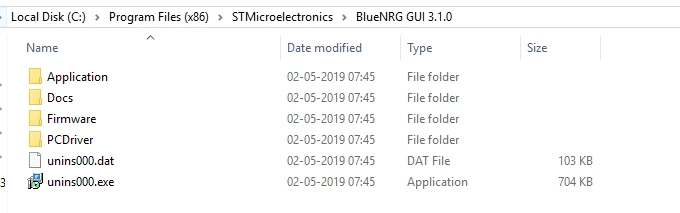
0690X000008B9hsQAC.png

There is no way for me to open a project in Keil either.

0690X000008B9jKQAS.png

0690X000008B9jPQAS.png

I encountered the issue even when I try to install this in different computer with different OS (WIndows 10 & 7). Any suggestions will be helpful. Thank you.

Regards,

Naveen Sankaran.

This topic has been closed for replies.

9 replies

rdscliff
Associate III
May 2, 2019

I think you need to install from an account with administrator rights for the driver to install correctly.

And the project files and library are included with the Development Kit package. They are not included with the GUI.

MagSense
MagSenseAuthor
Associate III
May 3, 2019

Hi rdscliff,

I have installed both the packages with administrator rights. It has to do something with the digital signature I guess. The main issue here is not the driver but the missing files.

0690X000008BDVRQA4.png

As you can see, I have installed the developer kit and there are no project or library files.

Winfred LU
ST Employee
May 6, 2019

Hi Naveen,

The project files are under C:\Users\<ID>\ST\BlueNRG-1_2 DK 3.1.0\Project

As stated in Release Notes,

  • Library, Project, Utilities folders are located under {User} –> ST in order to be able to directly compile projects even with Windows User Account Control activated.

Best Regards,

Winfred

rdscliff
Associate III
May 3, 2019

Did you see the thread about me asking where the project files were? I had the same problem.

Where is the project directory?

MagSense
MagSenseAuthor
Associate III
May 6, 2019

Thanks for the reply. But that just answers first half of my question. I still can't find certain files, which are required to completely open them in Keil (for example). I encountered the same issue during the workshop conducted by ST. Let me show you something for better understanding.

0690X000008BHjSQAW.png

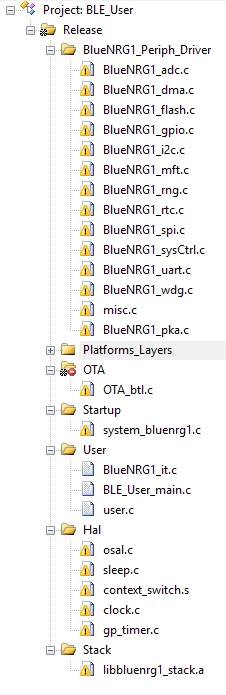
This is the image from a slide that was presented during the workshop. The project clearly lies inside program files directory, which may have misled me. But, the project contains all the necessary files to start in the first place. I am missing those, which can be seen in the image below.

0690X000008BHkBQAW.png

As you can see from thea above image, I am clearly missing the files which were listed in the image from the workshop. I asked the same question there, but they just gave me a portable version of the installed package.

Thank you for the reply.

Winfred LU
ST Employee
May 6, 2019

Hi Naveen,

Not quite understand the question. Which files are missing?

All the project files that come with DK shall work without needing to add files.

All the required files have been in  C:\Users\<ID>\ST\BlueNRG-1_2 DK 3.1.0\Project

0690X000008BHqdQAG.png

0690X000008BHqnQAG.png

Compile BLE_RemoteControl project with Keil MDK-ARM successfully:

0690X000008BHqxQAG.png

Best Regards,

Winfred