Unexpected behavior with Sharpener when a secondary target approaches the primary target
Hello,
We are observing what seems to be unexpected behavior when using the Sharpener feature with an 8×8 autonomous ranging profile in VL53L5.
Configuration:
- Ranging profile: 8×8 autonomous
- Integration time: 60
- Frequency: 2
- Target order: Closest
Our primary target (marked in red) is a surface parallel to the field of view axis. The FoV intersects the surface at approximately 30 mm, which is correctly reported by the Distance measurement.
Initial measurements: Sharpener = 0%
Signal per SPAD:
6.00 3.00 3.00 2.00 3.00 3.00 2.00 3.00
7.00 13.00 15.00 5.00 3.00 4.00 2.00 0.00
67.00 56.00 43.00 9.00 7.00 6.00 3.00 3.00
131.00 131.00 44.00 18.00 19.00 12.00 7.00 4.00
154.00 142.00 44.00 36.00 38.00 29.00 17.00 4.00
230.00 148.00 105.00 85.00 69.00 55.00 31.00 14.00
303.00 314.00 171.00 120.00 112.00 82.00 48.00 27.00
561.00 387.00 299.00 217.00 172.00 111.00 111.00 139.00
Target status:
5 5 5 5 5 5 5 10
5 5 5 5 5 5 255 255
5 5 5 9 5 5 5 5
5 5 9 9 9 9 5 5
5 5 5 5 5 5 5 5
5 5 5 5 5 5 5 5
9 9 9 5 5 5 5 5
9 5 5 5 5 5 5 5
Distance (mm):
X 521 2258 541 2242 2215 2201 2146
573 611 624 555 X X X X
570 584 622 617 X X X X
542 593 589 76 53 77 X X
545 578 37 43 43 56 90 1154
552 26 32 30 27 51 55 168
32 21 26 33 28 45 59 108
73 49 27 28 30 40 336 337
When a secondary target approaches the primary surface from above, the signal per SPAD and measured distance also increase, as expected with Sharpener = 0%.
Secondary target approaching: Sharpener = 0%
Signal per SPAD:
8167.00 8001.00 8135.00 9266.00 10295.00 9217.00 9660.00 9726.00
6237.00 6680.00 7099.00 7997.00 8591.00 7527.00 7560.00 8209.00
6045.00 6518.00 7080.00 7149.00 7381.00 6866.00 6711.00 7311.00
5009.00 5579.00 6131.00 5948.00 5794.00 6397.00 6188.00 6504.00
4442.00 4845.00 5123.00 5220.00 5017.00 5227.00 5369.00 5269.00
2965.00 3558.00 3854.00 4268.00 4313.00 4496.00 4611.00 4528.00
1448.00 1751.00 2127.00 2425.00 2725.00 2736.00 2583.00 2475.00
1025.00 770.00 832.00 906.00 1070.00 1042.00 1016.00 1059.00
Target status: all zones report status 5.
Distance (mm):
73 70 71 69 70 67 68 65
73 76 71 74 69 73 66 69
79 76 76 75 73 72 72 71
79 81 75 76 74 77 71 74
84 81 80 76 76 76 76 73
82 83 78 80 76 79 75 77
74 74 77 76 77 78 78 75
70 64 59 63 62 69 69 72
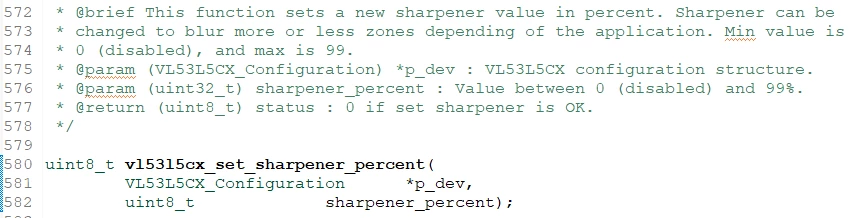
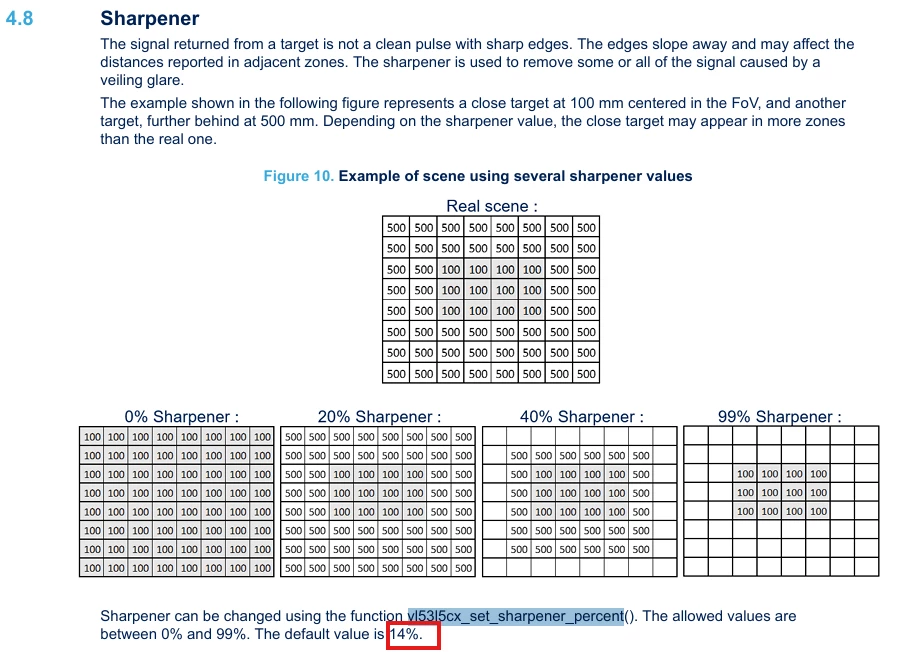
Unexpected behavior with Sharpener = 5%
The strange behavior appears when changing Sharpener from 0% to 5% and the secondary target approaches the primary surface.
The primary target's signal per SPAD becomes very weak, the target status becomes mostly 13 (Target detected but inconsistent data; frequently happens for secondary targets), and the reported distance moves to significantly larger values.
Signal per SPAD:
6216.00 6456.00 7316.00 8217.00 8237.00 8115.00 9217.00 7566.00
5791.00 6987.00 2.00 8194.00 6805.00 8247.00 6647.00 7650.00
5098.00 5120.00 5828.00 5665.00 6096.00 5756.00 6161.00 7.00
4223.00 5207.00 4829.00 5357.00 4544.00 5643.00 4827.00 5596.00
3162.00 3139.00 3914.00 3486.00 3795.00 3438.00 4075.00 3505.00
1074.00 2088.00 1516.00 2515.00 1726.00 2599.00 1601.00 2358.00
0.00 7.00 851.00 837.00 1105.00 809.00 883.00 10.00
29.00 15.00 17.00 17.00 25.00 12.00 13.00 11.00
Target status:
5 5 5 5 5 5 5 5
5 5 5 5 5 5 5 5
5 5 5 5 5 5 5 5
5 5 5 5 5 5 5 5
5 5 5 5 5 5 5 5
255 5 255 5 255 5 13 13
5 13 13 13 13 13 13 5
5 13 13 13 13 5 5 5
Distance (mm):
52 50 52 52 54 51 52 52
53 56 54 57 55 56 55 55
59 58 59 59 59 57 57 59
60 63 61 61 61 62 59 61
66 65 65 64 64 63 64 63
68 68 66 67 65 66 65 66
620 1279 1287 63 65 64 66 64
607 600 1234 1225 1214 1185 1124 998
Could someone clarify whether this behavior is expected when Sharpener is enabled, particularly when a secondary target is approaching a primary target?
With Sharpener = 0%, the primary surface remains consistently detected as the secondary target approaches. With Sharpener = 5%, however, the primary target appears to lose signal, produces predominantly status 13, and the reported distance can jump from approximately 30 mm to >1 m in some zones.
Is this an expected consequence of the Sharpener algorithm, or could this indicate an issue with target selection/filtering in the autonomous ranging pipeline?