

Senior III
June 9, 2026

New community platform: Excessive screen space usage in the new platform

  • June 9, 2026
  • 3 replies
  • 25 views

One of the complaints from the previous platform was that a lot of the space was lost.

Yet, this new platform shows the same behavior:
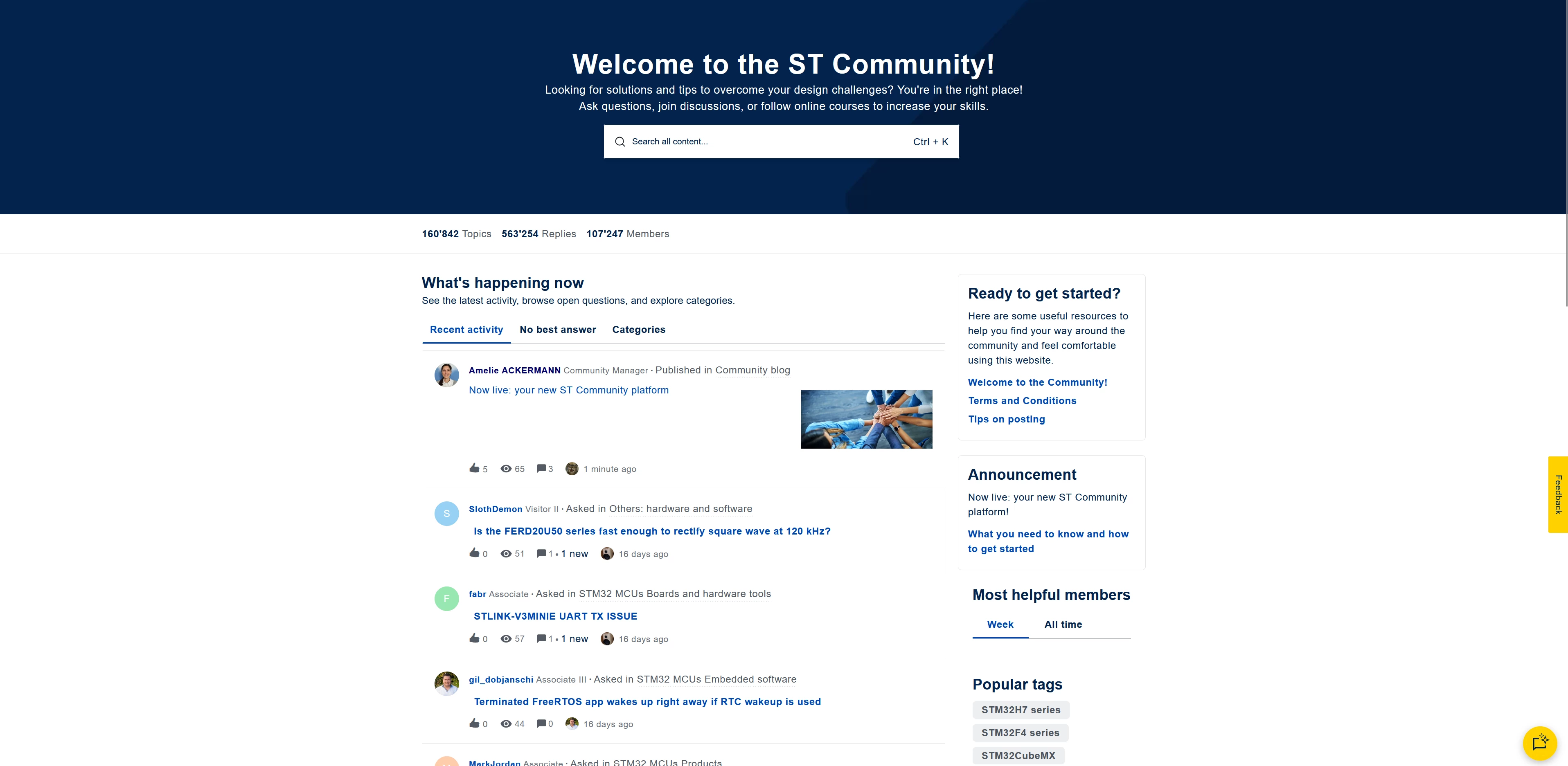
 

On the screen cap above, almost 1/3 of the screen is taken by the very large “Welcome” message + search box (the size of this can be divided by 2 without losing functionality, nor visibility).

The posts themselves also take a lot of height for no real reasons.

The point is, on a 32” monitor a lot of space is wasted and more information could be displayed at once.

Maybe there is a hidden setting for a compact view ? I know I wish there would be one…


Have a nice day !

    3 replies

    Lina_DABASINSKAITE
    Community Manager
    June 9, 2026

    Thanks ​@Kraal ,

    Thanks for sharing this feedback! Are you using the webpage browser at 100%? 

    When I set it on 100, I get this: 
     

    Please confirm on your side. 
    Lina

    ​In order to give better visibility on the answered topics, please click on 'Best answer' on the reply which solved your issue or answered your question.
    KraalAuthor
    Senior III
    June 9, 2026

    Hello ​@Lina_DABASINSKAITE 

    Yes, the webpage browser is set at 100%.
    My configuration is (for what it’s worth) 32” monitor, 4k resolution, Firefox latest and 100% zoom.

    Your screen shows exactly what I meant, a lot of the space could be reclaimed for useful data / posts.

    And I mean reclaimed vertically, white space on left and right sides I can understand.

    Also the first post is from ​@Amelie ACKERMANN , and the platform is embedding a thumbnail of the image in the post recap. Will it be the same for all posts with images inside ?

    waclawek.jan
    Super User
    June 9, 2026

    +1 to remove the unnecessary large “welcome” banner

    Also, wasted space can be reduced and readibility can be simultaneously enhanced, simply by removing the explicit kerning (“letter-spacing” attribute) in the texts, leaving it to the browsers’ defaults as it should be.

    JW

    Lead III
    June 9, 2026

    on subforums too:

    Half the screen is headers+vertical spacing before the first topic titles are visible, only 4 topic titles fit until you scroll down.

    Some headers could be merged.

    "Kudo posts if you have the same problem and kudo replies if the solution works.Click ""Accept as Solution"" if a reply solved your problem. If no solution was posted please answer with your own."