

Andrew Neil
Super User
June 29, 2026
Question

Line wrapping in code blocks

  • June 29, 2026
  • 9 replies
  • 148 views

The new forum seems to be wrapping lines within source code blocks; eg lines 44 & 45 here:
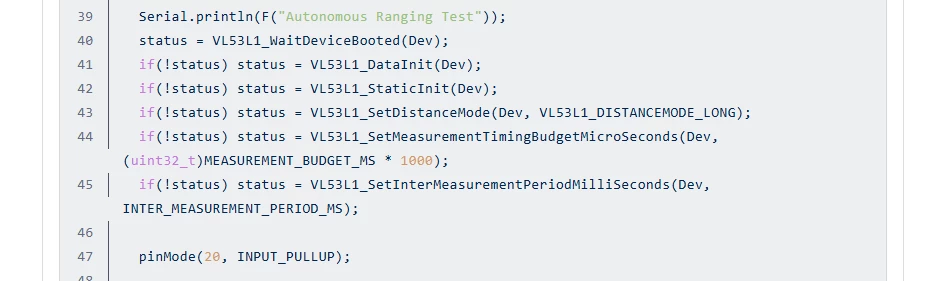
 

This really messes with the layout - surely, it’s one of the things which a code block specifically should not do ?

9 replies

Andrew Neil
Super User
June 30, 2026

Another one here:

The wrapping has completely messed-up the layout:


A complex system that works is invariably found to have evolved from a simple system that worked.A complex system designed from scratch never works and cannot be patched up to make it work.
Lina_DABASINSKAITE
ST Community Manager
June 30, 2026

Hi ​@Andrew Neil , 

Thanks for raising this up. I am looking into this with our vendor and will get back. 

Kind regards,
Lina

​In order to give better visibility on the answered topics, please click on 'Best answer' on the reply which solved your issue or answered your question.
Lina_DABASINSKAITE
ST Community Manager
July 6, 2026

Hi ​@Andrew Neil

I confirmed with the vendor that this is expected behavior. 

What you're seeing is the intentional / expected behaviour. Line numbers correspond to lines in the source code (i.e., lines separated by newline characters), not to how text visually wraps inside the container. When a single logical line is too long to fit on one visual line, the renderer wraps it to the next visual row but keeps the same line number, from the code's perspective, it's still one line.

You can verify this by copying the code out of the block and pasting it into a plain text editor: the wrapped continuation (the part appearing without a number) will land back on the same line as the numbered portion. It's the same line, just visually broken across two rows because of container width.


I also checked that on our previous vendor, the long lines were not wrapped but instead we had to move the code block to see the complete input which reduced the readability from the start. 

Let me know if you have any other questions.

Kind regards,
Lina

​In order to give better visibility on the answered topics, please click on 'Best answer' on the reply which solved your issue or answered your question.
Andrew Neil
Super User
July 6, 2026

When a single logical line is too long to fit on one visual line, the renderer wraps it to the next visual row

Yes - that’s what I was complaining about.

Key to presenting source code is that the forum should not wrap lines.

Wrapping code lines makes them much harder to read.

The approach of the old forum was preferable.

A complex system that works is invariably found to have evolved from a simple system that worked.A complex system designed from scratch never works and cannot be patched up to make it work.
Senior III
July 6, 2026

Hello ​@Lina_DABASINSKAITE 

I agree with ​@Andrew Neil , the old layout was better.

Here I have a third of the screen (horizontally) that is used for showing data, the rest is white.

I would prefer to have the ability to use more estate of my display, which would reduce the need for the code block to wrap lines, and if possible use a slider instead for lines longer than xx chars.

Andrew Neil
Super User
July 9, 2026

See also another complaint about code presentation:


A complex system that works is invariably found to have evolved from a simple system that worked.A complex system designed from scratch never works and cannot be patched up to make it work.
unsigned_char_array
Lead III
July 9, 2026

The wrapping is also an archaic 80 columns, instead of a more sensible 100 or 120 columns.
I have an ultrawide screen and the wrapping is completely unnecessary.
Here is a screenshot of what it looks like on my monitor (I’ve added text to the white part).


"Kudo posts if you have the same problem and kudo replies if the solution works.Click ""Accept as Solution"" if a reply solved your problem. If no solution was posted please answer with your own."