


Andrew Neil
Super User
August 12, 2026
Question

Inconsistent presentation of links

  • August 12, 2026
  • 3 replies
  • 107 views

Mostly, the forum converts a link to a post/thread to a “preview” showing the author’s avatar and post title.

But sometimes it doesn’t.

Example:
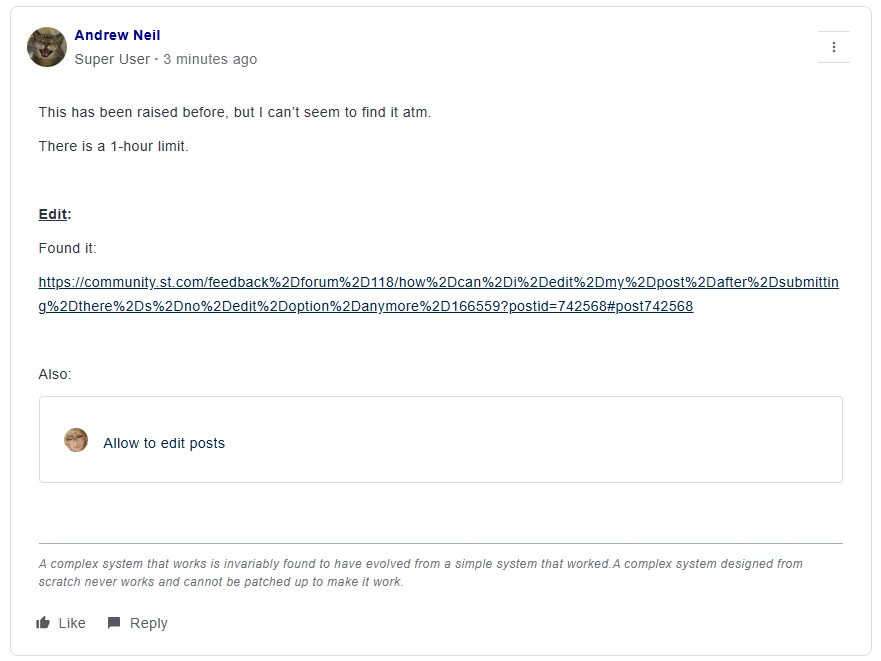
Both of those links came from the menu ‘Copy link’ option.

Here:


In the above case, it was the same both in the editor and after posting.

Sometimes, the “preview” doesn’t show in the editor, but does show once posted.

3 replies

TDK
August 12, 2026

 Testing stuff.

https://community.st.com/stm32-mcus-products-25/fdcan-cccr-init-bit-is-not-getting-cleared-stm32h723zg-16573


Edit: so when you paste a link, the forum software converts it to this weird format where you can “click and drag to move”. If you press ctrl+z once, it undoes this and has the bare link.


If you use Insert link instead, it just does a bare link.

"If you feel a post has answered your question, please click ""Accept as Solution""."
Zita LASZLOFI
ST Community Manager
August 14, 2026

Hello ​@Andrew Neil and ​@TDK,

Thank you for flagging this inconsistency. I reached out to our platform provider to learn more about this behavior. I will keep you posted on this thread. 

Kind Regards, 
Zita

In order to give better visibility on the answered topics, please click on 'Best answer' on the reply which solved your issue or answered your question.
Zita LASZLOFI
ST Community Manager
August 20, 2026

Hello both, 

I learned that this happens when a link containing a hyphen is copied in an encoded format. In that case, the hyphen can appear as %2D, which prevents the link from showing as a preview card. As a best practice, I recommend one of these options when it happens again:

  1. Paste the URL into your browser address bar first. The browser will decode it and display the clean version with proper hyphens, which you can then copy and paste into your post.
  2. Navigate directly to the page and copy the URL from the address bar.

I hope this helps. 

Regards, 
Zita

In order to give better visibility on the answered topics, please click on 'Best answer' on the reply which solved your issue or answered your question.