


Andrew Neil
Super User
July 15, 2026
Question

Can't escape 'Code' formatting

  • July 15, 2026
  • 11 replies
  • 180 views

This forum has a new ‘code’ format option - for source code keywords in the middle of plain text:
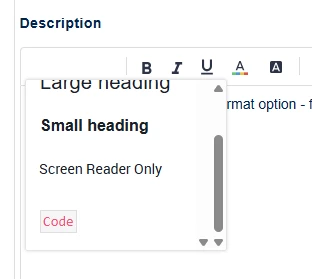
It works fine provided, as above, you type the whole text first, then go back to add formatting.

But, if you apply the highlight at the very end of a post, there is no way to “escape” - the whole of the rest of the post will be formatted!

11 replies

Andrew Neil
Super User
July 15, 2026

Note how the insertion point is within the formatting block:


A complex system that works is invariably found to have evolved from a simple system that worked.A complex system designed from scratch never works and cannot be patched up to make it work.
Andrew Neil
Super User
July 15, 2026

Also, why does it appear under ‘Paragraph’ in the editor menu?

It is not a paragraph format.

A complex system that works is invariably found to have evolved from a simple system that worked.A complex system designed from scratch never works and cannot be patched up to make it work.
Andrew Neil
Super User
July 15, 2026

And, again, the rendering of the format in the post editor is different from the rendering once it’s posted:


In the editor:


When posted:


See also:

And:


A complex system that works is invariably found to have evolved from a simple system that worked.A complex system designed from scratch never works and cannot be patched up to make it work.
unsigned_char_array
Lead III
July 15, 2026

Test before code. Test during code. Test after code.

Ok I got it to work with a trick. Copy any text and paste without formatting to after the code and then edit it. 

This is not how you want it to work.
 

"Kudo posts if you have the same problem and kudo replies if the solution works.Click ""Accept as Solution"" if a reply solved your problem. If no solution was posted please answer with your own."
Andrew Neil
Super User
July 15, 2026

Also, once ‘code’ formatting has been applied, there doesn’t seem to be any way to remove it.

A complex system that works is invariably found to have evolved from a simple system that worked.A complex system designed from scratch never works and cannot be patched up to make it work.
Zita LASZLOFI
ST Community Manager
July 22, 2026

Thank you for sharing this detailed feedback with us, ​@Andrew Neil.

Here’s what we can share so far when it comes to the code editor: 

Regarding the location of the code format option, we agree with you that it should be easily accessible. This improvement cannot be implemented at this time but hopefully in the future it will be made available via the platform. 

I believe the styling inconsistency was addressed in this post, and we will follow up there: Code is rendered differently in editor


We forward your feedback to our platform provider and ask them for best practices when it comes to writing code and change existing code format to a paragraph style. I let you know, once we here back. 

In order to give better visibility on the answered topics, please click on 'Best answer' on the reply which solved your issue or answered your question.
Andrew Neil
Super User
July 22, 2026

Here’s what we can share so far when it comes to the code editor: 

In this thread, I’m not talking about the Code Editor - that’s covered separately in the other mentioned threads.

What I’m talking about here is the ‘Code’ option under the ‘Paragraph’ drop-down menu:


A complex system that works is invariably found to have evolved from a simple system that worked.A complex system designed from scratch never works and cannot be patched up to make it work.
Zita LASZLOFI
ST Community Manager
July 24, 2026

Thank you for your patience ​@Andrew Neil, and your inputs ​@unsigned_char_array and ​@TDK, much appreciated. 

After checking with the platform provider, the workaround that I can offer is similar to what you also found:

  1. Add a new line after your code.
  2. Place the cursor on that line.
  3. Set the paragraph style back to Normal to exit the code box.

I understand that involves more steps than ideal, hence we continue to advocate for this improvement for better experience in the community. 

In order to give better visibility on the answered topics, please click on 'Best answer' on the reply which solved your issue or answered your question.
unsigned_char_array
Lead III
July 24, 2026

It doesn’t work that way for me. I have to click on “paragraph” multiple times or use backspace.


"Kudo posts if you have the same problem and kudo replies if the solution works.Click ""Accept as Solution"" if a reply solved your problem. If no solution was posted please answer with your own."