

Associate
Jul 11, 2025 1:04 PM UTC
Solved

X-CUBE-AI doesn't detect the Layers of my keras model correct on STM32H7

Hi everyone,

I have created a NN with tensorflow:

# ----- Model Definition -----
def build_model(input_dim):
 model = Sequential([
 InputLayer(shape=(input_dim,)),
 Dropout(0.2),
 Dense(128, activation='relu'), # increased layer size
 Dense(64, activation='relu'),
 Dense(32, activation='relu'),
 Dense(1, activation='linear')
 ])
 model.compile(optimizer='adam', loss='mse', metrics=['mae'])
 return model

model = build_model(X_train.shape[1])

When I import this into X-CUBE-AI in STMCubeMX and analyze it, there are no Errors. However when I press show Graph, you can see that it imported just a single layer, even though there should be 4.
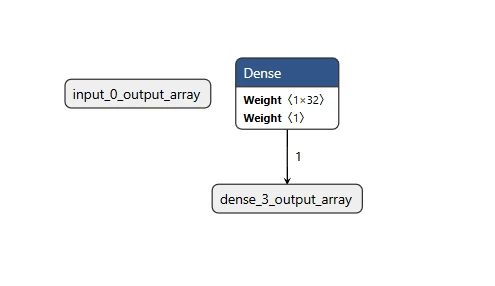
wga_0-1752238223716.png
When i upload the same model in ST Edge AI Developer Cloud, it does the layers correct:
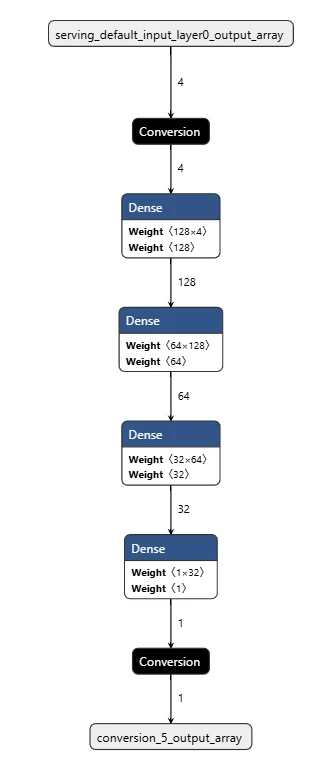
wga_1-1752238419143.png

I can even run the benchmark in the cloud on the same STM32H7 which I have physically on my desk and it works.

Because the layers are not detected correctly in my local STM32CubeMX, i get really bad performance when I validate the model. I also tried importing .h5 file, but it doesn't change. Is there some limitations in layers or do I need a special export of the model?



This topic has been closed for replies.
Julian E.
Julian E.Best answer
ST Technical Moderator
Jul 16, 2025 7:52 AM UTC

Hello @wga,


Yes, the 10.2.0 is out, for some reason, it does not show in cubeMX, but the version is stable.

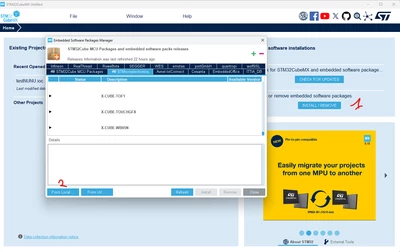
You can download it from manual files:

JulianE_0-1752652300006.png


To download the latest files:

X-CUBE-AI - AI expansion pack for STM32CubeMX - STMicroelectronics


Unzip the .pack file and select it in cubeMX while installing.


Let me know if it solves your issue.


Have a good day,

Julian

​In order to give better visibility on the answered topics, please click on 'Accept as Solution' on the reply which solved your issue or answered your question.

4 replies

Julian E.
ST Technical Moderator
Jul 15, 2025 2:42 PM UTC

Hello @wga,


We had a bug regarding sequential model in tensorflow. It was fix in stedgeai core 2.2 (X Cube AI 10.2.0).

I think that in the dev cloud, it was using the newest version, but I think that in local with cubeMX you may be using an older version.


Could you please install the last version of X Cube AI (10.2.0) and tell me if it solved your issue.

You may have to install this update using local files that you can download here:

X-CUBE-AI - AI expansion pack for STM32CubeMX - STMicroelectronics


Have a good day,

Julian

​In order to give better visibility on the answered topics, please click on 'Accept as Solution' on the reply which solved your issue or answered your question.
wgaAuthor
Associate
Jul 16, 2025 7:47 AM UTC

Hi Julian,

thanks for the answer. It seems that 10.2.0 didn't get fully distributed. My CubeMX and STMCubeIDE doesnt detect any available updates for the component.

wga_0-1752651746002.png

On Developer Cloud i can select ST Edge AI Core 2.1.0 and it works as well. Is it possible to manually install 10.2.0? Would you recommend that?

Julian E.
Julian E.Best answer
ST Technical Moderator
Jul 16, 2025 7:52 AM UTC

Hello @wga,


Yes, the 10.2.0 is out, for some reason, it does not show in cubeMX, but the version is stable.

You can download it from manual files:

JulianE_0-1752652300006.png


To download the latest files:

X-CUBE-AI - AI expansion pack for STM32CubeMX - STMicroelectronics


Unzip the .pack file and select it in cubeMX while installing.


Let me know if it solves your issue.


Have a good day,

Julian

​In order to give better visibility on the answered topics, please click on 'Accept as Solution' on the reply which solved your issue or answered your question.
wgaAuthor
Associate
Jul 16, 2025 12:54 PM UTC

Hi Julian,

with Version 10.2.0 it is working. Thanks for the support :thumbs_up: