

Using the STM32H747I-DISCO display for AI image classification not working
Hello,
I've got a problem with displaying an image classification AI on my board. So far I've been following this tutorial:
starting from step 3, as I already have a trained AI model as .tflite file.
The execution with the .yaml file is working fine, it's flashing but the display is only showing artifacts.
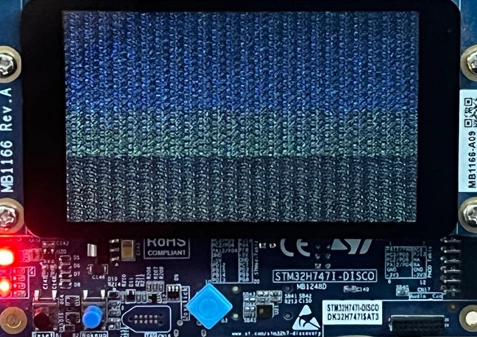
Hardware details:
STM32H747I-DISCO: MB1248-H747I-D03
- LCD Daughterboard: MB1166-A09
- Panel Controller: NT35510
B-CAMS-OMV:
Camera module adapter board: MB1683-CAMS-A02
- Camera module: MB1379-2V8-A05
- Image sensor: OV5640
The display was a newer version so I changed the defines in
application_code/image_classification/STM32H7/Application/STM32H747I-DISCO/Inc/CM7/stm32h747i_discovery_conf.h
to this:
#define USE_LCD_CTRL_OTM8009A 0U
#define USE_LCD_CTRL_NT35510 1U
#define USE_LCD_CTRL_ADV7533 0U
The nt35510.c and .h files already existed in the Drivers/BSP/Components folder. I don’t know how to proceed from this, the AI model and flashing seems to work just fine, I think it’s a hardware/driver issue with the LCD? Any help on what to do is appreciated.
I know that the tutorial I followed was last updated a year ago, but there are several deprecated tutorials out there and the ModelZoo is also getting updated every now and then, if there are any more recent options on how to do this, please let me know as well. Thanks!