Hello @FilipeLourenço
First did you already read README, Quick Start Guide, and User Manual? Those documents are essential to understand how FP-SNS_DATALOG2 works and how to install the Python SDK.
@FilipeLourenço wrote:
[...]
Then i discovered the hsdatalog_data_export.py but i am getting a lot of errors like this:
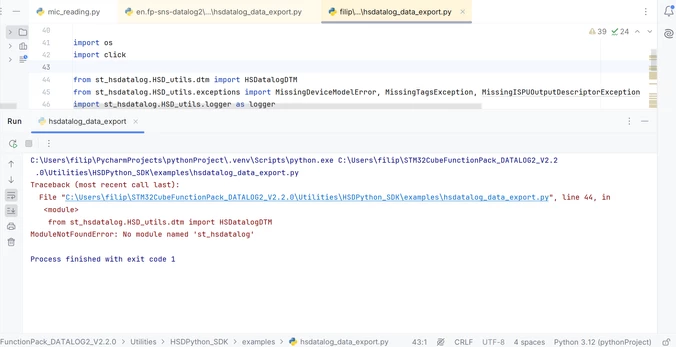
I already had the same problem with the module click, but i managed to install it on PyCharm and was fixed. But with this specific modules from Python SDK i don't know what to do.
The above errors mean that you didn't install the SDK. See the log in PyCharm: if the script you launched isn’t finding 'st_datalog', it means that you didn't install it.
Are you familiar with Python? I suggest you make this experiment and reinstall HSDPython_SDK from scratch:
- Download FP-SNS_DATALOG2 v2.3.0 and use the latest SDK.
- Unzip it and open a terminal in your HSDPython_SDK folder.
- If you don't like to do that, open a terminal in your HSDPython_SDK folder (from your log I guess the path is C:\Users\filip\STM32CubeFunctionPack_DATALOG2_V2.2.0\Utilities\HSDPython_SDK).
- Create a virtual environment (all references here).
- Launch programmatically HSDPython_SDK_install.bat (launch the command in the prompt by typing HSDPython_SDK_install.bat.
You'll see all dependencies automatically solved with no error messages and you should be able to use the HSDPython SDK.
Best regards,
Simone
In order to give better visibility on the answered topics, please click on 'Best answer' on the reply which solved your issue or answered your question.