Associate
Jun 17, 2025 12:08 PM UTC
Solved

STEVAL-MKBOXPRO NanoEdgeAI Studio v5.0.1 Datalogger

Hello Community, 

I've been stuck at this now for some time. I created a datalogger using the tool in NEAI studio, got a .zip file containing the Metadata.json and the neai_logger.bin. The .bin i flashed to the BOXPRO and i get a output using a STLink like the DL tool suggested. 

When i try then try (Anomaly Detection) Add Signal -> Log Signal from Serial USB and connect to the port that worked in Putty/TeraTerm, i get a warning "No data detected, please check COM-Port and try again"

Is there something i missed?

all the best

This topic has been closed for replies.
Julian E.
Julian E.Best answer
ST Technical Moderator
Jun 18, 2025 1:13 PM UTC

Hello @ThomasMSchmid,


We are in the process of updating this video. You need to:

  1. Go to the datalogger
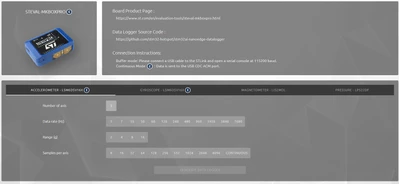
  2. Select the SensorTile.Box Pro, sensor and parameters
    JulianE_0-1750252433739.png
  3. Flash the binary datalogger
  4. Go to your project and log data


Then do a benchmark, validate your model etc and create a project that integrate the generated AI library, build a new firmware and flash your final application.


Have a good day,

Julian

​In order to give better visibility on the answered topics, please click on 'Accept as Solution' on the reply which solved your issue or answered your question.

5 replies

Julian E.
ST Technical Moderator
Jun 17, 2025 1:01 PM UTC

Hello @ThomasMSchmid,


I think you did not select the right COM port when logging.

You can see which come port you are using doing this:

  • Type device manager and look for the STLink, in this case it is on the port59JulianE_1-1750165032425.png
  • Then select it in NanoEdge:
    JulianE_2-1750165273572.png


Let me know if it worked,

Have a good day,

Julian


​In order to give better visibility on the answered topics, please click on 'Accept as Solution' on the reply which solved your issue or answered your question.
Associate
Jun 17, 2025 3:44 PM UTC

The STLink would show up as COM5. 

Using cont-mode, i was able to to get the data in NEAI but it overwhelmed the system. But not with a datalogger @ODR:30, 256 Samples and Range: 8g.

To get the correct Signal format for Anomaly detection (i.e. 256 samples in N-lines), can i use the datalogger or would i have to format it myself?

Julian E.
ST Technical Moderator
Jun 18, 2025 7:21 AM UTC

Hello @ThomasMSchmid,


Indeed, the data logger in NanoEdge is made to get buffers as continuous mode is too fast to be logged here.

Please either use putty/tera term to log continuous data and it as .csv to import them in NanoEdge. Or log in NanoEdge but with buffer datalogger.


Have a good day,

Julian

​In order to give better visibility on the answered topics, please click on 'Accept as Solution' on the reply which solved your issue or answered your question.