

Associate
June 12, 2026
Question

ONNX conversion error in STM32Cube AI Studio

  • June 12, 2026
  • 4 replies
  • 129 views

I am currently exploring STM32Cube AI Studio / Edge AI Cloud, but I am not very familiar with them yet. I encountered an issue during the model conversion process and would like to ask for your assistance.


I am trying to analyze and convert an ONNX model exported from PyTorch using STM32Cube AI Studio or Edge AI Cloud.

Development board: STM32N6570-DK

When running Analyze / Generate Code, I encountered the following error:
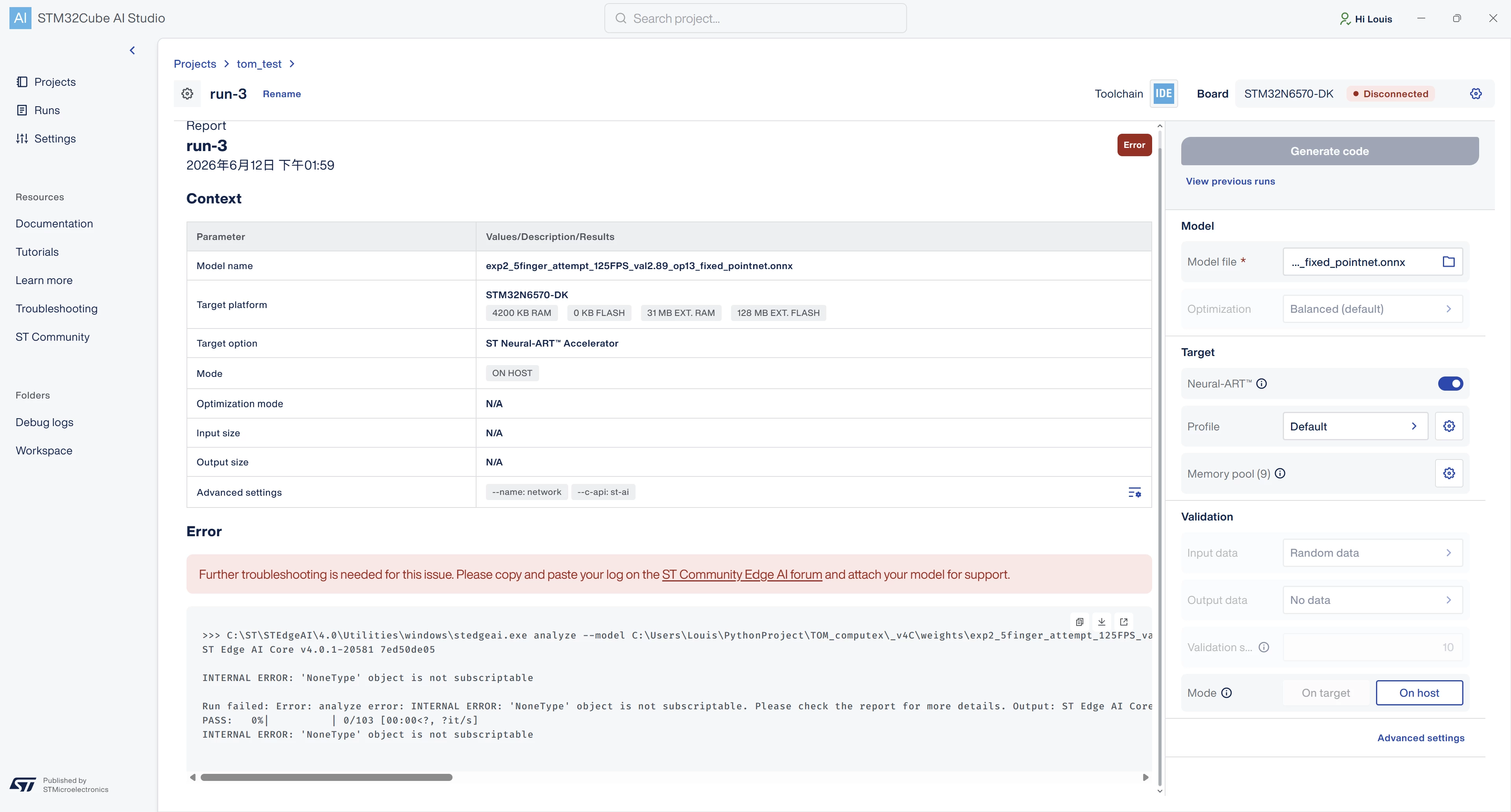


I would like to ask:

  1. Is this error usually caused by the ONNX model format, opset version, or unsupported operators?
  2. Are there any recommended ONNX export settings, such as opset version, dynamic shape settings, input/output naming, etc.?
  3. Could you help identify the possible cause of this error or provide further debugging suggestions?


Thank you for your assistance.

4 replies

hamitiya
ST Technical Moderator
June 12, 2026

Hello ​@Louis_PIkachu 

I opened a internal ticket to follow up.

It seems to be related to ST Neural-ART compiler enablement. I will keep you updated if I have any further information.


Best regards,

Yanis

​In order to give better visibility on the answered topics, please click on 'Best answer' on the reply which solved your issue or answered your question.
Associate
June 12, 2026

Hello Yanis,


Thank you for your help and for opening an internal ticket to follow up on this issue.


If there is any update, possible solution, or workaround to avoid this issue, please let me know.

In the meantime, is there anything I can check or modify on my side, such as the ONNX export settings, opset version, or model structure?


Thank you again for your support.

Best regards, Louis

hamitiya
ST Technical Moderator
June 12, 2026

Actually ST Edge AI Core uses:

- ONNX version     : 1.16.2
- ONNX RT version  : 1.19.2
 

I could first suggest to align to this version if it is not done yet. 


Best regards,

Yanis

​In order to give better visibility on the answered topics, please click on 'Best answer' on the reply which solved your issue or answered your question.
Associate
June 17, 2026

Sorry to bother you. I would like to follow up and ask if there has been any progress on this issue.

Recently, I also tested modifying and adjusting the model architecture. I found that one previous version was able to be converted successfully. After comparing the two model versions, the network layers used in both models seem to be quite similar.

Could you please advise what the possible cause might be? For example, could it be related to the model size being too large, or are there any other possible reasons?

Please also let me know if you need me to provide any additional information or files.

Thank you.