Visitor II
July 2, 2026
Solved

Need help running object detection with MediaPipe Face Landmark on STM32N6570-DK

  • July 2, 2026
  • 1 reply
  • 83 views

Hi ST Community,

I am working on the STM32N6570-DK board and need guidance on running two AI models together in a single pipeline:

  1. YOLO-FastestV2 for object detection (this is my custom train model)
  2. MediaPipe Face Landmark for facial landmark detection

My Goal

I want to:

  • Run YOLO-FastestV2 to detect objects/faces from camera input
  • Then run MediaPipe Face Landmark on detected face regions (ROI)
  • Process both models efficiently on STM32N6570-DK
  • Display final output with bounding boxes + face landmarks

Current Status

  • I can run object detection examples on STM32N6570-DK.
  • I have AI models available in ONNX/TFLite format.
  • I am exploring deployment using STM32Cube.AI / ST AI tools.
  • I am not sure about the best architecture for running both models together.

Questions

I need help with the following:

  1. Is it possible to run two AI models in parallel on STM32N6570-DK?
  2. What is the recommended pipeline?
    • Camera → YOLO-FastestV2 → ROI extraction → Face Landmark → Display Output
  3. Should both models be merged into one application, or should I create separate inference pipelines?
  4. Are there memory limitations when using both models together?
  5. Is there any example project for multi-model inference on STM32N6?
  6. What is the best way to handle ROI cropping/resizing for the second model?

Challenges

Main concerns are:

  • RAM/Flash usage
  • Inference latency
  • Camera pipeline integration
  • Efficient post-processing

If anyone has experience with multi-model deployment or similar use cases on STM32N6 devices, your suggestions would be very helpful.

Thanks in advance.

Best answer by Julian E.

Hi ​@Rutva Patel,


Please look at this example:

STMicroelectronics/x-cube-n6-ai-hand-landmarks: An AI software application package demonstrating hand landmarks detection use case on STM32N6 product.


We use 2 models: hand detection, then hand landmark with some ROI between the 2 models.

I would suggest giving it to claude code or any good LLM and it should be able to answer any of your questions


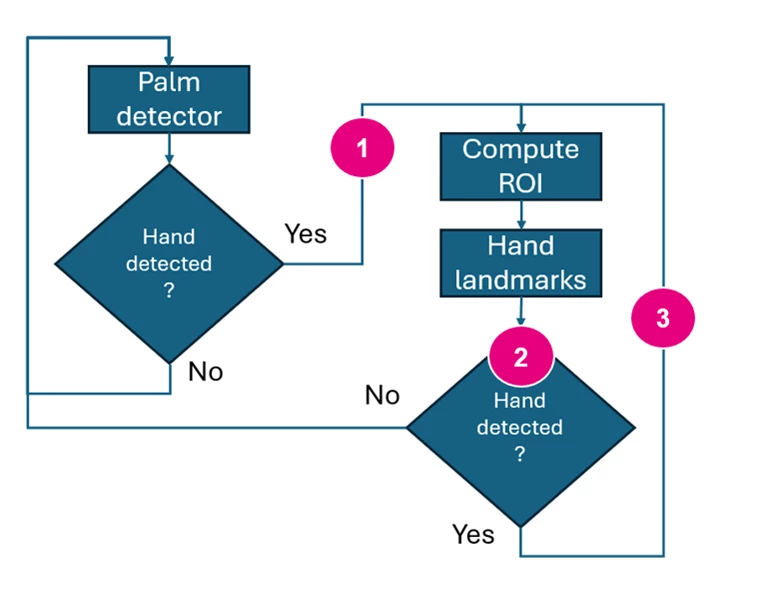
the flow is as follow:


  1. The output of the “Palm detector” are multiple bounding boxes. We select one and this is a small bounding box (in red in the demo).
    We are then resizing it and rotating the image to have the hand in this position ✋(this kind of is the green bounding box)
    This is then sent to the other model
  2. The output of the “Hand landmark model” is both the landmarks and if a hand is detected
    if the confidence of a hand being in the image too low => we go back to the hand detector (“No” path)
    Else, we get a similar bounding box as the one mentioned in point 1 (“Yes” path)
  3. We apply the same preprocessing (because the hand may have moved a little) => resize + rotation before feeding it again in the “hand landmark” model


We do not support epoch level parallelization (run 1 epoch of model1, then run 1 epoch of model2). Maybe with a RTOS you could do it.

For the best way to handle ROI, as I said ask a LLM to see what is done in the package. This is also described here:
x-cube-n6-ai-hand-landmarks/Doc/Application-Overview.md at main · STMicroelectronics/x-cube-n6-ai-hand-landmarks


Have a good day,

Julian

1 reply

Julian E.
Julian E.Best answer
ST Technical Moderator
July 28, 2026

Hi ​@Rutva Patel,


Please look at this example:

STMicroelectronics/x-cube-n6-ai-hand-landmarks: An AI software application package demonstrating hand landmarks detection use case on STM32N6 product.


We use 2 models: hand detection, then hand landmark with some ROI between the 2 models.

I would suggest giving it to claude code or any good LLM and it should be able to answer any of your questions


the flow is as follow:


  1. The output of the “Palm detector” are multiple bounding boxes. We select one and this is a small bounding box (in red in the demo).
    We are then resizing it and rotating the image to have the hand in this position ✋(this kind of is the green bounding box)
    This is then sent to the other model
  2. The output of the “Hand landmark model” is both the landmarks and if a hand is detected
    if the confidence of a hand being in the image too low => we go back to the hand detector (“No” path)
    Else, we get a similar bounding box as the one mentioned in point 1 (“Yes” path)
  3. We apply the same preprocessing (because the hand may have moved a little) => resize + rotation before feeding it again in the “hand landmark” model


We do not support epoch level parallelization (run 1 epoch of model1, then run 1 epoch of model2). Maybe with a RTOS you could do it.

For the best way to handle ROI, as I said ask a LLM to see what is done in the package. This is also described here:
x-cube-n6-ai-hand-landmarks/Doc/Application-Overview.md at main · STMicroelectronics/x-cube-n6-ai-hand-landmarks


Have a good day,

Julian

​In order to give better visibility on the answered topics, please click on 'Accept as Solution' on the reply which solved your issue or answered your question.