

Associate
Nov 9, 2026 6:28 AM UTC
Question

Issue after updating Cube AI Studio

Hi,

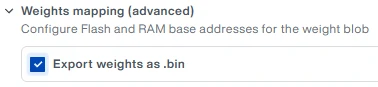
I’m using updated cube ai studio 1.4.0 to export model as .raw file. But the error occurred and show as attached log.txt. However, it works well when the “export weights as .bin” is unchecked.
The chip used is STM32N657X0Q.

1 reply

Julian E.
ST Technical Moderator
Nov 20, 2026 10:09 AM UTC

Hi ​@An5,


This is indeed a bug on our side.

With "Export weights as .bin" enabled on the N6, the weights are placed at the start of the external flash, and the Neural-ART epoch-controller blobs were also placed in that same region (0x71000000).

A fix is planned for the next release.


In the meantime, here is a workaround:

1. Validate without binary export.
   - Run "Validate on target" with "Export weights as .bin" disabled. In our tests this passes.
2. Run with binary export, without validation, then generate the project.
   - Enable "Export weights as .bin".
   - Launch a run without validation. This is the analyze mode of ST Edge AI Core.
   - Then generate the project from that run.
3. Edit the generated linker script.
   - Open the project's `.ld` file.
   - In the external flash section at 0x71000000 (the weights region), find `*(.rodata._ec_blob_*)` and remove it.
   - Rebuild. The blobs must not share the weights region.
4. Flash both pieces.
   - Flash the firmware as usual.
   - Flash the weights `.bin` to 0x71000000 with STM32CubeProgrammer and the board's external loader.


Have a good day,

Julian


​In order to give better visibility on the answered topics, please click on 'Accept as Solution' on the reply which solved your issue or answered your question.