
How to use the static library generated by NanoEdge AI Studio in the ISPU template
Hi!
I have generated an n-Class Classification static library with NanoEdge AI Studio using data from ISM330ISN. I want to use this library in the ISPU template project that comes with X-CUBE-ISPU (X-CUBE-ISPU\1.1.0\Ispu\ism330is_lsm6dso16is\template\ispu). I have pasted the .h files (NanoEdgeAI.h and knowledge.h) and the static library (libneai.a) in the ispu_utils folder and have linked the static library by going to Properties > C/C++ Build > Settings > Tool Settings > GNU STRED Cross C Linker > Libraries and inserting the following information:
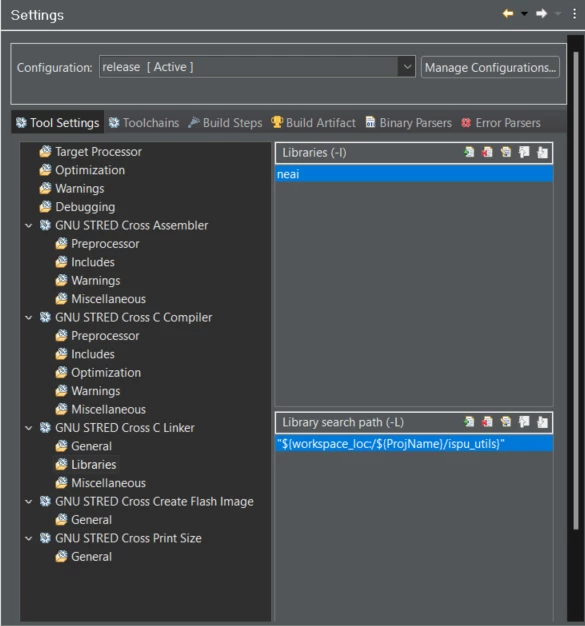
But after hitting "Apply", "Rebuild Index" and "Apply and Close", when I try to build the project, I get the following errors:
07:30:02 **** Incremental Build of configuration release for project ispu_basic ****

make all

Building target: ispu_basic.elf

Invoking: GNU STRED Cross C Linker

reisc-gcc -mcpu=reiscl -mfp32-format=ieee -Os -ffunction-sections -fdata-sections -Wall -Wextra -Wdouble-promotion -fno-strict-aliasing -T ../../ispu_utils/boot.ld -Xlinker --gc-sections -L"C:\Users\Henrique\isensi\new\Spider\basic_project\ispu_basic\ispu_utils" -Wl,-Map,"ispu_basic.map" --specs=nano.specs -o "ispu_basic.elf" ./src/main.o ./ispu_utils/crt0.o ./ispu_utils/global.o -lneai

c:/st/stm32cubeide_1.13.0/stm32cubeide/features/com.stred.toolchain.win.feature_8.1.2/reisc-8.1.2-win-x86_64/bin/../lib/gcc/reisc/8.3.1/../../../../reisc/bin/ld.exe: skipping incompatible C:\Users\Henrique\isensi\new\Spider\basic_project\ispu_basic\ispu_utils\libneai.a when searching for -lneai

c:/st/stm32cubeide_1.13.0/stm32cubeide/features/com.stred.toolchain.win.feature_8.1.2/reisc-8.1.2-win-x86_64/bin/../lib/gcc/reisc/8.3.1/../../../../reisc/bin/ld.exe: cannot find -lneai

collect2.exe: error: ld returned 1 exit status

make[1]: *** [makefile:57: ispu_basic.elf] Error 1

make: *** [makefile:48: all] Error 2

"make all" terminated with exit code 2. Build might be incomplete.
Information that may be relevant (or not):
In the "Deployment" step, in NanoEdge AI Studio, I have already tried to generate the library checking and unchecking the "Float abi" compilation flags. I have not checked other options. If I don't link the library, I can successfully build the project.
I have used the same template to follow along this video tutorial from STMicroelectronics channel and everything went well.
I have already tried to use double quotes around the library name and the result was the same. I have already tried to append ".a" to the library name, and as a result, the library could not be found.
Versions:
STM32CubeIDE version: 1.13.2
NanoEdge AI Studio version: 3.4.2
X-CUBE-ISPU version: 1.1.0