Associate
Apr 10, 2025 8:43 AM UTC
Solved

How to use the extended Flash on X-CUBE-AI

I'm running low on FLASH, and I'm confused about extensions.May i ask if there are any routines or tutorials available?

This topic has been closed for replies.
hamitiya
hamitiyaBest answer
ST Technical Moderator
Apr 11, 2025 5:59 AM UTC

Hello

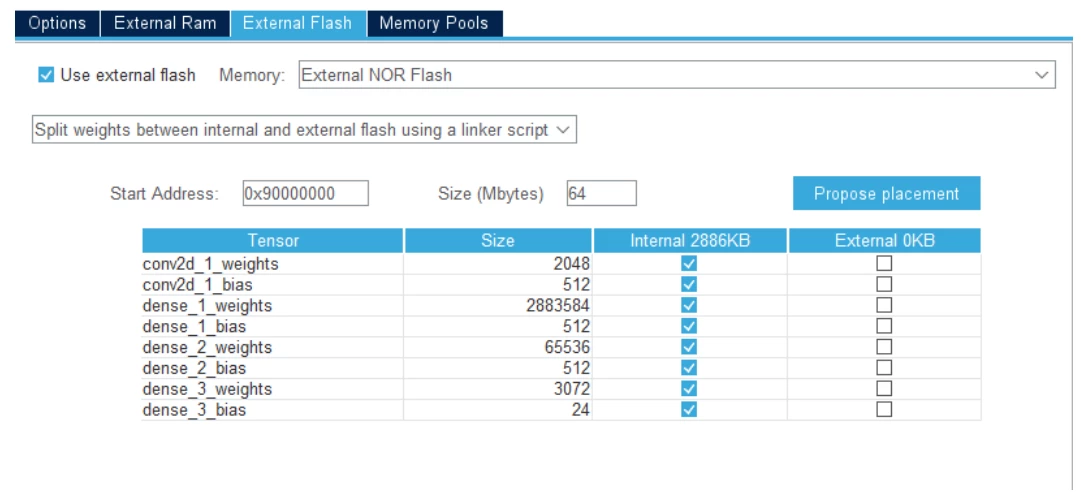
In order to use external flash with X-CUBE-AI, you can find in X-CUBE-AI panel:

- Advanced Settings

- "External Flash" tab

And you can set the external flash start address and how you should split your weights. Different methods exist like a separate bin with your weights.

hamitiya_0-1744351091229.png

You can find more details here (page 21)

Getting started with X-CUBE-AI Expansion Package for Artificial Intelligence (AI) - User manual


Best regards

Yanis

​In order to give better visibility on the answered topics, please click on 'Best answer' on the reply which solved your issue or answered your question.

2 replies

pienascAuthor
Associate
Apr 10, 2025 8:54 AM UTC

Now it's like this, I have extended W25Q128 chips, but I don't know how to write code to connect them

hamitiya
hamitiyaBest answer
ST Technical Moderator
Apr 11, 2025 5:59 AM UTC

Hello

In order to use external flash with X-CUBE-AI, you can find in X-CUBE-AI panel:

- Advanced Settings

- "External Flash" tab

And you can set the external flash start address and how you should split your weights. Different methods exist like a separate bin with your weights.

hamitiya_0-1744351091229.png

You can find more details here (page 21)

Getting started with X-CUBE-AI Expansion Package for Artificial Intelligence (AI) - User manual


Best regards

Yanis

​In order to give better visibility on the answered topics, please click on 'Best answer' on the reply which solved your issue or answered your question.