


hasankaynar
Associate
September 8, 2021
Solved

SPC5Studio - No such file or directory

  • September 8, 2021
  • 2 replies
  • 1509 views

Hi,

I'm getting a lot of errors in SPC5Studio. If I use it with main.c without separating the library directory I'm working in, I don't have a problem. But when I want to separate the libraries, it doesn't work like an ordinary eclipse. Likewise, I don't have any problems with STM32CubeIDE, but SPC5Studio gives a lot of errors. The errors I get are:

make -j8 all

Compiling main.c

main.c:4:21: fatal error: nextion.h: No such file or directory

#include "nextion.h"

^

compilation terminated.

make: *** [components/spc560bxx_platform_component_rla/lib/rsc/rules.mk:137: build/obj/main.o] Error 1

"make -j8 all" terminated with exit code 2. Build might be incomplete.

For example, when I write the library I have reserved as nextion.h directly into main, it works. I will share with you the settings I made and the library I created.
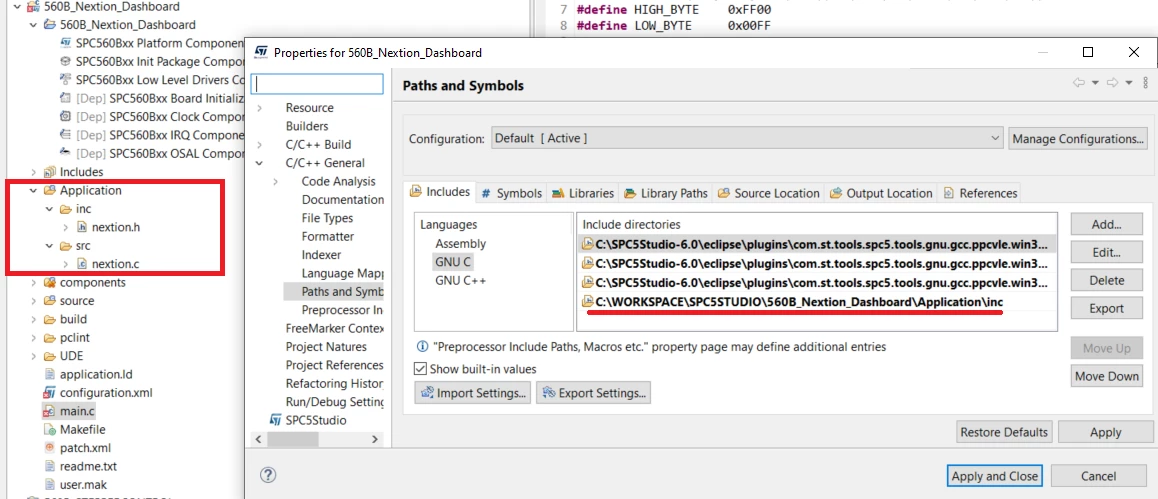
0693W00000DmXMSQA3.png 

Regards.

    This topic has been closed for replies.
    Best answer by Erwan YVIN

    Hello ,

    SPC5Studio test application does not use CDT Settings.

    i recommend to add the include library or source in user.mak. (nextion.c nextion.h)

    # List of all user C source files
    U_C_SRC = ./main.c
     
    # List of all user C++ source files
    U_CPP_SRC =
     
    # List of all user ASM source files
    U_ASM_SRC =
     
    # List all user C define here, like -D_DEBUG=1
    UDEFS =
     
    # Define ASM defines here
    UADEFS =
     
    # List all user directories here
    UINCDIR =
     
    # List the user directory to look for the libraries here
    ULIBDIR =
     
    # List all user libraries here
    ULIBS =

    Best Regards

    Erwan

    2 replies

    Erwan YVIN
    Erwan YVINBest answer
    ST Technical Moderator
    September 8, 2021

    Hello ,

    SPC5Studio test application does not use CDT Settings.

    i recommend to add the include library or source in user.mak. (nextion.c nextion.h)

    # List of all user C source files
    U_C_SRC = ./main.c
     
    # List of all user C++ source files
    U_CPP_SRC =
     
    # List of all user ASM source files
    U_ASM_SRC =
     
    # List all user C define here, like -D_DEBUG=1
    UDEFS =
     
    # Define ASM defines here
    UADEFS =
     
    # List all user directories here
    UINCDIR =
     
    # List the user directory to look for the libraries here
    ULIBDIR =
     
    # List all user libraries here
    ULIBS =

    Best Regards

    Erwan

    In order to give better visibility on the answered topics, please click on 'Best answer' on the reply which solved your issue or answered your question.
    hasankaynar
    Associate
    September 9, 2021

    Hello,

    I made the user.mak file as you said, but it still doesn't see the library. For example, I opened a led project and I include it, and I get an error. Can you post a sample project with an external library? Thanks a lot for your support.

    0693W00000DmdkVQAR.jpg 

    Best Regards
