Associate
August 10, 2023
Solved

SPC5Studio FreeGcc ToolChain

  • August 10, 2023
  • 3 replies
  • 3296 views

Hi,

i used SPC5Studio 5.8.1 for many years, but today (after windows update) in Properties->Tool Chain Editor->Current toolchain->"No ToolChain".

This means that i have no possibility to change Build Settings. The same things also in SPC5Studio 6.

Of course i have C:\SPC5Studio-6.0\eclipse\plugins\com.st.tools.spc5.tools.gnu.gcc.ppcvle.win32_4.9.4.20200908161514\toolchain

Somebody can help to fix this?

Thank you in advantages.

This topic has been closed for replies.
Best answer by Erwan YVIN

Hello,

Sorry, it does not install by default :

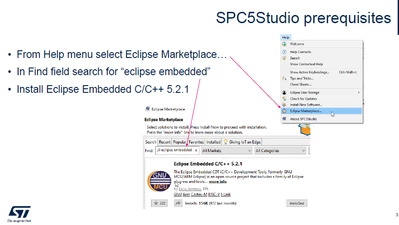
You should install Embedded MCU from Eclipse Marketplace 

Cf screenshot

ErwanYVIN_0-1692951734847.png

Embedded CDT is nice eclipse feature / plugins to customize your toolchain in SPC5Studio or Eclipse.

Best regards

                 Erwan


3 replies

Erwan YVIN
ST Technical Moderator
August 16, 2023

Hello ,

we are not using CDT Settings to compile a project.

the toolchain is set in the platform component

ErwanYVIN_0-1692171540259.png

ErwanYVIN_1-1692171606727.png

if you want to use CDT you set your toolchain in 

ErwanYVIN_2-1692171687484.png

And set your project as CDT

Best Regards Erwan


In order to give better visibility on the answered topics, please click on 'Best answer' on the reply which solved your issue or answered your question.
ck182Author
Associate
August 25, 2023

Hello Erwan,

thank you for your replay.

Sorry but i have no MCU setting under Preference, so i'm still blocking.

Best Regards

Erwan YVIN
Erwan YVINBest answer
ST Technical Moderator
August 25, 2023

Hello,

Sorry, it does not install by default :

You should install Embedded MCU from Eclipse Marketplace 

Cf screenshot

ErwanYVIN_0-1692951734847.png

Embedded CDT is nice eclipse feature / plugins to customize your toolchain in SPC5Studio or Eclipse.

Best regards

                 Erwan


In order to give better visibility on the answered topics, please click on 'Best answer' on the reply which solved your issue or answered your question.