Chamber Ling
Associate
January 15, 2018
Solved

SPC5Studio build failure, too

  • January 15, 2018
  • 3 replies
  • 3410 views
Posted on January 15, 2018 at 18:20

My problems same as 

https://community.st.com/message/10560


The SPC5Studion was upgraded to 5.7.1

But I selected SPC56-DISCOVERY(BOARD) , DRIVERS --STM 

My toolchains is the GNU make builder of spc5studio default.

Keep the example codes from code generation...

it is giving following errors,


- Symbol 'NULL' could not be resolved


- Symbol 'uint32_t' could not be resolved


- Symbol 'int32_t' could not be resolved


- Symbol 'uint16_t' could not be resolved


- Symbol 'uint8_t' could not be resolved

...


I was tried to set 

in


C/C++ general ==> Preprocesseur Include

It cannot be to solved these problems.

Can you help me resolve these?

Thanks in advance for all your help.

Chamberplus


#spc56

    This topic has been closed for replies.
    Best answer by Erwan YVIN
    Posted on January 16, 2018 at 09:59

    Hello Chamber ,

    It is not a build failure.

    it is just a configuration issue on CDT perspective on your SPC5Studio project on the symbols synchronization.

    https://stackoverflow.com/questions/37466808/type-uint32-t-could-not-be-resolved


    your should update your configuration in GNU C not GNU C++.

    0690X00000609OVQAY.png

              Best regards

                                        Erwan

    3 replies

    Chamber Ling
    Associate
    January 16, 2018
    Posted on January 16, 2018 at 09:13

    I tried to solve it myself, and I did it.

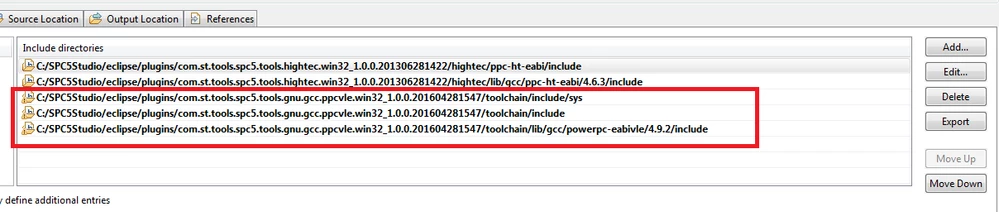
    Share my settings

    Both of GNU C and GNU C++ are same setting. 

    0690X00000604GMQAY.jpg0690X00000604DAQAY.jpg
    Erwan YVIN
    Erwan YVINBest answer
    ST Technical Moderator
    January 16, 2018
    Posted on January 16, 2018 at 09:59

    Hello Chamber ,

    It is not a build failure.

    it is just a configuration issue on CDT perspective on your SPC5Studio project on the symbols synchronization.

    https://stackoverflow.com/questions/37466808/type-uint32-t-could-not-be-resolved


    your should update your configuration in GNU C not GNU C++.

    0690X00000609OVQAY.png

              Best regards

                                        Erwan

    In order to give better visibility on the answered topics, please click on 'Best answer' on the reply which solved your issue or answered your question.
    Chamber Ling
    Associate
    January 17, 2018
    Posted on January 17, 2018 at 04:44

    Erwan

    OK. I got it !

    I will exactly update my configuration in GNU C.

    Thanks

    Chamber