Rassom
Associate II
November 11, 2021
Solved

SPC5Studio 6.0 - make not found in PATH

  • November 11, 2021
  • 2 replies
  • 2005 views

First time building a sample project after installation of SPC5Studio 6.0 + autodevkit + MCTK_LIB and got this:

22:10:13 **** Incremental Build of configuration Default for project SPC560Pxx_RLA AEK_MOT_3P99081_3Phase_Motor_Control_via_CAN ****

make all 

Cannot run program "make": Launching failed

Error: Program "make" not found in PATH

PATH=[C:/SPC5Studio-6.0/eclipse/jre/bin/server;C:/SPC5Studio-6.0/eclipse/jre/bin; ...

    This topic has been closed for replies.
    Best answer by Erwan YVIN

    Hello Rassom ,

    I think that you have broken you environment variable or your settings.

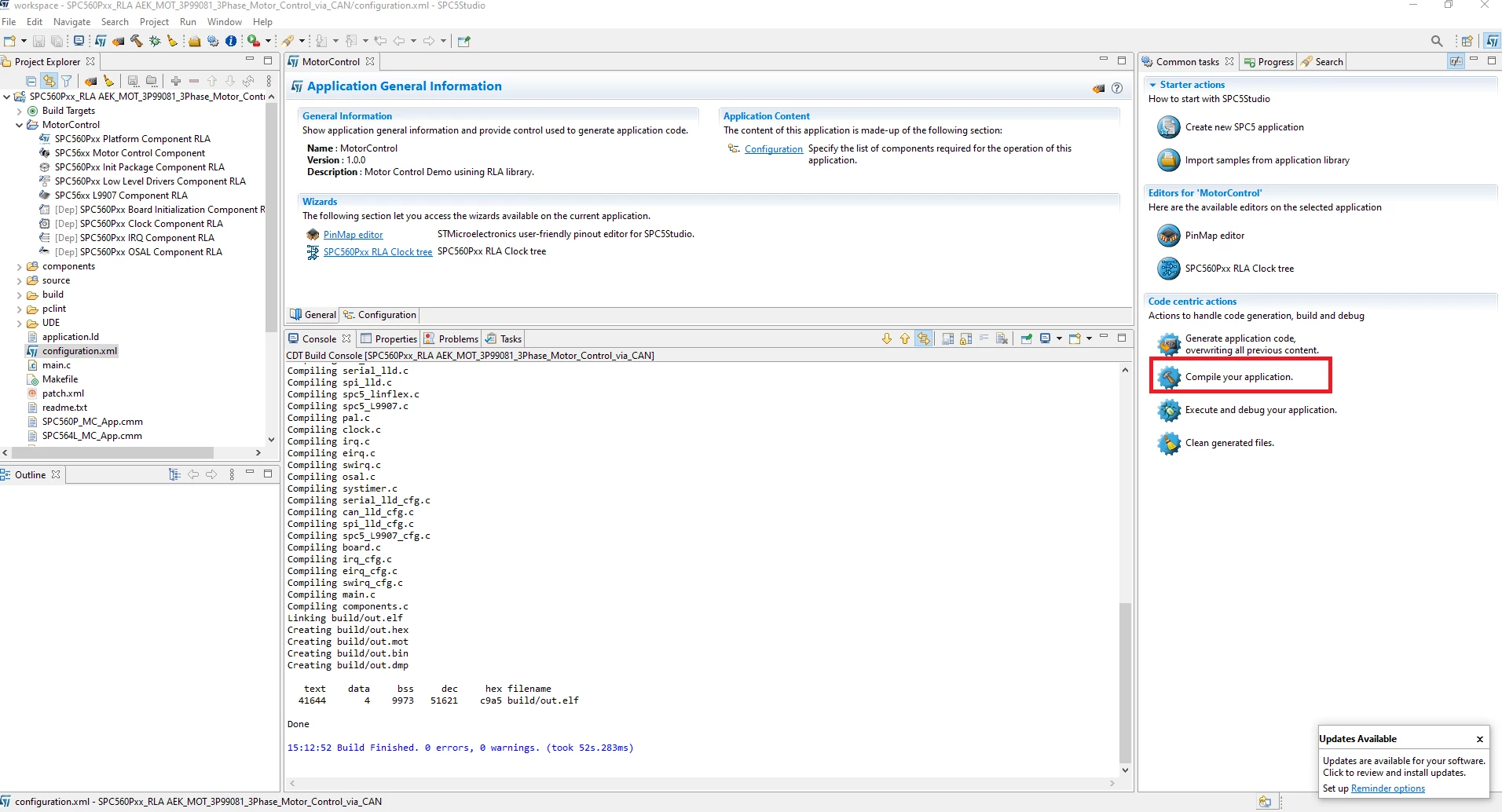
    Could you try the button Compile your application on the right not the CDT Button ?

    (cf screenshot)

    make should be installed in the gnutools feature.

    0693W00000GXOoAQAX.png 

    Best Regards

    Erwan

    2 replies

    Erwan YVIN
    Erwan YVINBest answer
    ST Technical Moderator
    November 12, 2021

    Hello Rassom ,

    I think that you have broken you environment variable or your settings.

    Could you try the button Compile your application on the right not the CDT Button ?

    (cf screenshot)

    make should be installed in the gnutools feature.

    0693W00000GXOoAQAX.png 

    Best Regards

    Erwan

    In order to give better visibility on the answered topics, please click on 'Best answer' on the reply which solved your issue or answered your question.
    Rassom
    RassomAuthor
    Associate II
    November 13, 2021

    Thank you, that works.

    I regularly use STMCubeIDE on a different computer. This one is a fresh Windows 10 installation. In the last few days, I have been trying to get AEK-MOT-3P99081 up and running. I finally got it working. However, my experience with SPC5Studio has been very poor so far compared to CubeIDE and Nucleo series.