Wilhelm Bairlein
Associate
January 8, 2018
Solved

Processor is in unknown state!

  • January 8, 2018
  • 3 replies
  • 1360 views
Posted on January 08, 2018 at 16:10

hello everybody,

we use the SPC56EL70 discovery board with Spc5 studio as IDE and UDE STK - 4.8 as Debugger.

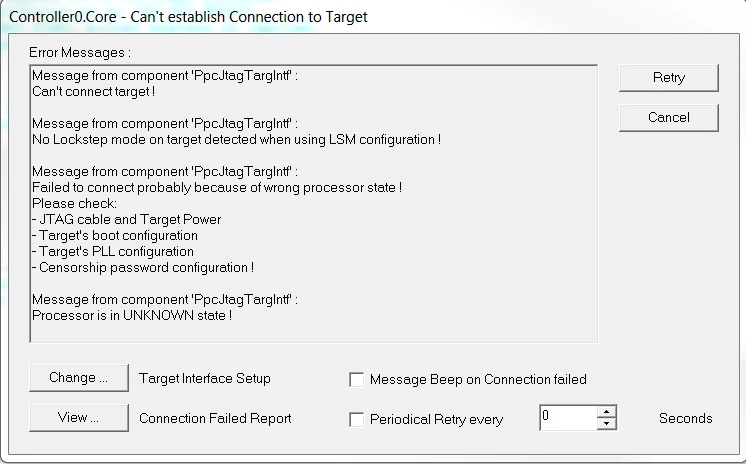
Today we got the following failure message - please see the following picture.

0690X00000609O6QAI.png

The only thing we changed was the additional usage of the A/D-port E12. After downloading the extended code we got the above failure message. Now we can�t flash the SPC with another source code.

Please let us know how we can put the SPC back into operation.

Thanks in advance.

#processor-in-unknown-state

    This topic has been closed for replies.
    Best answer by david tomsa
    Posted on January 09, 2018 at 06:59

    Hi,

    you can try the following: Interface Setup -> Connect and choose under connect: Keep application running. 

    3 replies

    david tomsa
    david tomsaBest answer
    Associate III
    January 9, 2018
    Posted on January 09, 2018 at 06:59

    Hi,

    you can try the following: Interface Setup -> Connect and choose under connect: Keep application running. 

    Erwan YVIN
    ST Technical Moderator
    January 9, 2018
    Posted on January 09, 2018 at 10:10

    Hi ,

    Yes , in LSM (Lock Step Mode) , you should update your debug configuration

    In order to give better visibility on the answered topics, please click on 'Best answer' on the reply which solved your issue or answered your question.
    Wilhelm Bairlein
    Associate
    January 9, 2018
    Posted on January 09, 2018 at 15:15

    Hi Erwan,

    how can I update the debug configuration respectively which settings do you mean?