Parth1
Associate II
July 10, 2021
Solved

How to include standard header files in SPC5 Studio project

  • July 10, 2021
  • 2 replies
  • 1109 views

After importing a sample project, how to include header files of components configured.

    This topic has been closed for replies.
    Best answer by Erwan YVIN

    Hello ,

    you can include the header files of components configured

    by using include macros in your source file :

    #include "adc_lld_cfg.h"

    0693W00000BdPaaQAF.png Best Regards

    Erwan

    2 replies

    Erwan YVIN
    Erwan YVINBest answer
    ST Technical Moderator
    July 12, 2021

    Hello ,

    you can include the header files of components configured

    by using include macros in your source file :

    #include "adc_lld_cfg.h"

    0693W00000BdPaaQAF.png Best Regards

    Erwan

    In order to give better visibility on the answered topics, please click on 'Best answer' on the reply which solved your issue or answered your question.
    Parth1
    Parth1Author
    Associate II
    July 16, 2021

    Hello,

    Thank you for your reply.

    Please find below attached error snip which I am getting after building the project that is imported from SPC5 examples. I simply imported the application, then generated the SPC5 application and build the project.

    0693W00000Czoz9QAB.jpg 

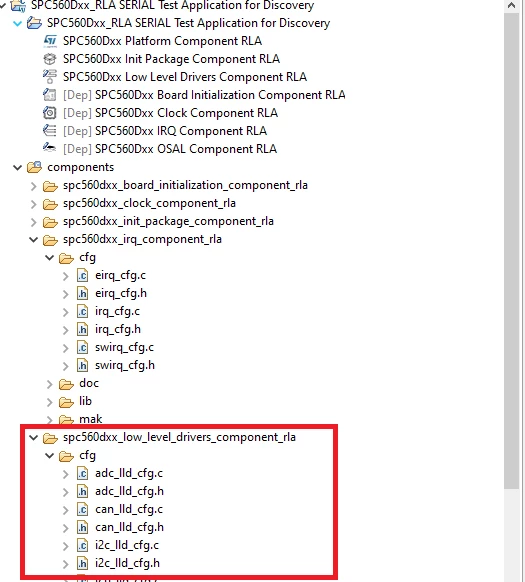
    I guess includes folder is missing from generated files (refer below snip)

    0693W00000CzoziQAB.jpg 

    I have also attached the workspace (.rar) in which the above error occurred.

    Please let me know if any further information is required.

    Thanks