Sathish Sulegai
Associate
March 22, 2018
Solved

eTimer Clock selection

  • March 22, 2018
  • 3 replies
  • 1727 views
Posted on March 22, 2018 at 18:36

Hello Dear Forum members,

This question is regarding SPC560P40L1 controller's eTimer module.

At the moment my eTimer module using 'IP Bus clock' which is of 64M Hz. I am using prescaler value of '32' to get 2M Hz to eTimer module.

I want to have clock frequency of 20M Hz(or 40M Hz or multiples of 20M Hz basically).

I see in the block diagram of technical datasheet that(Please see attachments) there is option to choose from clock sources: 'Clock' or 'IP Bus clock'

The crystal oscillator frequency is 40M Hz. I would like to use this frequency as input to my eTimer module but i don't know how or even it's possible to get this Frequency routed to eTimer ?

I would be happy if someone can share any useful tips or suggestion in this regard.

Best regards

Sathish 

#spc5 #spc5x #clock-selection #etimer

    This topic has been closed for replies.
    Best answer by Erwan YVIN
    Posted on March 23, 2018 at 10:10

    Hello Sathish ,

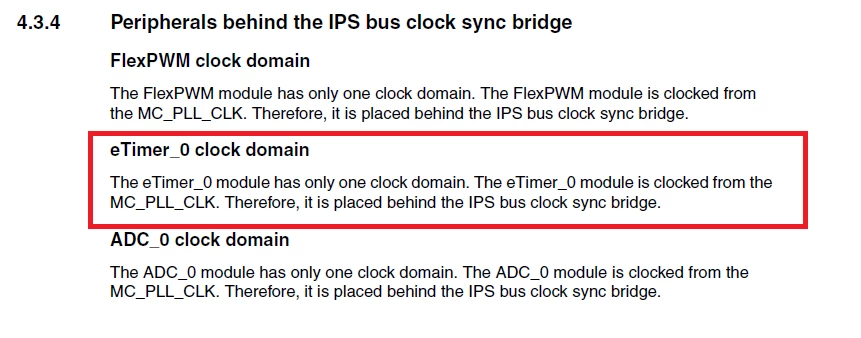
    The RM is not clear in the clock domain

    0690X0000060ADYQA2.png

    if you want to configure correctly,

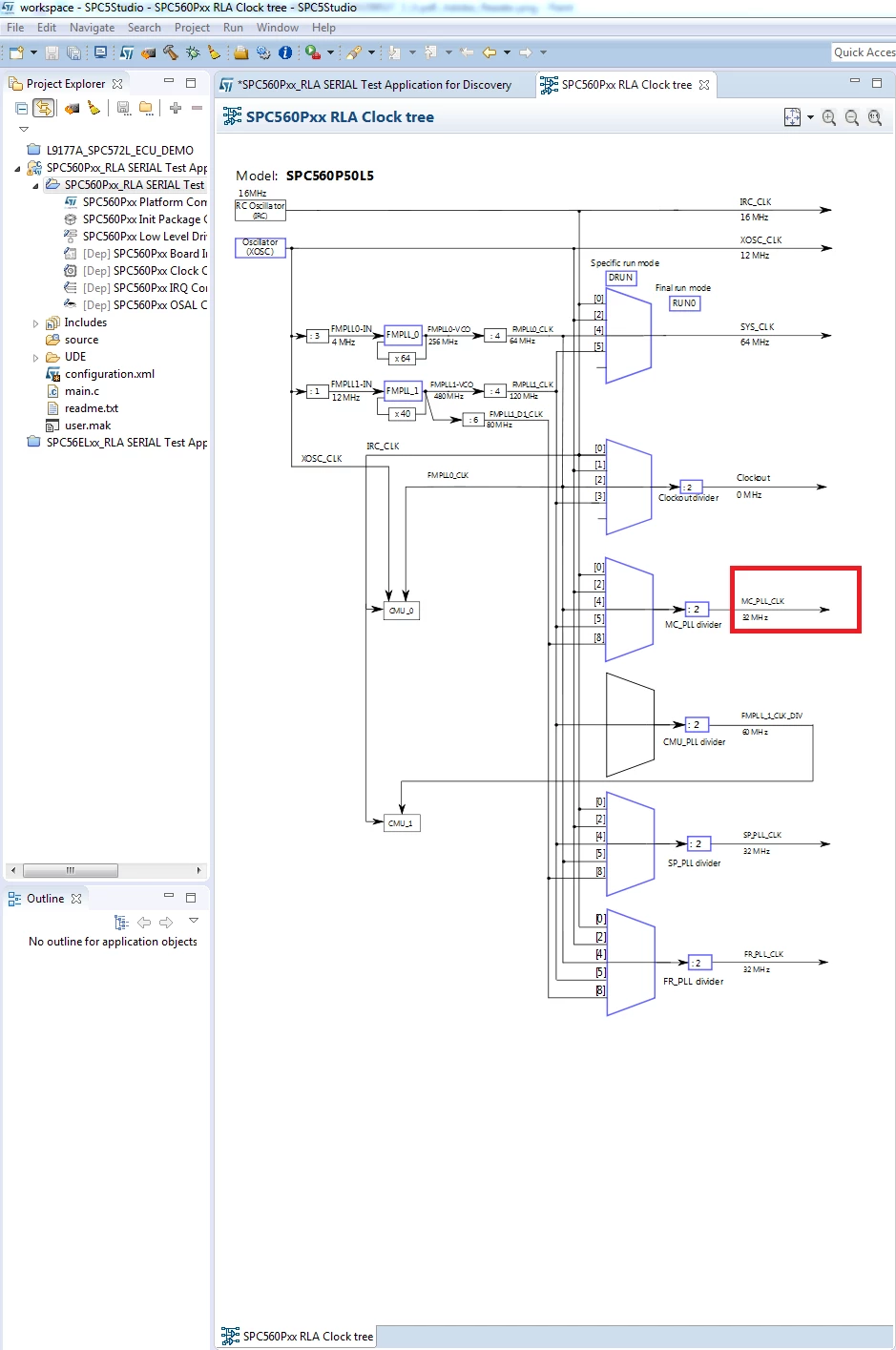
    It is a good thing to use the clocktree in SPC5Studio Tools Suite.

    0690X0000060A5lQAE.png

      Best regards

                 Erwan

    3 replies

    Erwan YVIN
    Erwan YVINBest answer
    ST Technical Moderator
    March 23, 2018
    Posted on March 23, 2018 at 10:10

    Hello Sathish ,

    The RM is not clear in the clock domain

    0690X0000060ADYQA2.png

    if you want to configure correctly,

    It is a good thing to use the clocktree in SPC5Studio Tools Suite.

    0690X0000060A5lQAE.png

      Best regards

                 Erwan

    In order to give better visibility on the answered topics, please click on 'Best answer' on the reply which solved your issue or answered your question.
    Sathish Sulegai
    Associate
    March 23, 2018
    Posted on March 23, 2018 at 12:12

    Dear Erwan,

    Thank you for your reply.

    In my project clock tree(Please see attachment) i do not see clock selection logic block for ''MC_PLL_CLK''.

    Please let me know how could i add this block and how do i route this(MC_PLL_CLK) to eTimer module instead of  SYS_CLK with Prescaler 0690X0000060ACzQAM.png?

    Freundliche Grüßen

    Sathish 

    Erwan YVIN
    ST Technical Moderator
    March 23, 2018
    Posted on March 23, 2018 at 13:46

    Hello Sathish,

    for P40 Family, you should take SYS_CLK.

    the clocktree is well valid (cf below)

    0690X0000060AAuQAM.png

    The RM is a game of investigation ;)

      best regards

                 Erwan

    In order to give better visibility on the answered topics, please click on 'Best answer' on the reply which solved your issue or answered your question.