Associate
March 20, 2024
Solved

Autodevkit openOCD

  • March 20, 2024
  • 1 reply
  • 1224 views

Hello,

I tried to use openOCD with my custom board based on SPC58EG80E5. I can successfully flash the ELF file of my project with SPC5LNKA debugger, but the debug features such as the watch window and breakpoints do not work.

How can I enable these features?

This topic has been closed for replies.
Best answer by Max VIZZINI

Hello,


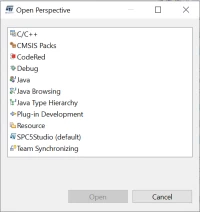
Select the icon highlighted in the image below to open the perspective window and select Debug.

 

MaxVIZZINI_0-1711530677372.png


MaxVIZZINI_1-1711530677374.png


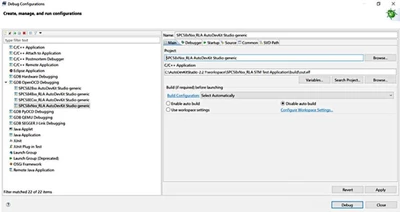
Select Debug Configurations.

After selecting your configuration, insert the path of the elf file in the project field. Click on Debug.

MaxVIZZINI_2-1711530677378.png


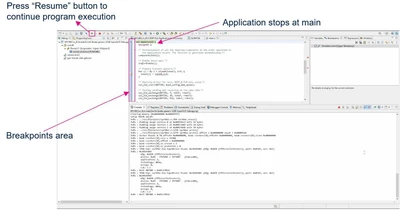
The console opens up and shows your application code execution. The code execution stops at the main file. To continue executing the code, press resume. You can manually insert a breakpoint to stop code execution.

MaxVIZZINI_3-1711530677393.png

You can see the video tutorial how to use openOCD inside AutoDevKit Studio Welcome Page>Tutorial or see the AEK-MCU-SPCLNK_QSG.pdf file attached.

Best Regards,

AutoDevKit Team

1 reply

Max VIZZINI
Max VIZZINIBest answer
ST Technical Moderator
March 27, 2024

Hello,


Select the icon highlighted in the image below to open the perspective window and select Debug.
 

MaxVIZZINI_0-1711530677372.png


MaxVIZZINI_1-1711530677374.png


Select Debug Configurations.

After selecting your configuration, insert the path of the elf file in the project field. Click on Debug.
MaxVIZZINI_2-1711530677378.png


The console opens up and shows your application code execution. The code execution stops at the main file. To continue executing the code, press resume. You can manually insert a breakpoint to stop code execution.
MaxVIZZINI_3-1711530677393.png

You can see the video tutorial how to use openOCD inside AutoDevKit Studio Welcome Page>Tutorial or see the AEK-MCU-SPCLNK_QSG.pdf file attached.

Best Regards,

AutoDevKit Team