


How to play audio files using STM32 Part 3
How to play audio files using STM32?
Welcome back!
In this last part we'll cover the interrupt implementation and the final results, so stay tuned
In the interrupt service routine, more specifically in the TIM3 periodic interrupt, we must execute a few actions as well:
- Include the adpcm header
- Check if the audio file to be played has changed or not
- Clear the interrupt flag
- Decode the audio file
- Repeat the same position of the audio file 8 times
- Output the decoded value in the PWM or DAC
- Once the 8 repetitions are made, move to the next decoded position in the vector
- If the audio file was fully played, stop the TIM3 interrupt to stop the audio output
/* USER CODE BEGIN Includes */
#include "adpcm.h"
#ifdef USE_DAC
#include "dac.h"
#endif
/* USER CODE END Includes */

/* USER CODE BEGIN PV */
tTwoByte newSample;
extern AudioElement AudioFile;
extern uint8_t AudioFileToPlay;
/* USER CODE END PV */

/**
 * @brief This function handles TIM3 global interrupt.
 */
void TIM3_IRQHandler(void)
{
 /* USER CODE BEGIN TIM3_IRQn 0 */
	uint8_t adpcmSample;
	static uint16_t pcmSample;
	static uint8_t nibble = 1;
	static uint8_t repetition = 0;
	static uint16_t sample_position = 0;
	static unsigned char *RawAudio;
	static uint8_t PrevAudioFileToPlay = 0xFF;

	if(PrevAudioFileToPlay != AudioFileToPlay)
	{
		PrevAudioFileToPlay = AudioFileToPlay;
		nibble = 1;
		repetition = 0;
		sample_position = 0;
		RawAudio = (unsigned char *)AudioFile.AudioFiles[AudioFileToPlay];
	}

	if (LL_TIM_IsActiveFlag_UPDATE(TIM3))
	{
		LL_TIM_ClearFlag_UPDATE(TIM3);

		if ((repetition==0) & (sample_position < AudioFile.AudioSize[AudioFileToPlay]))
		{ // new sample is generated
			repetition = 7;	// reinitialize repetition down counter
			if (nibble)
			{ // first 4 bits of the ADPCM byte decoded
				adpcmSample = (uint8_t)(RawAudio[sample_position] >> 4);
			}
			else
			{ // last 4 bits of the ADPCM byte decoded
				adpcmSample = (uint8_t)(RawAudio[sample_position] & 0x0F);
				sample_position++ ;
			}

			nibble = (uint8_t)(!nibble);/* indicator inverted mean next interrupt will handle
																					 the second part of the byte. */
			pcmSample = ADPCM_Decode(adpcmSample);

			// update sample
			newSample.uShort = (uint16_t)32768 + pcmSample;
			TIM3->CCR2 = newSample.uBytes[0]; //LSB
			TIM3->CCR1 = newSample.uBytes[1]; //MSB
#ifdef USE_DAC
			HAL_DAC_SetValue(&hdac1, DAC_CHANNEL_1, DAC_ALIGN_12B_R, (newSample.uShort)>>4);
#endif
		}
		else if (sample_position < AudioFile.AudioSize[AudioFileToPlay])
		{ // repetition 7 more times of the PWM period before new sample, total of times the same value is repeated = 8
			repetition--;

			// reload Timer with the actual sample value
			newSample.uShort = (uint16_t)32768 + pcmSample;
			TIM3->CCR2 = newSample.uBytes[0]; //LSB
			TIM3->CCR1 = newSample.uBytes[1]; //MSB
#ifdef USE_DAC
			HAL_DAC_SetValue(&hdac1, DAC_CHANNEL_1, DAC_ALIGN_12B_R, (newSample.uShort)>>4);
#endif
		}
		else
		{ // end of the audio clip
			/* Disable the TIM3 Interrupt */
			NVIC_DisableIRQ(TIM3_IRQn);
			// stop the timer
			LL_TIM_DisableCounter(TIM3);
		}

	}
	return;
 /* USER CODE END TIM3_IRQn 0 */
 /* USER CODE BEGIN TIM3_IRQn 1 */

 /* USER CODE END TIM3_IRQn 1 */
}
Now you have all the steps prepared and you can build your application by pressing “Ctrl+B”. You should see 0 errors and 0 warnings and in the memory details you should have the .myAudioFiles with the size of your audio file: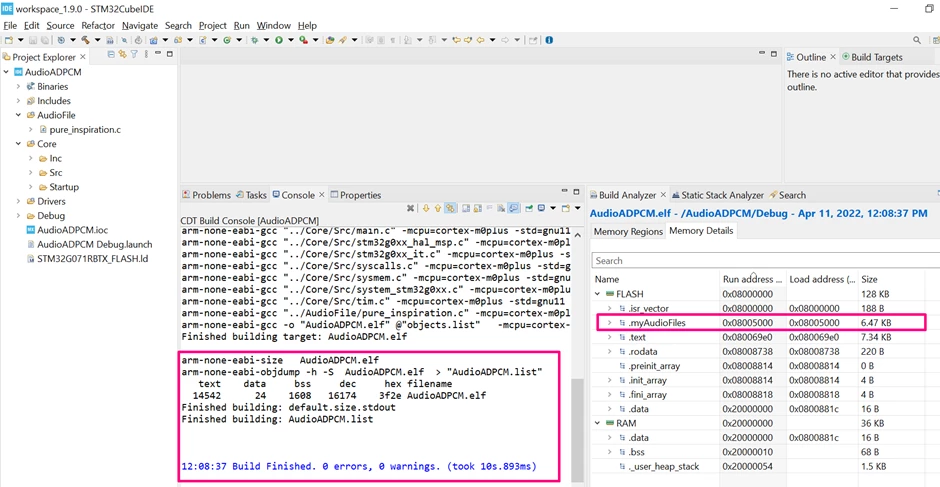
Assuming you have your hardware ready and properly connected, you can load the program in the STM32 and play with your audio file! You can add as many audio files your memory can withstand by repeating the process shown in this article
Conclusion:
The ADPCM encode and decode functions available in the software pack allows a rather small implementation to play audio files / music with all STM32. With some additional steps, you can enhance the storage to an external memory and create your own audio player
Enjoy your STM32 playing musics!
Part 1
Part 2
Part 3