

Wolfgang Reinig
Associate
January 7, 2018
Solved

SPBTLE-1S - How to get a BLE connection?

  • January 7, 2018
  • 10 replies
  • 3049 views
Posted on January 07, 2018 at 03:06

Hi,

I just got the EVAL-IDB007V1M with the spbtle-1s (based on bluenrg-1 and installed the STSW-BLUENRG1-DK (v2.5.0) on my Windows PC. The BlueNRG-1 Navigator recognizes the EVAL-IDB007V1M and I can 'Flash & Run' the basic examples and the BLE demonstration and test applications.

They seem to run on the EVAL-IDB007V1M - at least they to something when I press the buttons but I get strange results.

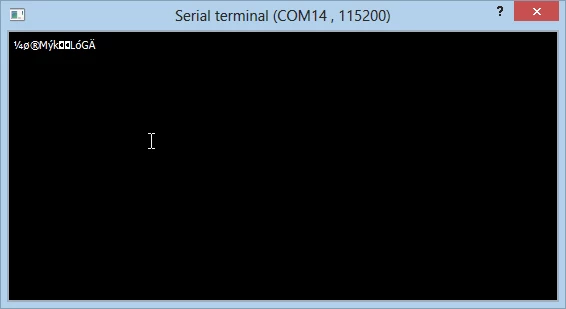
First, when I 'Flash & Run' the BlueNRG-1 Hello World from the basic examples I get this output:
0690X00000609NSQAY.png

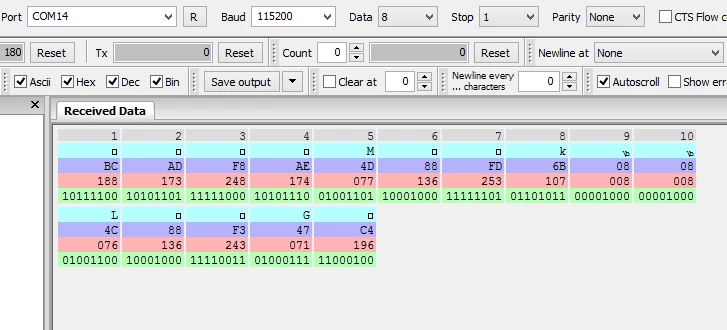
With another terminal program it looks like this:
0690X00000609NXQAY.png

I expected Hello World... What's wrong?

Second problem (and more severe in my case): When I flash and run the BLE demonstration and test applications I would expect to be able to establish a connection to the EVAL-IDB007V1M from my Android smartphone. I tried to use the Apps STM32 BLE Profiles, BlueNRG and (sorry for that) nRF Connect. But I couldn't get any connection to the  EVAL-IDB007V1M. I tried several demo applications, e.g. BLE Beacon.

The Apps and the BLE stuff on my smartphone works in general and I can connect to other BLE devices.

Again: What's wrong?

TIA

Wolfgang

#stsw-bluenrg1-dk #steval-idb007v1m #spbtle-1s #bluenrg-1

    This topic has been closed for replies.
    Best answer by Antonio Vilei
    Posted on February 09, 2018 at 10:36

    Dear

    wreinig

    ,

    if you're using the EVAL-IDB007V1Mboard, you have to change the setting for the 32 MHz crystal used in the SPBTLE-1S module. The BlueNRG-1 navigator is preconfigured for the EVAL-IDB007V1 board, which has another crystal (16 MHz).

    Please make sure that in your project settings you use this setting:

    HS_SPEED_XTAL=HS_SPEED_XTAL_32MHZ

    The default configuration in all the projects that you have tried was fora 16 MHz crystal (HS_SPEED_XTAL_16MHZ)and that's why you were not able to make it work with your board.

    I don't have anyEVAL-IDB007V1M board to test it myself. Please let me know if this works for you.

    Best regards,

    Antonio

    10 replies

    Antonio Vilei
    ST Employee
    January 9, 2018
    Posted on January 09, 2018 at 15:18

    Hi Wolfgang,

    please keep into account that STSW-BLUENRG1-DK  provides you with different applications. They define different proprietary profiles and require their specific counterpart app on the phone/tablet.

    In order to test the BLE functionality, I suggest to run the BLE_SensorDemo application on your EVAL-IDB007V1M. In this case, you will need to use the BlueNRG app on your Android phone.

    If you want to build and flash the BLE_SensorDemo project, the relative path within your SW package is:

    Project\BLE_Examples\BLE_SensorDemo

    If you want to use a pre-built binary, instead, you can find it here:

    Firmware\BLE_Examples\BlueNRG-1\BLE_SensorDemo

    Your current configuration for the terminal program (115200, 8N1, no flow control) is OK.

    Best regards,

    Antonio

    Wolfgang Reinig
    Associate
    January 9, 2018
    Posted on January 09, 2018 at 21:33

    Hi Antonio,

    thank you for your fast answer. I already used 'Flash & Run' in 'BlueNRG-1 Navigator' to flash the BLE_SensorDemo. The LED DL1 is flickering a little bit but I got no BLE Connection with my smartphone (Samsung Galaxy S7) and with three different apps from different suppliers: BlueNRG, nRF Connect and BLE Scanner.To make sure BLE on my smartphone works as it should I used a BLE HRM belt which was recognized by all three apps.

    With your answer I used the 'BlueNRG-1 Flasher' utility to flash the Firmware\BLE_Examples\BlueNRG-1\BLE_SensorDemo.hex file again. Same behaviour: DL1 is flickering but no BLE connection to any of the three apps (BLE HRM belt works fine)...

    This is a screenshot after flashing BLE_SensorDemo.hex:

    0690X00000609H6QAI.png

    Do you have any further ideas what I could do?

    best regards

    Wolfgang

    Antonio Vilei
    ST Employee
    June 7, 2018
    Posted on June 07, 2018 at 11:34

    Hi Mitja,

    after reading another message of yours in another thread, I understood that you were referring to preprocessor define for the crystal, i.e.

    HS_SPEED_XTAL=HS_SPEED_XTAL_32MHZ

    .

    If you're using IAR Embedded Workbench, from the menu select 'Project > Options...' and then you can define it in the 'Preprocessor' tab of the C/C++ Compiler section, as shown in the picture below.

    0690X0000060LB7QAM.png

    Best regards,

    Antonio

    SA.12
    Visitor II
    January 4, 2019

    Hi Aontonio,

    i am using the EVAL-IDB007V1M board and Keil V5.

    as per your previous discussion ,i change 32 Mhz and it works for "hello World" example.

    here, i modify "system_bluenrg.h" file.

    But BLE programs are loaded to EVAL-IDB007V1M board but the BLE Android applications not detect.

    kindly give the solution...0690X000006CxZNQA0.jpg