DDing.1
Associate III
April 9, 2021
Solved

Hello,I want to konw how to turn on the verification of the images(op-tee)
  • April 9, 2021
  • 4 replies
  • 7093 views

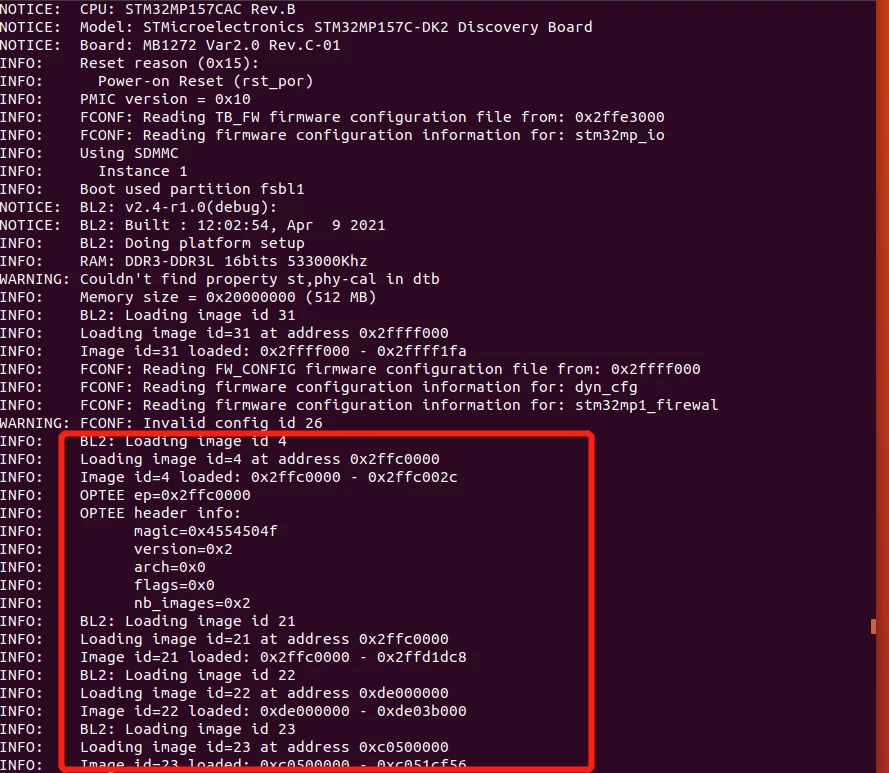
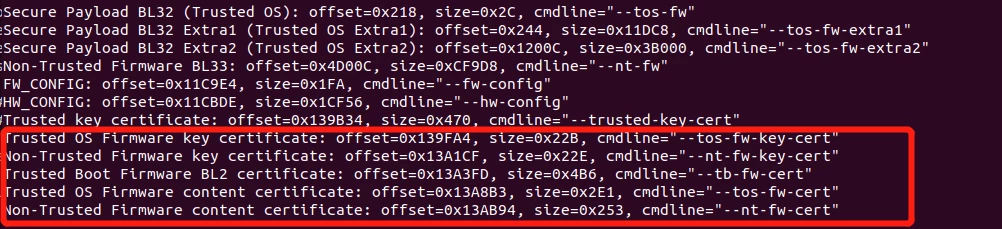
0693W000008z8EKQAY.png0693W000008z8EFQAY.pngI used the latest official version(2021-03-31) to configure the stm32mp157c-dk2 of the optee version, and used the official tutorial to generate fip.bin and burn it to the corresponding partition, but it seems that the image is not checked,in other worlds, I did not see the successful prompt for the verification of the mirror image.

This topic has been closed for replies.
Best answer by LionelD

Hi @DDing.1​ ,

Go to know, in the FIP management there is no formal "Authentication success" to be printed.

If it boots, it works ;)

The only way can you can ensure that it works is that the complete firmware + certificate are loaded:

Image 31 (FW_CONFIG) required Image 6 (Trusted Boot Firmware Certificate).

You have mode loaded images (ID must correspond to all certificates) to confirm that it works.

There is no possibility to skip the authentication so if OP-TEE/U-Boot are launched, authentication is successful.

BR,

Lionel

4 replies

Olivier GALLIEN
Technical Moderator
April 9, 2021

Hi @DDing.1​ ,

I understand you expect FIP binaries to be authenticate, right ?

Please refer to https://wiki.st.com/stm32mpu/wiki/How_to_configure_TF-A_FIP#Secure_boot

Hope it help

Olivier

Olivier GALLIEN In order to give better visibility on the answered topics, please click on 'Accept as Solution' on the reply which solved your issue or answered your question.
DDing.1
DDing.1Author
Associate III
April 9, 2021

Yes, I configured it according to this (use the TF-A makefile), but I did not see the corresponding verification process when stm32 was started(the startup log did not seem to change). I want to know if I I have forgotten any steps,thanks

LionelD
Visitor II
April 10, 2021

Hi @DDing.1​ ,

According to your traces, the FIP seems to be properly generated BUT the BL2 is not build with the TRUSTED_BOARD_BOOT=1 support. So the processing to load associated certificate chain is not supported in your current BL2 TF-A binary -> No authentication.

To ensure that it is properly on, there is a trace during boot to now if the crypto_lib is initialized:

NOTICE: BL2: v2.4-r1.0(debug):v2.4-stm32mp-r1

NOTICE: BL2: Built : 12:14:26, Apr 10 2021

INFO:   Using crypto library 'stm32_crypto_lib'

Please rebuild the TF-A BL2 as explained https://wiki.st.com/stm32mpu/wiki/TF-A_BL2_overview#Trusted_boot_support and reflash it.

Use:

https://wiki.st.com/stm32mpu/wiki/How_to_configure_TF-A_BL2#Build_process

Important is the

TRUSTED_BOARD_BOOT = 1: adds MBEDTLS build sources and authentication framework enabled

BR,

Lionel

DDing.1
DDing.1Author
Associate III
April 13, 2021

Hello, I have now modified the configuration of BL2 according to the document and the configuration command is as follows:

make ARM_ARCH_MAJOR=7 ARCH=aarch32 PLAT=stm32mp1 DTB_FILE_NAME=stm32mp157c-dk2.dtb STM32MP_SDMMC=1 STM32MP_EMMC=1 AARCH32_SP=optee TRUSTED_BOARD_BOOT=1 GENERATE_COT=1 DYN_DISABLE_AUTH=1  MBEDTLS_DIR=/home/tflgr/mbedtls

Then I configured the fip binary file again, the command is as follows:

make ARM_ARCH_MAJOR=7 ARCH=aarch32 PLAT=stm32mp1 AARCH32_SP=optee

DTB_FILE_NAME=stm32mp157c-dk2.dtb

BL33=../../FIP_artifacts/u-boot/u-boot-nodtb-stm32mp15.bin

BL33_CFG=../../FIP_artifacts/u-boot/u-boot-stm32mp157c-dk2-trusted.dtb

BL32=../../FIP_artifacts/optee/tee-header_v2-stm32mp157c-dk2.bin BL32_EXTRA1=../../FIP_artifacts/optee/tee-pager_v2-stm32mp157c-dk2.bin

BL32_EXTRA2=../../FIP_artifacts/optee/tee-pageable_v2-stm32mp157c-dk2.bin

FW_CONFIG=../../FIP_artifacts/arm-trusted-firmware/fwconfig/stm32mp157c-dk2-fw-config-optee.dtb

MBEDTLS_DIR=/home/tflgr/mbedtls  TRUSTED_BOARD_BOOT=1 GENERATE_COT=1

ROT_KEY=./plat/arm/board/common/rotpk/arm_rotprivk_rsa.pem fip

The following files were generated, and then put .stm32 and fip.bin into the sdb1 and sdb3 partitions with the dd command.

0693W000008zLKBQA2.jpg 

But the startup log did not change and did not output INFO:   Using crypto library 'stm32_crypto_lib', as follows:

NOTICE: CPU: STM32MP157CAC Rev.B                                              

NOTICE: Model: STMicroelectronics STM32MP157C-DK2 Discovery Board             

NOTICE: Board: MB1272 Var2.0 Rev.C-01                                         

INFO:   Reset reason (0x14):                                                  

INFO:     Pad Reset from NRST                                                 

INFO:   PMIC version = 0x10                                                   

INFO:   FCONF: Reading TB_FW firmware configuration file from: 0x2ffe3000     

INFO:   FCONF: Reading firmware configuration information for: stm32mp_io     

INFO:   Using SDMMC                                                           

INFO:     Instance 1                                                          

INFO:   Boot used partition fsbl1                                             

NOTICE: BL2: v2.4-r1.0(debug):v2.4-dirty                                      

NOTICE: BL2: Built : 16:43:51, Nov 17 2020                                    

INFO:   BL2: Doing platform setup                                             

INFO:   RAM: DDR3-DDR3L 16bits 533000Khz                                      

WARNING: Couldn't find property st,phy-cal in dtb                              

INFO:   Memory size = 0x20000000 (512 MB)                                     

INFO:   BL2: Loading image id 31                                              

INFO:   Loading image id=31 at address 0x2ffff000                             

INFO:   Image id=31 loaded: 0x2ffff000 - 0x2ffff1fa                           

INFO:   FCONF: Reading FW_CONFIG firmware configuration file from: 0x2ffff000 

INFO:   FCONF: Reading firmware configuration information for: dyn_cfg        

INFO:   FCONF: Reading firmware configuration information for: stm32mp1_firewal

WARNING: FCONF: Invalid config id 26                                           

INFO:   BL2: Loading image id 4                                               

INFO:   Loading image id=4 at address 0x2ffc0000                              

INFO:   Image id=4 loaded: 0x2ffc0000 - 0x2ffc002c                            

INFO:   OPTEE ep=0x2ffc0000                                                   

INFO:   OPTEE header info: 

Thanks.

LionelD
Visitor II
April 13, 2021

Hi,

Your build command looks go to me, but I'm surprised that the build date print into your boot is NOTICE: BL2: Built : 16:43:51, Nov 17 2020.

Are you sure to updated it into your card? First partition must be updated with you binary generated, stm32 file. 

I'm surprised as, regarding your build command, you will generate a release version (without all these logs)?

Could you please confirm.                        

DYN_DISABLE_AUTH=1 -> Not mandatory, you could remove it from now or maybe double check that the property is still set to 0 in the DT file to avoid any removal of the authentication.

GENERATE_COT=1 -> Used to generate the FIP, not required during the BL2 build.

BR,

Lionel

LionelD
Visitor II
April 14, 2021

Hi @[DDing.1]​ ,

The wiki as a lack of info, I'll add it soon for the MBEDTLS part.

MBEDTLS is used as an external repo as mentioned here in the official doc:

https://trustedfirmware-a.readthedocs.io/en/v2.4/design/trusted-board-boot-build.html

To build the FIP image, ensure the following command line variables are set while invoking 

make to build TF-A:

MBEDTLS_DIR=<path of the directory containing mbed TLS sources>

TRUSTED_BOARD_BOOT=1

GENERATE_COT=1

As per requirement:

https://trustedfirmware-a.readthedocs.io/en/v2.4/getting_started/prerequisites.html

The following libraries are required for Trusted Board Boot support:

mbed TLS == 2.24.0 (tag: mbedtls-2.24.0)

So now, regarding your issue (because it seems that your build is now OK as the crypto lib is initialized).

It seems internal MBEDTLS error. Could you please double check the version used to build your BL2 and confirm that it's the 2.24.0?

BR,

Lionel

DDing.1
DDing.1Author
Associate III
April 15, 2021

Thanks.But I rebuilt the image with version 2.24.0, but it still got the same error.