


crackl1ng
Associate III
March 3, 2022
Solved

STM32L4R - is there an application note how to retain 64KB SRAM2 memory?

  • March 3, 2022
  • 4 replies
  • 2747 views

Hi STM32-Community,

I'm currently using an STM32L4R-MCU and was trying to set it up for standby. By using LoRa, I don't want it to keep requesting an OTAA-Command to join the network, I'm trying to use the SRAM2 Retention of my MCU in Standby-Mode. Googling and skimming through the datasheet, I only found at which adress the 64 KB SRAM are located, but how do I actually write to that memory and also read it back again?

I've neither found an application note, nor an example code. I would be really glad, if someone knows more about this topic.

Kind regards

crackl1ng
Best answer by crackl1ng

I think I have understood it now.

For anyone wondering:

There is a .ld.file, in which the linker gets told, where it should save its data. You have to add RAM2 eg if you want to use SRAM2.

MEMORY
{
RAM (xrw) : ORIGIN = 0x20000000, LENGTH = 640K
FLASH (rx) : ORIGIN = 0x8000000, LENGTH = 2048K
RAM2 (xrw) : ORIGIN = 0x10000000, LENGTH = 64K 
}

followed by

 .ram2 (NOLOAD):
 {
 _sram2 = .;
 *(.ram2*)
 . = ALIGN(4);
 _eram2 = .;
 } >RAM2

Followed by this in the SECTIONS part.

Now data can be initialized within SRAM2 like this:

volatile uint32_t Counter __attribute__((section(".ram2")));
volatile uint32_t test123[20] __attribute__((section(".ram2")));

Et voilà:

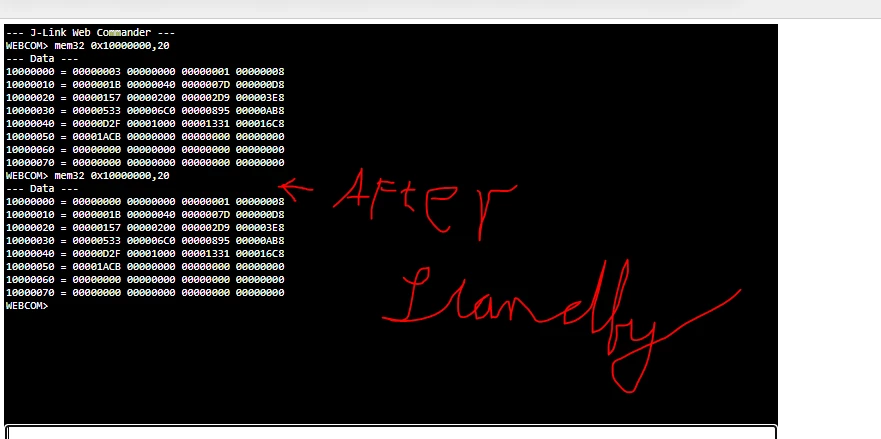
0693W00000KbRLyQAN.pngI saved n³ (for n from 0 to 19) in test123, and counter was reset on purpose.

Thank you very much for your post, it helped me a lot!

Kind regards

4 replies

TDK
March 3, 2022

Set up a segment in your linker script for SRAM2 and assign variables to be placed there, or create a pointer to that memory and store them manually.

Follow this, but use SRAM2 instead of CCMRAM:

https://www.openstm32.org/Using%2BCCM%2BMemory

"If you feel a post has answered your question, please click ""Accept as Solution""."
crackl1ng
crackl1ngAuthor
Associate III
March 4, 2022

Thank you for your reply. That looks very promising and I will try it out. Anyway, there is no application note directly from STM32? Those always have been very informative and usually worked flawlessly.

crackl1ng
crackl1ngAuthorBest answer
Associate III
March 4, 2022

I think I have understood it now.

For anyone wondering:

There is a .ld.file, in which the linker gets told, where it should save its data. You have to add RAM2 eg if you want to use SRAM2.

MEMORY
{
RAM (xrw) : ORIGIN = 0x20000000, LENGTH = 640K
FLASH (rx) : ORIGIN = 0x8000000, LENGTH = 2048K
RAM2 (xrw) : ORIGIN = 0x10000000, LENGTH = 64K 
}

followed by

 .ram2 (NOLOAD):
 {
 _sram2 = .;
 *(.ram2*)
 . = ALIGN(4);
 _eram2 = .;
 } >RAM2

Followed by this in the SECTIONS part.

Now data can be initialized within SRAM2 like this:

volatile uint32_t Counter __attribute__((section(".ram2")));
volatile uint32_t test123[20] __attribute__((section(".ram2")));

Et voilà:

0693W00000KbRLyQAN.pngI saved n³ (for n from 0 to 19) in test123, and counter was reset on purpose.

Thank you very much for your post, it helped me a lot!

Kind regards

Anthony Plantin
Associate
April 11, 2024

Hello there,

Did you find a solution to store the context in SRAM ? For not rejoining the context ? 

I'm struggling with the ST example and the NVM management.

Can you share you're solution or some tips? 

Have a good day 
Anthony