widemeadows
Associate II
February 21, 2015
Question

[SOLVED] STM32F3-Discovery: HSE never switches to ready, no 72 MHz

  • February 21, 2015
  • 5 replies
  • 1197 views
Posted on February 21, 2015 at 04:20

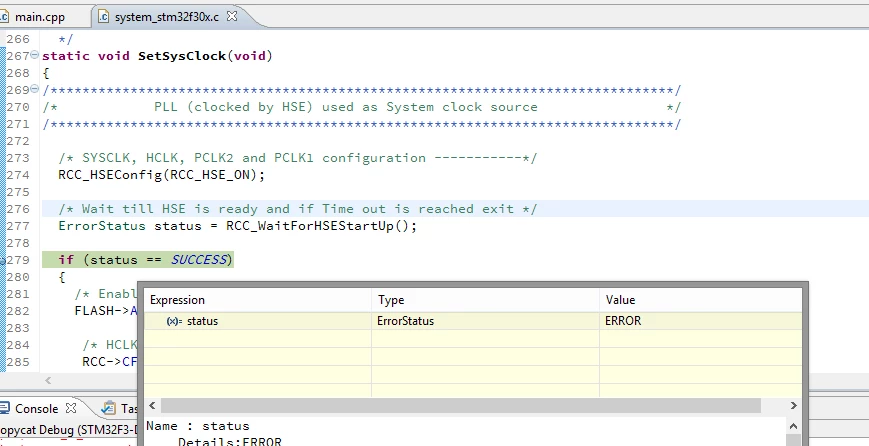
I'm trying to get a STM32F3-Discovery to run on 72 MHz. I have a test project set up

https://github.com/sunsided/stm32f3-disco/tree/hse-problem

. The project is nothing fancy, basically a default project generated from GNU ARM Toolchain for Eclipse.

However, in the 

SetSysClock()

code (

https://github.com/sunsided/stm32f3-disco/blob/hse-problem/system/src/cmsis/system_stm32f30x.c&sharpL273-L280

), the loop that waits for the HSE to become ready always times out, so I'm stuck with the 8 MHz internal oscillator.

I tried 

RCC_HSEConfig(RCC_HSE_ON)

as well as 

RCC_HSEConfig(RCC_HSE_Bypass)

(which I assume is what I need), to no avail. This is on a plain F3-Discovery, i.e. only the 8 MHz osc from the ST-Link, no osc on X2.

Am I doing anything wrong?

0690X00000605ZKQAY.png

#stm32f3-discovery #stm32f3 #hse
This topic has been closed for replies.

5 replies

Tesla DeLorean
Guru
February 21, 2015
Posted on February 21, 2015 at 05:48

And you have the appropriate SB (solder bridges) configured to connect the 8 MHz signal from the F103 part?

SB12 is OFF by default.

Tips, Buy me a coffee, or three.. PayPal VenmoUp vote any posts that you find helpful, it shows what's working..
widemeadows
Associate II
February 21, 2015
Posted on February 21, 2015 at 06:00

If I understood that correctly, SB12 should be closed, SB17 open and R33 open as well. Should be the case, this is how it looks like on my board:

0690X000006036TQAQ.jpg

R32 and R33 appear to be closed in the photo due to perspective, but are open.

0690X00000603JPQAY.jpg

Tesla DeLorean
Guru
February 21, 2015
Posted on February 21, 2015 at 12:52

The library has code for the bypass case

STM32F3-Discovery_FW_V1.1.0\Project\Peripheral_Examples\ADC_Example\system_stm32f30x.c

You might also what to check the signals with a scope, and direct the HSE signal out the MCO (PA8) pin, to see what the core sees.
Tips, Buy me a coffee, or three.. PayPal VenmoUp vote any posts that you find helpful, it shows what's working..
widemeadows
Associate II
February 21, 2015
Posted on February 21, 2015 at 15:36

Thank you so far! The ADC example code very much looks like what I did already (and I'm glad about that! :))

I tried it nevertheless just to be sure, but it didn't work, that is, didn't change anything. As for measuring the clock via PA8, I used the following code.

void
InitializeMCOGPIO() {
RCC_AHBPeriphClockCmd(RCC_AHBPeriph_GPIOA, ENABLE);
/* Configure MCO (PA8) */
GPIO_InitTypeDef gpioStructure;
gpioStructure.GPIO_Pin = GPIO_Pin_8;
gpioStructure.GPIO_Speed = GPIO_Speed_50MHz;
gpioStructure.GPIO_Mode = GPIO_Mode_AF;
gpioStructure.GPIO_OType = GPIO_OType_PP;
gpioStructure.GPIO_PuPd = GPIO_PuPd_NOPULL ;
GPIO_Init(GPIOA, &gpioStructure);
/* Output HSE clock on MCO pin (PA8) */
RCC_MCOConfig(RCC_MCOSource_HSE);
}

Note that I'm unable to set a higher clock speed than

GPIO_Speed_50MHz

and my logic analyzer only samples up to 24 MHz, so I tested with several sampling rates to rule out aliasing ... without success. With

RCC_MCOSource_HSE

there's always flatline. When I use

RCC_MCOSource_HSI

or

RCC_MCOSource_SYSCLK

instead, I can see a wobbly, but good-enough 8 MHz waveform. So, from what it appears, the F3 doesn't even get any clock from the F103?
widemeadows
Associate II
February 21, 2015
Posted on February 21, 2015 at 16:21

Humpf ... from what it seems, the R48 resistor is dead.

EDIT: Indeed it was. I replaced the R48 resistor with one I desoldered from an old scanner board and voila, 72 MHz we go. Thanks again!