Kristian Nielsen
Associate
June 21, 2017
Question

''No ST-LINK detected'' when connecting with stm32f401RE board

  • June 21, 2017
  • 6 replies
  • 5929 views
Posted on June 21, 2017 at 13:50

I have a nucleo stm32f401RE board and it has been working fine for the most part.

Here recently, I followed a tutorial in the book ''mastering stm32'', where it said to install openocd. I had been following along

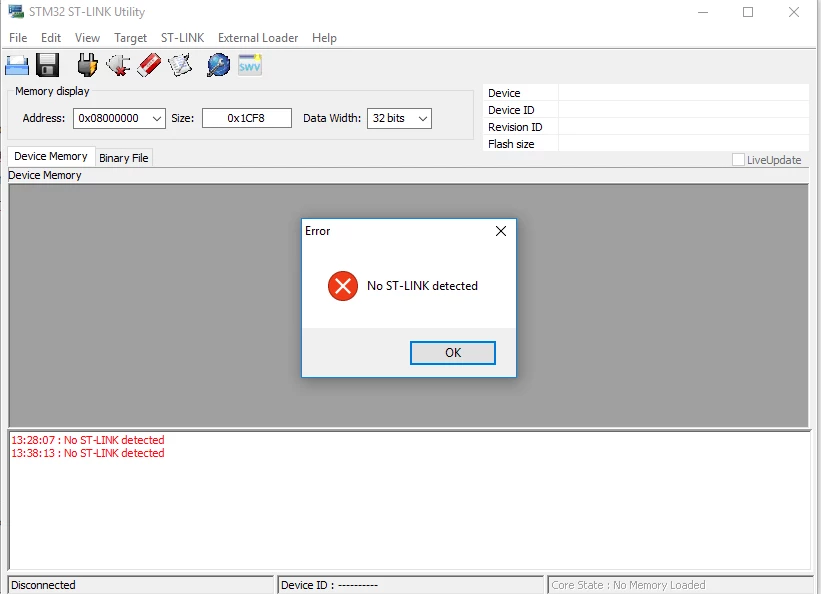
before this as well, and I had been able to connect to my board and flashing it with no problem. After attempting to get openocd to work though, this is no longer possible. Every time i try to connect to my board, I simply get the following error message:

0690X00000607QFQAY.png

I have not been able to find a solution for this anywhere, so I hope you guys can help! If there is anymore relevant information needed, just let me know.

Thank you very much.

    This topic has been closed for replies.

    6 replies

    o gaste
    Associate II
    June 21, 2017
    Posted on June 21, 2017 at 16:14

    what probe are you using ?? what system are you working on ?

    best bet are probe driver screwed up by openocd's one ... try reinstall it (

    http://www.st.com/content/st_com/en/products/embedded-software/development-tool-software/stsw-link009.html

      if using STlinkV2)

    if on windows check in device control panel stlink v2 is recognise

    0690X00000603thQAA.jpg
    Kristian Nielsen
    Associate
    June 21, 2017
    Posted on June 21, 2017 at 16:30

    Hey o gaste,

    I?m working on windows 10. I unfortunately don?t know what you mean when referring to witch probe I am using? 

    I have already tried to update the drivers multiple times without any luck. Here is a picture of my device manager, which does not seem to contain the ''STMicroelectronics STLink dongle'':

    0690X00000607ROQAY.png

    Also, here is an image of my board, if that can give any clearance:

    0690X00000607RrQAI.png

    Thanks

    o gaste
    Associate II
    June 21, 2017
    Posted on June 21, 2017 at 23:21

    ok kristian

    the board you are using is including a STLink dongle the small part where you usb plug is (witch I call also probe sorry it's a direct translation of french word and may be not accurate) you can use it also for flash other boards but here it looks binded to the nucelo as describe here

    http://www.st.com/content/ccc/resource/technical/document/technical_note/group0/30/c8/1d/0f/15/62/46/ef/DM00290229/files/DM00290229.pdf/jcr:content/translations/en.DM00290229.pdf


    anyway i think it's well known by windows under 'st link debug'

    I sugest you to upgrade your probe (I checked it's the right word ) firmware by using this

    http://www.st.com/content/st_com/en/products/embedded-software/development-tool-software/stsw-link007.html

    (requiring a power off/on of your probe)

    and check your board documentation about the 2 jumpers on the right side of usb plug

    remember me why you have installed openocd ?? what EDI are you using ??

    o gaste
    Associate II
    June 22, 2017
    Posted on June 22, 2017 at 14:42

    I'm sorry I start to get stuck on your problem

    OpenOCD is good when trying to debugunder gnu gdb or equivalent

    I suppose you already tried to remove OpenOCD

    if not I suggest you to try it and simply use Keil Microvision 5 free to debug

    Kristian Nielsen
    Associate
    June 22, 2017
    Posted on June 22, 2017 at 14:56

    I can understand that - it has been really frustrating, but thank you for your help so far.

    I have removed OpenOCD but with no luck. 

    I don’t really know where to go from here? Is there any other information that I could give you that might help? I can send images of the tutorial I followed, or I can send you the book as a pdf if that could resolve anything?

    I would have no problem with using the Keil Microvision 5 for debugging, but I would still have to be able to connect to my device first correct?

    Again, thank you very much for your help, I really appreciate it.
    mike louaillier
    Associate III
    June 23, 2017
    Posted on June 23, 2017 at 20:38

    Hello Kristian,

    from your photo above it's clear that the jumpers on ur nucleo are correct, so it's very strange that the 'probe' could be bricked like that. (i call it a 'loader' since it is more often used just to load your program into the microController chip). the reason the nucleo board has slots in it is so that the loader part of the board can optionally be broken off once the uC has been programmed. But whether you separate it or not, it can be used independently of the main part of the board (by changing the jumpers) as a 'dongle' to program other stm devices or boards.

    i've had the 'no st-link detected' when using the ST-Link Upgrade utility to upgrade my ST-Link dongle and usually got it working just by unpluging and repluging the device. But not always. i've had frequent problems with faulty usb cables.

    maybe if you post the document you're using we can find what's wrong.

    Akio Nakamura
    Visitor II
    June 24, 2017
    Posted on June 24, 2017 at 13:37

    Hello Kristian,

    This may not really help you, but one reference information.

    I hit the same problem a couple of months ago. I am also learning STMF32 on Eclipse, using the mastering stm32 book (Good book!). I tried several attempts to restore the connection, but all failed. At that time, I had Nucleo 32F303RE and 446RE.

    Eventually, I utilized Windows 8.1 restoring function to put it back to the state of several days ago.

    After that everything came back to normal.

    I take a look at my current Windows hardware configuraiton and confirmed identical to what you showed on June 21, for the STM relevant items.

    I suspect some of the related driver may have touched windows registry key (?). I am still not familiar with debugging feature on STM, due to lack of knowledge. I am using UART + TeraTerm to check the  parameter, when needed.

    Kristian Nielsen
    Associate
    June 24, 2017
    Posted on June 24, 2017 at 22:35

    Hello Akio,

    Thank you very much for your answer!

    I did in fact want to attempt to revert windows back to an earlier point, but I realized that currently do not have such a point, so that is unfortunately not possible. Good thinking though!

    james farrant
    Associate II
    February 10, 2018
    Posted on February 10, 2018 at 22:46

    I am following the same book 'Mastering STM32' and got to the same point where I connect to a nucleo-64 STM32F446RE via openocd in the terminal emulator. 

    My PC no longer detects the ST LINK on two different boards now...

    This is frustrating.

    Hopefully a solution is found for this soon.

    james farrant
    Associate II
    February 10, 2018
    Posted on February 10, 2018 at 22:53

    I forgot to add, connecting a new board (in my case the STM32F3 discovery) had no problem detecting the ST LINK... So it looks like currently the only solution is to set aside your old nucleo board, buy a new one and skip the openocd debugging section in the Mastering STM32 book until this gets resolved. 

    Regards,

    James

    neill lambert
    Visitor II
    June 5, 2018
    Posted on June 05, 2018 at 18:47

    hi kristian

    i have been starting out with a stm32f401re,

    i updated my board manager in the arduino ide to include the stm mcu's. this has been developed by st and arduino.

    anyways, when i returned to eclipse, i could not debug the stm32. i will include the exception stack if you wish, but for now, eclipse didnt recognise the stm32. neither did stm cube programmer. dev no stlink error.

    i reinstalled the stm32 driver from the st website:

    https://my.st.com/content/my_st_com/en/products/development-tools/software-development-tools/stm32-software-development-tools/stm32-utilities/stsw-link009.license=1528189432129.html


    and this seems to have resolved the problem.

    does this shed any light?

    neill