

How to minimize the power consumption in low power mode: An example using NUCLEO-F401RE board
1. Introduction
Optimizing power consumption is one of the biggest challenges when designing an MCU based application.
In this article we selected the STM32F401 MCU that can be configured in four different modes: Run mode, Sleep mode, Stop mode and Standby mode. In our test, the NUCLEO-F401RE is configured in the Stop mode.
The purpose of this article is to share tips for power consumption optimization while describing steps to achieve it.
2. Prerequisites
2.1. Hardware
Mini-B USB cable used to power the Nucleo board from a host machine and to load the code into the STM32.
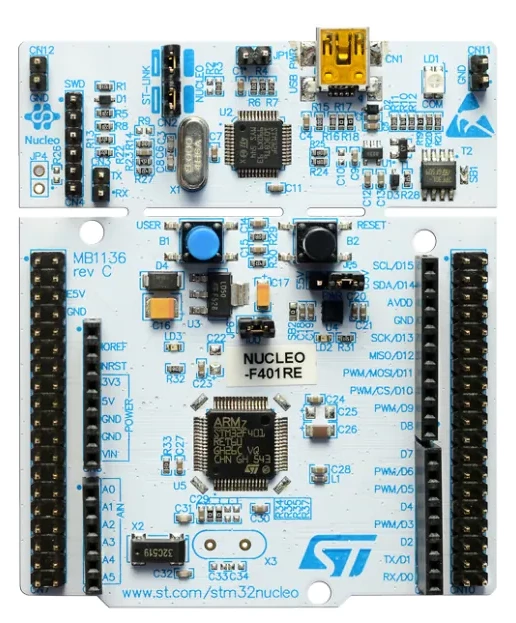
NUCLEO-F401RE.
2.2. Software
STM32CubeIDE.
3. Steps
1. Open STM32CubeIDE.
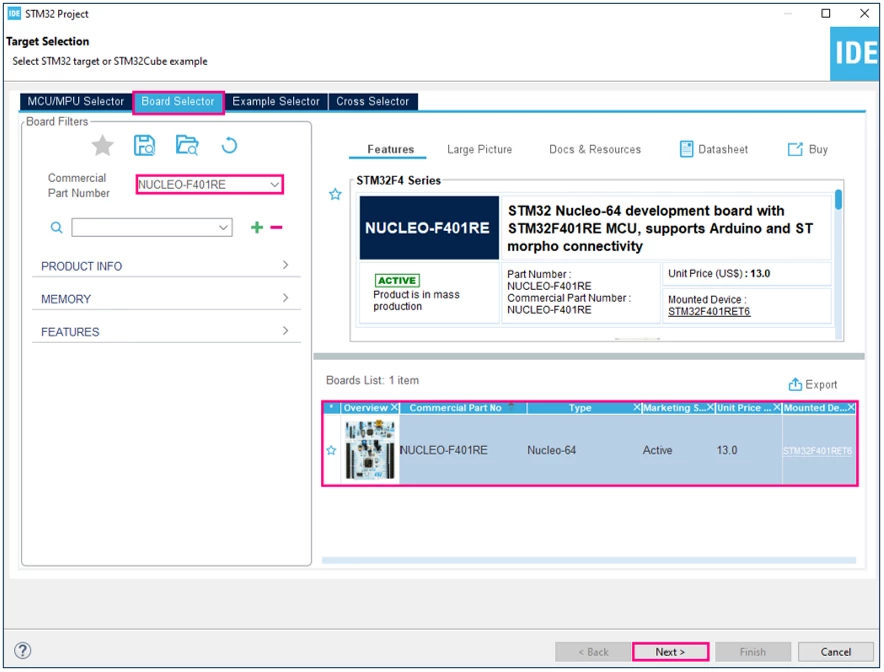
2. Create a new project using the NUCLEO-F401RE board.
Select NUCLEO-F401RE boar using Board Selector:
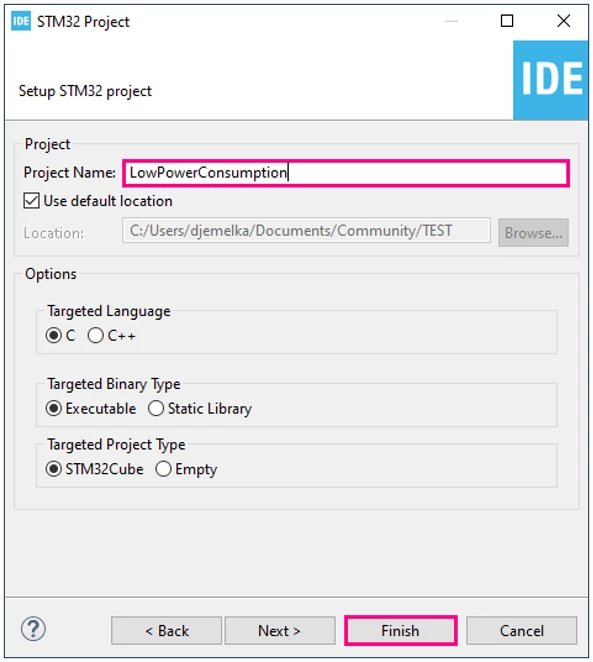
3. Enter a name for the project, for example "LowPowerConsumption".
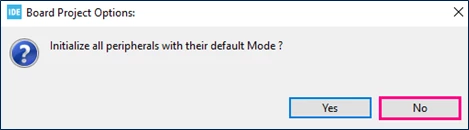
4. Initialize all peripherals with their default Mode?
Answer No to minimize power consumption as below:
5. Clear pinouts as shown in the below figures or by using "Ctrl+p".
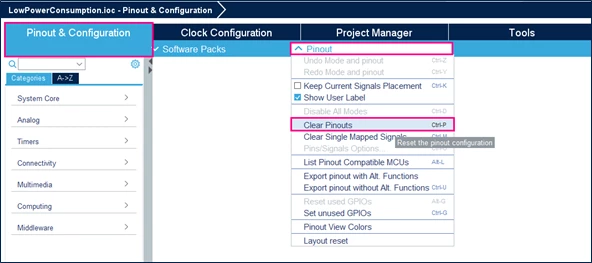
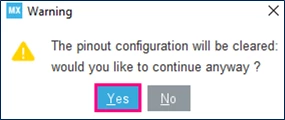
6. Set all free pins as analog (to optimize the power consumption).
In Project Manager tab, select code generator and click on Set all free pins as analog (to optimize the power consumption).
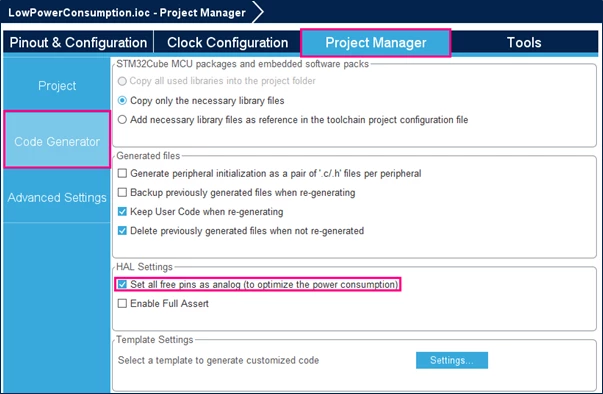
Note that this feature allows the addition of these code lines in the Mx_GPIO_Init function in the main.c file:
static void MX_GPIO_Init(void)
{
 GPIO_InitTypeDef GPIO_InitStruct = {0};

 /* GPIO Ports Clock Enable */
 __HAL_RCC_GPIOC_CLK_ENABLE();
 __HAL_RCC_GPIOH_CLK_ENABLE();
 __HAL_RCC_GPIOA_CLK_ENABLE();
 __HAL_RCC_GPIOB_CLK_ENABLE();
 __HAL_RCC_GPIOD_CLK_ENABLE();

 /*Configure GPIO pins : PC13 PC14 PC15 PC0
 PC1 PC2 PC3 PC4
 PC5 PC6 PC7 PC8
 PC9 PC10 PC11 PC12 */
 GPIO_InitStruct.Pin = GPIO_PIN_13|GPIO_PIN_14|GPIO_PIN_15|GPIO_PIN_0
 |GPIO_PIN_1|GPIO_PIN_2|GPIO_PIN_3|GPIO_PIN_4
 |GPIO_PIN_5|GPIO_PIN_6|GPIO_PIN_7|GPIO_PIN_8
 |GPIO_PIN_9|GPIO_PIN_10|GPIO_PIN_11|GPIO_PIN_12;
 GPIO_InitStruct.Mode = GPIO_MODE_ANALOG;
 GPIO_InitStruct.Pull = GPIO_NOPULL;
 HAL_GPIO_Init(GPIOC, &GPIO_InitStruct);

  /*Configure GPIO pins : PH0 PH1 */
 GPIO_InitStruct.Pin = GPIO_PIN_0|GPIO_PIN_1;
 GPIO_InitStruct.Mode = GPIO_MODE_ANALOG;
 GPIO_InitStruct.Pull = GPIO_NOPULL;
 HAL_GPIO_Init(GPIOH, &GPIO_InitStruct);

 /*Configure GPIO pins : PA0 PA1 PA2 PA3
 PA4 PA5 PA6 PA7
 PA8 PA9 PA10 PA11
 PA12 PA13 PA14 PA15 */
 GPIO_InitStruct.Pin = GPIO_PIN_0|GPIO_PIN_1|GPIO_PIN_2|GPIO_PIN_3
 |GPIO_PIN_4|GPIO_PIN_5|GPIO_PIN_6|GPIO_PIN_7
 |GPIO_PIN_8|GPIO_PIN_9|GPIO_PIN_10|GPIO_PIN_11
 |GPIO_PIN_12|GPIO_PIN_13|GPIO_PIN_14|GPIO_PIN_15;
 GPIO_InitStruct.Mode = GPIO_MODE_ANALOG;
 GPIO_InitStruct.Pull = GPIO_NOPULL;
 HAL_GPIO_Init(GPIOA, &GPIO_InitStruct);

 /*Configure GPIO pins : PB0 PB1 PB2 PB10
 PB12 PB13 PB14 PB15
 PB3 PB4 PB5 PB6
 PB7 PB8 PB9 */
 GPIO_InitStruct.Pin = GPIO_PIN_0|GPIO_PIN_1|GPIO_PIN_2|GPIO_PIN_10
 |GPIO_PIN_12|GPIO_PIN_13|GPIO_PIN_14|GPIO_PIN_15
 |GPIO_PIN_3|GPIO_PIN_4|GPIO_PIN_5|GPIO_PIN_6
 |GPIO_PIN_7|GPIO_PIN_8|GPIO_PIN_9;
 GPIO_InitStruct.Mode = GPIO_MODE_ANALOG;
 GPIO_InitStruct.Pull = GPIO_NOPULL;
 HAL_GPIO_Init(GPIOB, &GPIO_InitStruct);

 /*Configure GPIO pin : PD2 */
 GPIO_InitStruct.Pin = GPIO_PIN_2;
 GPIO_InitStruct.Mode = GPIO_MODE_ANALOG;
 GPIO_InitStruct.Pull = GPIO_NOPULL;
 HAL_GPIO_Init(GPIOD, &GPIO_InitStruct);
}
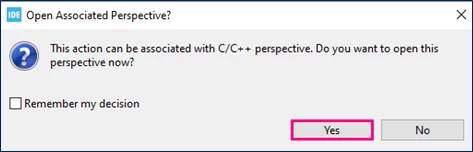
7. Generate Code.
Save the project and generate the code by clicking "Ctrl+s".
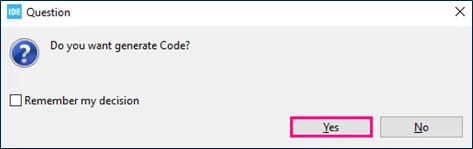
8. Insert the following lines between /* USER CODE BEGIN 2 */ and /* USER CODE END 2 */ to enter stop mode:
/* FLASH Deep Power Down Mode enabled */
HAL_PWREx_EnableFlashPowerDown();

/* Enter Stop Mode*/
HAL_PWR_EnterSTOPMode(PWR_LOWPOWERREGULATOR_ON, PWR_STOPENTRY_WFI);
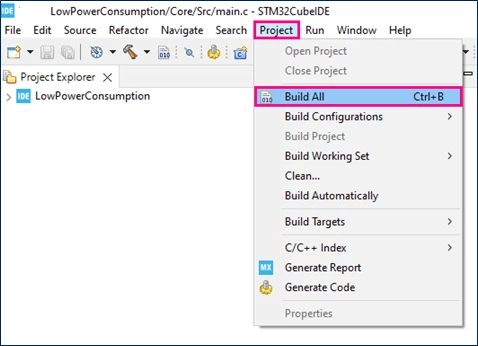
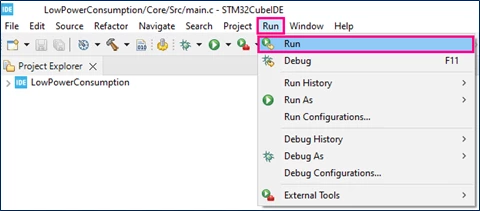
9. Build the project and run the code as shown in the below figures.
10. To measure the consumption current, just remove jumper 6 and place a multimeter instead of it.
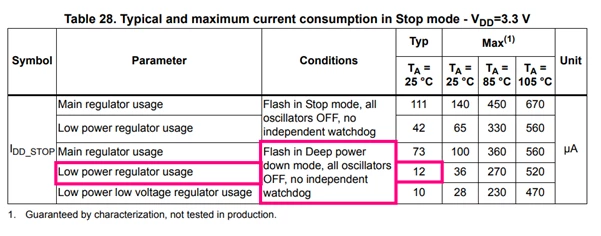
11. In this case the power consumption will be equal to 17µA. This value is similar to the value shared in the datasheet .
Notes:
- When we don’t use the feature of set all free pins as analog (to optimize the power consumption) a supplementary consumption will be added, in our case, 133µA.
- The NUCLEO-F401RE and the stop mode is an example. This power consumption optimization method can be applied for different boards working on different modes.
4. Related links
- https://www.st.com/resource/en/user_manual/um1724-stm32-nucleo64-boards-mb1136-stmicroelectronics.pdf
- https://www.st.com/resource/en/datasheet/stm32f401re.pdf
- https://www.st.com/resource/en/reference_manual/rm0368-stm32f401xbc-and-stm32f401xde-advanced-armbased-32bit-mcus-stmicroelectronics.pdf
- https://www.st.com/en/development-tools/stm32cubeide.html
