

How to use the STM32CubeIDE terminal to send and receive data
Introduction
There is an embedded terminal available in the STM32CubeIDE that can be used to send and receive data. This is a very easy to use feature that can be used with most of our evaluation boards that open a VCOM, such as the NUCLEO boards. In this small tutorial, we’ll see how to configure and use it.
1. Connect your NUCLEO board
The first step is to connect your NUCLEO board or similar via the USB port to your computer. Then, locate at the bottom right of the STM32CubeIDE this icon: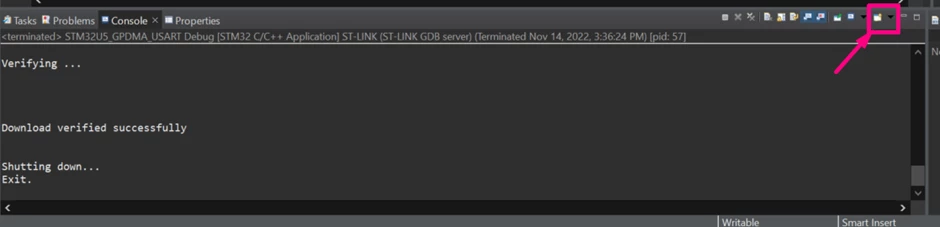
2. Create a new Serial Port Connection
Use the arrow to show the list of options and select the “Command Shell Console”: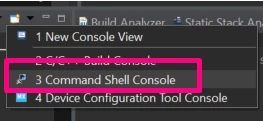
This will pop up a new window, where you can create it, make sure to select “Serial Port” and then click “New”: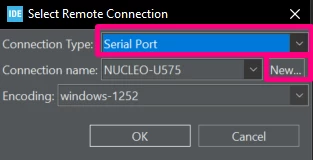
Now it is time to configure the UART parameters: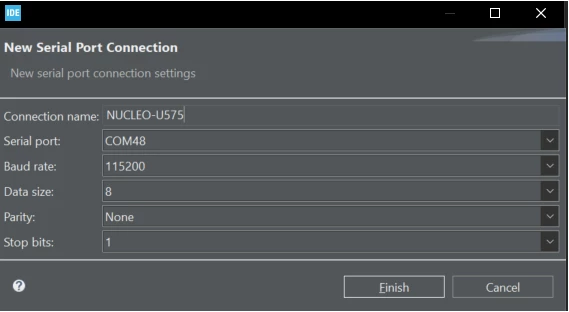
Once done, click “Finish” and then “OK”
3. Check your if your Serial port is working
You should see the CONNECTED message if everything is correct: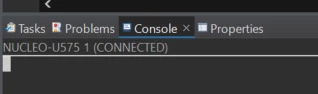
This also works while in debug mode and you can switch the “Console view” by clicking and expanding this icon:
Now all you have to do is use any of your application code to either send/print or scan something in the terminal! If you enjoyed my STM32CubeIDE dark theme used in this article or want to learn how to use printf or non-blocking scanf, here are some articles that you might find useful: setting the STM32CubeIDE in dark theme, how to use the printf function and how to use the scanf in a non-blocking way.
Hope you enjoyed it!