

FDigi
Associate III
March 22, 2023
Solved

Problem with Flex button in TouchGFX 4.21.2 Designer

  • March 22, 2023
  • 5 replies
  • 2530 views

I'm trying to use images through the flex button, but, when i select some images, there isn't any visual update and selection update. I tried change the "released" image and continuous with "No image" after the selection in my library images.

anyone know about this problem?
This topic has been closed for replies.
Best answer by Yoann KLEIN

Hello @FDigi​,

That's indeed a bug, I will report it to my colleagues.

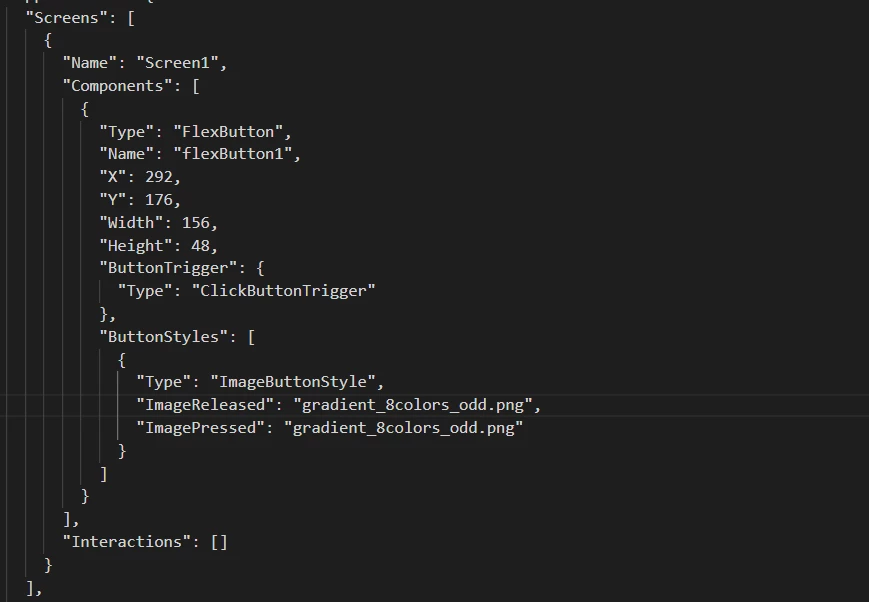
In the meantime, a work-around could be to open your .touchgfx file and modify the ButtonStyles>ImageReleased and ButtonStyles>ImagePressed paths, in order to insert the name of your image there. That will force TouchGFX to use your image, like this :

0693W00000aJYKlQAO.png 

Sorry for the inconvenience,

/Yoann

5 replies

FDigi
FDigiAuthor
Associate III
March 22, 2023

Same problem in 4.21.3

FDigi
FDigiAuthor
Associate III
March 22, 2023

I have tested in 4.21.0 and the problem didn't occurs.

4.21.0 -> Flex Button without problem

4.21.1 -> Flex Button without problem

4.21.2 -> Flex Button with problem

4.21.3 -> Flex Button with problem

Romain DIELEMAN
ST Employee
March 23, 2023

Hi,

Could you clarify a bit more the issue you are facing ? The "pressed" image is not properly displayed when you click on a flex button ? Do you face this on the simulator or on target ? Could you share your project or button settings so that we can replicate it ? (I think I did but just want to be sure we are talking about the same thing since I might have found more bugs as well :grinning_face_with_sweat:)

/Romain

Yoann KLEIN
Yoann KLEINBest answer
ST Employee
March 23, 2023

Hello @FDigi​,

That's indeed a bug, I will report it to my colleagues.

In the meantime, a work-around could be to open your .touchgfx file and modify the ButtonStyles>ImageReleased and ButtonStyles>ImagePressed paths, in order to insert the name of your image there. That will force TouchGFX to use your image, like this :

0693W00000aJYKlQAO.png 

Sorry for the inconvenience,

/Yoann

Yoann KLEINST Software Developer | TouchGFX
FDigi
FDigiAuthor
Associate III
March 23, 2023

@Romain DIELEMAN​  when you create new flex button and try change the "visual Elements" with new image choosing a image for "released" state and "pressed" state, this component doesn't change the image through the designer software and after compilation in a board, but @Yoann KLEIN​ answered about the alternative for temporarly solution.

@Yoann KLEIN​ thanks for the solution, i will use like this for for now until a new version of TouchGFX is released.
