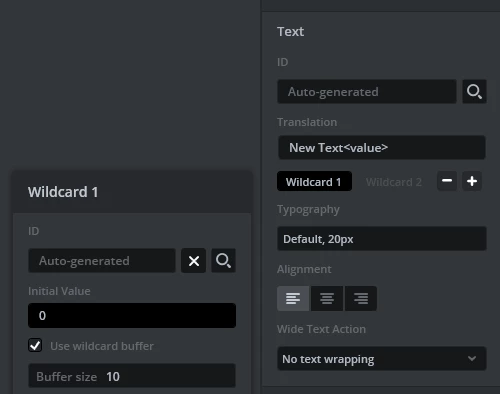
Code generation for touchgfx::TextAreaWithOneWildcard?
I started to use TouchGFX version 4.21.1 recently. Noticed that code generation in Designer is changed compared to some old versions and this renders unusable many tutorials and documentations that can be found on net.
My problem is that I can not display variable using TextAreaWithOneWildcard.
Basically invalidate function does nothing.
I prepared new typography with more or less default settings (-,+ as default wildcard characters, A-Z,0-9 as Wildcard ranges).
According many tutorials on net, code generator should generate buffer for this TextAreaWithOneWildcard.
But I can see in
MainViewBase::MainViewBase()
textArea1.setTypedText(touchgfx::TypedText(T___SINGLEUSE_CPF7));
and no buffer for user use.
I have added my buffer
Unicode::UnicodeChar myBuffer[20];
and in void MainView::setupScreen()
I have added the line:
textArea1.setWildcard(myBuffer);
I expected after execution of this code
void MainView::update_text_field(uint16_t new_val){
Unicode::snprintf(myBuffer, 20, "%02d",new_val);
textArea1.invalidate();
}
text field on the screen to be updated with the new value of the new_val.
But nothing is shown. If I put some default text in designer that text stays on the screen.
In myBuffer I can see value of the variable with unicode characters.
I will appreciate if someone can point what I am doing wrong.
I am trying some old product to port on new custom hardware so I can not provide minimal example easily.