vbk22398
Senior
August 5, 2024
Question

Unable to upload my code using Serial Wire Debug
  • August 5, 2024
  • 6 replies
  • 11398 views

Screenshot 2024-08-05 163011.png

Screenshot 2024-08-05 162955.png

Screenshot 2024-08-05 162916.png

I am trying to upload my code using ST Link(SWD)into a custom board with an STM32 Core. I am using serial wire debug for programming. So I am getting the above shown error messages. If anyone have come across this issue, please help me resolve it.
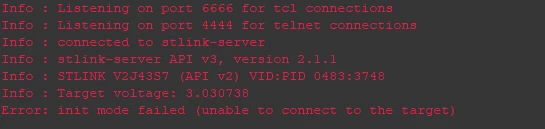
Screenshot 2024-08-05 163741.png


Screenshot 2024-08-05 165217.png

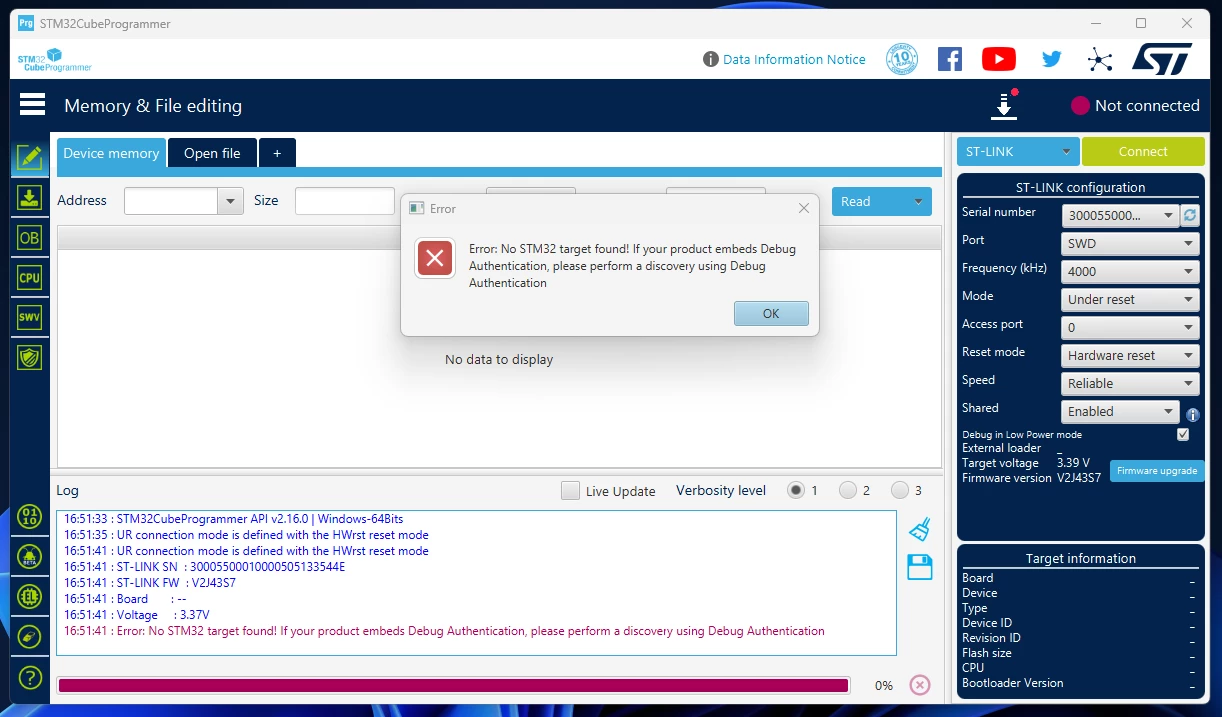
I tried uploading the code using STM Cube Programmer also. I am getting the above error.!

    6 replies

    TDK
    August 5, 2024

    Perhaps pins are not wired up correctly. Can you share a schematic? How is the board connected to the programmer specifically?

    Looks like it's detecting a voltage. That's good.

    "If you feel a post has answered your question, please click ""Accept as Solution""."
    vbk22398
    vbk22398Author
    Senior
    August 6, 2024


    I tried programming the custom designed board using

    i.) an external ST-LINK and also

    ii.) using the debugger IC in the evaluation board(STM32L496ZGT6).

    Both gave the same error as i mentioned in the previous posts. 


    NOTE: 
    I am able to program an Evaluation board without using the On-chip debugger IC by using an external ST-LINK. But not able to do the same with the custom designed board. Not able to find the underlying cause.!

    In the debugger configuration I am able to detect the IC of the custom board. I am using Evaluation version debugger IC of STM32L496ZG to program a STM32F423RH. I am able to detect this IC when I change the setting to Segger J Link. I dont know why this happens.

    Screenshot 2024-08-06 125217.png

    vbk22398
    vbk22398Author
    Senior
    August 6, 2024

    I am also attaching the gdbserver_log. Kindly if anyone can infer from it and help the concern, it'll be very helpful. Thanks in advance :)

    Tesla DeLorean
    Guru
    August 5, 2024

    Focus on your hardware implementation,  doesn't appear viable.

    Check power, especially VDDA/VSSA

    What STM32? The make a handful of different ones, with different expectations. 

    Tips, Buy me a coffee, or three.. PayPal Venmo (See Profile) Up vote any posts that you find helpful, it shows what's working..
    LCE
    Principal II
    August 6, 2024

    I think the SWD interface also needs NRST.

    Not sure though... until now I only used the complete flash adapter, incl. VCC and "GND detect".

    So, what's the minimum pinning to flash (any?) STM32 via SWD?

    vbk22398
    vbk22398Author
    Senior
    August 6, 2024

    STM32 via SWD

    LCE
    Principal II
    August 6, 2024

    I just checked some other posts, just to make sure that my next STM32 design will be programmable with its 5-pin SWD connector...

    It seems that ST-Link needs the STM's supply voltage, NRST is only needed if the SWD pins are used for other purposes.

    vbk22398
    vbk22398Author
    Senior
    August 7, 2024

    https://community.st.com/t5/stm32cubeide-mcus/unable-to-upload-my-code-using-serial-wire-debug/m-p/705382/thread-id/29643


    With respect to the above link I am getting the following issues across various applications.

    Screenshot 2024-08-07 155257.png

    Screenshot 2024-08-07 155322.png

    Screenshot 2024-08-07 155356.png

    Screenshot 2024-08-07 155513.png

    I am still unable to program my custom board using the i.ST-LINK, ii.USB to UART(TTL), iii.another Evaluation board debugger IC. I don't know what the issue is. I have tried connecting the BOOT0 Pin to logic high and logic low, both. Kindly help me with the same.

    Tesla DeLorean
    Guru
    August 7, 2024

    Ok, so hardware is consistently Not Working.

    Perhaps review with a colleague or other staff there.

    Answer questions posed here and ignored.

    Review schematic, symbol and net list. Check supplies and orientation. Check pin designations. Check part number. Check for fake part.

    Tips, Buy me a coffee, or three.. PayPal Venmo (See Profile) Up vote any posts that you find helpful, it shows what's working..
    vbk22398
    vbk22398Author
    Senior
    August 7, 2024

    @Tesla DeLorean  I checked with the ST-LINK, it is properly programming the Evaluation board. I don't know much about schematics and not able to find the issue in hardware side. The supply voltages I have checked with multimeter across Vcap and Vss is shorted correctly. I am struck here and not able to move further sir.!

    LCE
    Principal II
    August 8, 2024

    @vbk22398 See TDK's post above: REMOVE R2 !

    You're shorting VCAP to GND, which makes no sense at all, and might have killed the MCU.