


Understanding FDCAN interrupts grouping in applicable STM32 MCUs with an example
- 0 replies
- 1928 views
Introduction
Many users have questions about the relationship between the FDCAN registers: FDCAN_IE, FDCAN_ILS, and FDCAN_ILE in certain STM32 microcontrollers such as the STM32H5 and STM32G4 series etc. This article explains how interrupt grouping for FDCAN is implemented in these MCUs, which feature the optimized version of the FDCAN peripheral. It also covers how the FDCAN interrupt lines (line 0 and line 1) are used in this context, including a practical example using the HAL library.
It is important to note that the STM32H7 series implements a more advanced (superset) version of the FDCAN peripheral. It differs from the approach used in the STM32H5 and STM32G4 series. This article highlights these differences with a focus on FDCAN interrupts.
- Introduction
- 1. FDCAN interrupt grouping in some STM32 MCUs
- 1.1 How interrupt grouping was implemented in some STM32 MCUs
- 1.2 Example of both FDCAN interrupt lines usage
- 1.3 Step-by-step configuration
- 2. How to use FDCAN interrupts with HAL
- 2.1 Summary of HAL definitions for interrupt configuration
- 2.2 Summary of HAL definitions for FDCAN interrupt configuration
- 2.3 Example of FDCAN interrupt mapping using HAL
- Conclusion
- Related links
1. FDCAN interrupt grouping in some STM32 MCUs
STM32 devices provide two FDCAN interrupt lines to enable flexible and prioritized interrupt management. The FDCAN_ILE register allows independent control over these lines. Interrupt sources can be assigned to either Line 0 or Line 1 depending on the application’s priority requirements. For example, if the Rx FIFO 0 interrupt needs to have a higher priority than the Rx FIFO 1 interrupt, this can be configured by software using this scheme. The interrupt grouping is adopted in the optimized version of FDCAN.
1.1 How interrupt grouping was implemented in some STM32 MCUs
In the optimized FDCAN implementation, the bits in the FDCAN_ILS register act as “parent” bits that group, by category, the related interrupt sources defined in the FDCAN_IE register. Essentially, interrupts enabled in FDCAN_IE are categorized and grouped under a single bit in FDCAN_ILS according to their interrupt category.
Example: grouping of FIFO0 related interrupts
All FIFO0-related interrupts in FDCAN_IE are grouped under one parent bit in FDCAN_ILS called RXFIFO0. In other words, this parent bit corresponds to three “child” interrupts activation in FDCAN_IE:
- RF0NE: Rx FIFO 0 new message interrupt enable
- RF0FE: Rx FIFO 0 full interrupt enable
- RF0LE: Rx FIFO 0 message lost interrupt enable
The following is the FDCAN_ILS register implementation in the optimized version of FDCAN peripheral:

Figure 1. Overview of the FDCAN_ILS register in the optimized FDCAN peripheral
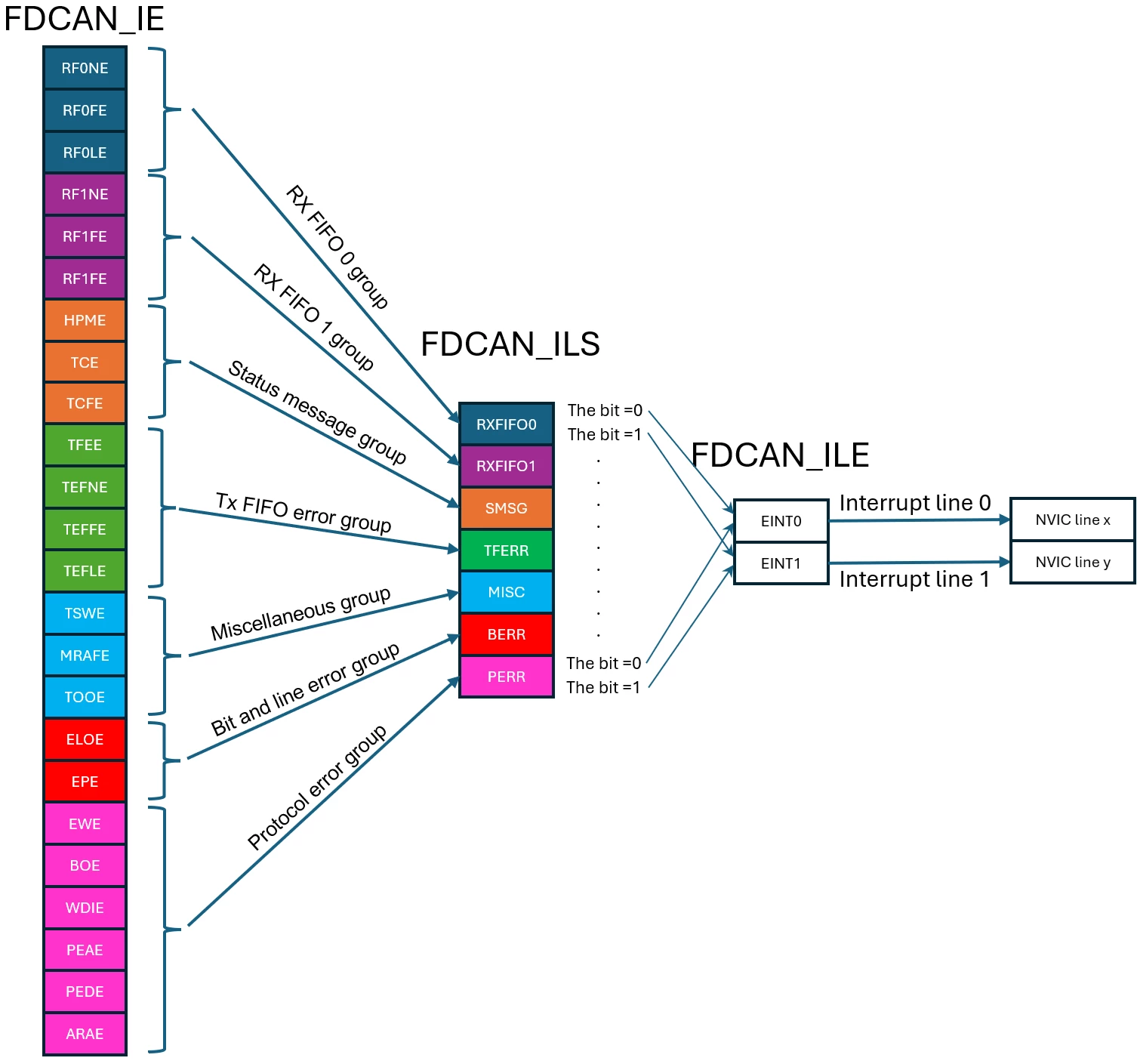
Figure 2. Overview of FDCAN interrupt grouping
By default, all FDCAN interrupts are mapped to FDCAN interrupt line 0. If you do not need to split the interrupts and want them all to trigger on the default line 0, simply keep the FDCAN_ILS register at its reset value. In this case, you only need to enable the corresponding interrupt bits in FDCAN_IE and enable the FDCAN line 0 interrupt by setting the EINT0 bit in the FDCAN_ILE register to 1.
FDCAN_ILS register differences in the superset version of FDCAN (for example, STM32H743):
Unlike the optimized version of FDCAN, the superset version (such as the one embedded in the STM32H743 MCU) does not use interrupt grouping. Each FDCAN interrupt can be independently mapped to either line 0 or line 1. The FDCAN_ILS register in the superset version is implemented as shown below:
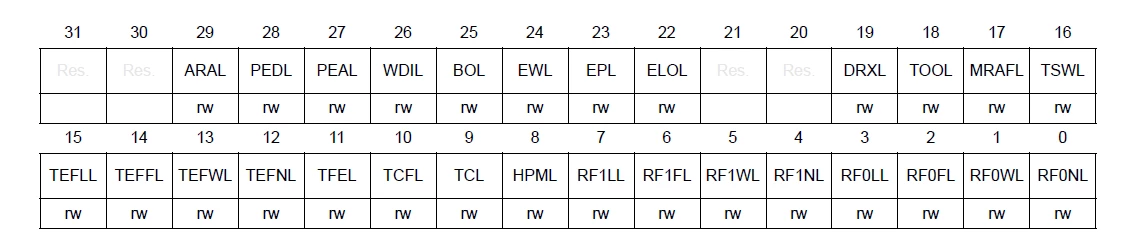
Figure 3. FDCAN_ILS register overview in the superset version of the FDCAN peripheral
This implementation is more flexible than the optimized version of FDCAN, allowing all 27 interrupts to be mapped individually to any FDCAN interrupt line. There are no “parent” bits grouping interrupts together, enabling full control over interrupt routing.
1.2 Example of both FDCAN interrupt lines usage
Suppose that we want to use three interrupts:
- FIFO0 New Message
- FIFO1 New Message
- Bus-Off Status
We want to map FIFO0 and FIFO1 interrupts to FDCAN interrupt line 0, while the Bus-Off interrupt is mapped to FDCAN interrupt line 1. Additionally, FIFO0 and FIFO1 interrupts should have higher priority than the Bus-Off interrupt.
1.3 Step-by-step configuration
Step 1: Set interrupt priorities in NVIC
Assign a higher priority to FDCAN line 0 interrupts (FIFO0 and FIFO1) than to FDCAN line 1 (Bus-Off). This can be done by setting a lower priority value for line 0 interrupts in NVIC, either in preemption priority or sub-priority, depending on the application requirements.
Step 2: Enable the interrupts in FDCAN_IE
- Set RF0NE (bit 0) to enable the Rx FIFO 0 new message interrupt.
- Set RF1NE (bit 3) to enable the Rx FIFO 1 new message interrupt.
- Set BOE (bit 19) to enable the Bus-Off status interrupt.
Step 3: Map interrupts to FDCAN interrupt lines using FDCAN_ILS
- The parent bit for FDCAN_IE.RF0NE is FDCAN_ILS.RXFIFO0. To map Rx FIFO 0 interrupt to line 0, keep FDCAN_ILS.RXFIFO0 = 0.
- The parent bit for FDCAN_IE.RF1NE is FDCAN_ILS.RXFIFO1. To map Rx FIFO 1 interrupt to line 0, keep FDCAN_ILS.RXFIFO1 = 0.
- The parent bit for FDCAN_IE.BOE is FDCAN_ILS.PERR. To map the Bus-Off interrupt to line 1, set FDCAN_ILS.PERR = 1.
Step 4: Enable both FDCAN interrupt lines in FDCAN_ILE
- Set both EINT0 and EINT1 bits to 1.
Figure 4 summarizes each content of FDCAN interrupts registers for the described scenario.
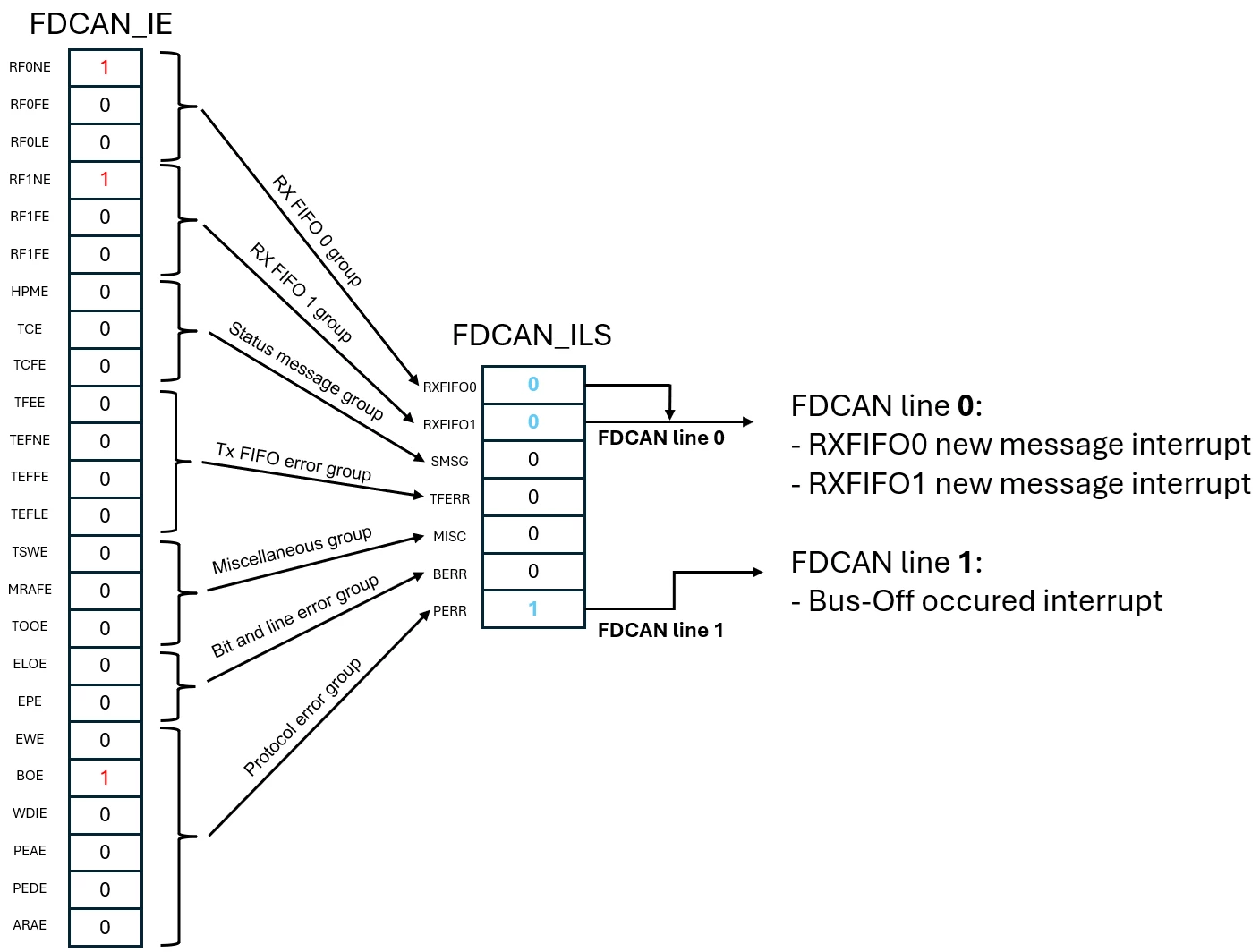
Figure 4. Example of FDCAN_IE and FDCAN_ILS register values for interrupt line mapping
This example is implemented using the HAL API in section 2.
2. How to use FDCAN interrupts with HAL
Before using HAL, it is important to identify the correct APIs and apply the appropriate definitions to ensure proper FDCAN interrupt configuration. There are two main APIs involved:
- HAL_FDCAN_ActivateNotification()
- HAL_FDCAN_ConfigInterruptLines()
The HAL_FDCAN_ActivateNotification() function is mandatory to enable FDCAN interrupts regardless of which interrupt line is used. On the other hand, HAL_FDCAN_ConfigInterruptLines() is not used if all interrupts are mapped to interrupt line 0 and interrupt line 1 is not used.
However, if your application requires balancing interrupt priority levels or enabling/disabling groups of interrupts, using HAL_FDCAN_ConfigInterruptLines() becomes essential.
2.1 Summary of HAL definitions for interrupt configuration
Using the correct HAL definitions with the appropriate APIs is crucial to achieve the desired FDCAN interrupt behavior. Tables 1 and 2 summarize which definitions should be used with each API.
Table 1 lists the definitions to be used with HAL_FDCAN_ActivateNotification() for enabling FDCAN interrupts at the software level. It also shows the corresponding interrupt enable bits in the FDCAN_IE register.
Table 2 summarizes the definitions to be used with HAL_FDCAN_ConfigInterruptLines(), along with their corresponding child definitions that should be used with HAL_FDCAN_ActivateNotification().
|
HAL interrupts enable definitions |
Corresponding FDCAN_IE bits |
Bit description |
|
FDCAN_IT_RX_FIFO0_NEW_MESSAGE |
RF0NE |
Bit 0: Rx FIFO 0 new message interrupt enable |
|
FDCAN_IT_RX_FIFO0_FULL |
RF0FE |
Bit 1: Rx FIFO 0 full interrupt enable |
|
FDCAN_IT_RX_FIFO0_MESSAGE_LOST |
RF0LE |
Bit 2: Rx FIFO 0 message lost interrupt enable |
|
FDCAN_IT_RX_FIFO1_NEW_MESSAGE |
RF1NE |
Bit 3: Rx FIFO 1 new message interrupt enable |
|
FDCAN_IT_RX_FIFO1_FULL |
RF1FE |
Bit 4: Rx FIFO 1 full interrupt enable |
|
FDCAN_IT_RX_FIFO1_MESSAGE_LOST |
RF1LE |
Bit 5: Rx FIFO 1 message lost interrupt enable |
|
FDCAN_IT_RX_HIGH_PRIORITY_MSG |
HPME |
Bit 6: High-priority message interrupt enable |
|
FDCAN_IT_TX_COMPLETE |
TCE |
Bit 7: Transmission completed interrupt enable |
|
FDCAN_IT_TX_ABORT_COMPLETE |
TCFE |
Bit 8: Transmission cancellation finished interrupt enable |
|
FDCAN_IT_TX_FIFO_EMPTY |
TFEE |
Bit 9: Tx FIFO empty interrupt enable |
|
FDCAN_IT_TX_EVT_FIFO_NEW_DATA |
TEFNE |
Bit 10: Tx event FIFO new entry interrupt enable |
|
FDCAN_IT_TX_EVT_FIFO_FULL |
TEFFE |
Bit 11: Tx event FIFO full interrupt enable |
|
FDCAN_IT_TX_EVT_FIFO_ELT_LOST |
TEFLE |
Bit 12: Tx event FIFO element lost interrupt enable |
|
FDCAN_IT_TIMESTAMP_WRAPAROUND |
TSWE |
Bit 13: Timestamp wraparound interrupt enable |
|
FDCAN_IT_RAM_ACCESS_FAILURE |
MRAFE |
Bit 14: Message RAM access failure interrupt enable |
|
FDCAN_IT_TIMEOUT_OCCURRED |
TOOE |
Bit 15: Timeout occurred interrupt enable |
|
FDCAN_IT_ERROR_LOGGING_OVERFLOW |
ELOE |
Bit 16: Error logging overflow interrupt enable |
|
FDCAN_IT_ERROR_PASSIVE |
EPE |
Bit 17: Error passive interrupt enable |
|
FDCAN_IT_ERROR_WARNING |
EWE |
Bit 18: Warning status interrupt enable |
|
FDCAN_IT_BUS_OFF |
BOE |
Bit 19: Bus-off status |
|
FDCAN_IT_RAM_WATCHDOG |
WDIE |
Bit 20: Watchdog interrupt enable |
|
FDCAN_IT_ARB_PROTOCOL_ERROR |
PEAE |
Bit 21: Protocol error in arbitration phase enable |
|
FDCAN_IT_DATA_PROTOCOL_ERROR |
PEDE |
Bit 22: Protocol error in data phase enable |
|
FDCAN_IT_RESERVED_ADDRESS_ACCESS |
ARAE |
Bit 23: Access to reserved address enable |
Table 1. HAL definition to be used with HAL_FDCAN_ActivateNotification() and their corresponding bits in the FDCAN_IE register
|
HAL interrupts enable definitions |
HAL interrupts grouping definitions |
Corresponding bits in the FDCAN_ILS register |
|
FDCAN_IT_RX_FIFO0_NEW_MESSAGE |
FDCAN_ILS_RXFIFO0 |
RXFIFO0 (Bit 0) |
|
FDCAN_IT_RX_FIFO0_FULL |
||
|
FDCAN_IT_RX_FIFO0_MESSAGE_LOST |
||
|
FDCAN_IT_RX_FIFO1_NEW_MESSAGE |
FDCAN_ILS_RXFIFO1 |
RXFIFO1 (Bit 1) |
|
FDCAN_IT_RX_FIFO1_FULL |
||
|
FDCAN_IT_RX_FIFO1_MESSAGE_LOST |
||
|
FDCAN_IT_RX_HIGH_PRIORITY_MSG |
FDCAN_ILS_SMSG |
SMSG (Bit 2) |
|
FDCAN_IT_TX_COMPLETE |
||
|
FDCAN_IT_TX_ABORT_COMPLETE |
||
|
FDCAN_IT_TX_FIFO_EMPTY |
FDCAN_ILS_TFERR |
TFERR (Bit 3) |
|
FDCAN_IT_TX_EVT_FIFO_NEW_DATA |
||
|
FDCAN_IT_TX_EVT_FIFO_FULL |
||
|
FDCAN_IT_TX_EVT_FIFO_ELT_LOST |
||
|
FDCAN_IT_TIMESTAMP_WRAPAROUND |
FDCAN_ILS_MISC |
MISC (Bit 4) |
|
FDCAN_IT_RAM_ACCESS_FAILURE |
||
|
FDCAN_IT_TIMEOUT_OCCURRED |
||
|
FDCAN_IT_ERROR_LOGGING_OVERFLOW |
FDCAN_ILS_BERR |
BERR (Bit 5) |
|
FDCAN_IT_ERROR_PASSIVE |
||
|
FDCAN_IT_ERROR_WARNING |
FDCAN_ILS_PERR |
PERR (Bit 6) |
|
FDCAN_IT_BUS_OFF |
||
|
FDCAN_IT_RAM_WATCHDOG |
||
|
FDCAN_IT_ARB_PROTOCOL_ERROR |
||
|
FDCAN_IT_DATA_PROTOCOL_ERROR |
||
|
FDCAN_IT_RESERVED_ADDRESS_ACCESS |
Table 2. HAL FDCAN interrupts grouping definitions to be used with HAL_FDCAN_ConfigInterruptLines() versus their definition’s children used with HAL_FDCAN_ActivateNotification()
Note that HAL_FDCAN_ConfigInterruptLines() should be called before HAL_FDCAN_ActivateNotification(). This is because HAL_FDCAN_ActivateNotification() reads the FDCAN_ILS bits, which are configured by HAL_FDCAN_ConfigInterruptLines(), to ensure the correct enabling of FDCAN interrupt lines in the FDCAN_ILE register.
2.2 Summary of HAL definitions for FDCAN interrupt configuration
This section explains how the HAL_FDCAN_ActivateNotification() API is implemented in the HAL and how to interpret its functionality:
	ITs_lines_selection = hfdcan->Instance->ILS;
	/* if the interrupt belongs to the list of RX_FIFO0 and the corresponding bit group line of RX_FIFO0 was reset in ILS previously HAL_FDCAN_ConfigInterruptLines() (to be redirected to interrupt line 0) , so enable the interrupt line 0 in ILE */
 if ((((ActiveITs & FDCAN_IT_LIST_RX_FIFO0) != 0U) && (((ITs_lines_selection) & FDCAN_IT_GROUP_RX_FIFO0) == 0U)) || \
 (((ActiveITs & FDCAN_IT_LIST_RX_FIFO1) != 0U) && (((ITs_lines_selection) & FDCAN_IT_GROUP_RX_FIFO1) == 0U)) || \
 (((ActiveITs & FDCAN_IT_LIST_SMSG) != 0U) && (((ITs_lines_selection) & FDCAN_IT_GROUP_SMSG) == 0U)) || \
 (((ActiveITs & FDCAN_IT_LIST_TX_FIFO_ERROR) != 0U) && (((ITs_lines_selection) & FDCAN_IT_GROUP_TX_FIFO_ERROR) == 0U)) || \
 (((ActiveITs & FDCAN_IT_LIST_MISC) != 0U) && (((ITs_lines_selection) & FDCAN_IT_GROUP_MISC) == 0U)) || \
 (((ActiveITs & FDCAN_IT_LIST_BIT_LINE_ERROR) != 0U) && (((ITs_lines_selection) & FDCAN_IT_GROUP_BIT_LINE_ERROR) == 0U)) || \
 (((ActiveITs & FDCAN_IT_LIST_PROTOCOL_ERROR) != 0U) && (((ITs_lines_selection) & FDCAN_IT_GROUP_PROTOCOL_ERROR) == 0U)))
	{
 /* Enable Interrupt line 0 */
 SET_BIT(hfdcan->Instance->ILE, FDCAN_INTERRUPT_LINE0);
 }
The interpretation of the first line of the if condition in the above code: if the interrupt belongs to the RX_FIFO0 group and the corresponding group bit for RX_FIFO0 was previously cleared in the FDCAN_ILS register by HAL_FDCAN_ConfigInterruptLines() (indicating it is redirected to interrupt line 0), then the interrupt line 0 should be enabled in the FDCAN_ILE register. A similar logic is implemented for enabling the FDCAN interrupt line 1.
It is important to note that the definitions starting with FDCAN_IT_LIST_ represent the definition of the interrupt groups and are defined in the stm32xxxx_hal_fdcan.h file. These definitions illustrate how FDCAN interrupt grouping is implemented within the HAL:
#define FDCAN_IT_LIST_RX_FIFO0 (FDCAN_IT_RX_FIFO0_MESSAGE_LOST | \
 FDCAN_IT_RX_FIFO0_FULL | \
 FDCAN_IT_RX_FIFO0_NEW_MESSAGE) /*!< RX FIFO 0 Interrupts List */
#define FDCAN_IT_LIST_RX_FIFO1 (FDCAN_IT_RX_FIFO1_MESSAGE_LOST | \
 FDCAN_IT_RX_FIFO1_FULL | \
 FDCAN_IT_RX_FIFO1_NEW_MESSAGE) /*!< RX FIFO 1 Interrupts List */
#define FDCAN_IT_LIST_SMSG (FDCAN_IT_TX_ABORT_COMPLETE | \
 FDCAN_IT_TX_COMPLETE | \
 FDCAN_IT_RX_HIGH_PRIORITY_MSG) /*!< Status Message Interrupts List */
#define FDCAN_IT_LIST_TX_FIFO_ERROR (FDCAN_IT_TX_EVT_FIFO_ELT_LOST | \
 FDCAN_IT_TX_EVT_FIFO_FULL | \
 FDCAN_IT_TX_EVT_FIFO_NEW_DATA | \
 FDCAN_IT_TX_FIFO_EMPTY) /*!< TX FIFO Error Interrupts List */
#define FDCAN_IT_LIST_MISC (FDCAN_IT_TIMEOUT_OCCURRED | \
 FDCAN_IT_RAM_ACCESS_FAILURE | \
 FDCAN_IT_TIMESTAMP_WRAPAROUND) /*!< Misc. Interrupts List */
#define FDCAN_IT_LIST_BIT_LINE_ERROR (FDCAN_IT_ERROR_PASSIVE | \
 FDCAN_IT_ERROR_LOGGING_OVERFLOW) /*!< Bit and Line Error Interrupts List */
#define FDCAN_IT_LIST_PROTOCOL_ERROR (FDCAN_IT_RESERVED_ADDRESS_ACCESS | \
 FDCAN_IT_DATA_PROTOCOL_ERROR | \
 FDCAN_IT_ARB_PROTOCOL_ERROR | \
 FDCAN_IT_RAM_WATCHDOG | \
 FDCAN_IT_BUS_OFF | \
 FDCAN_IT_ERROR_WARNING) /*!< Protocol Error Interrupts List */
2.3 Example of FDCAN interrupt mapping using HAL
The following the steps to enable the FDCAN interrupts based on the scenario described in section 1. It is implemented using the HAL with the FDCAN1 instance:
Step 1: Enable the FDCAN NVIC IRQs
/* Enable FDCAN line 0 and line 1 NVIC interrupts.

 FDCAN line 0 is configured to have higher priority than FDCAN line 1 */

HAL_NVIC_SetPriority(FDCAN1_IT0_IRQn, 5, 0);

HAL_NVIC_EnableIRQ(FDCAN1_IT0_IRQn);

HAL_NVIC_SetPriority(FDCAN1_IT1_IRQn, 6, 0);

HAL_NVIC_EnableIRQ(FDCAN1_IT1_IRQn);
Step 2: Define the interrupts to be mapped on line 0 (New message interrupts for RxFIFO0 and RxFIFO1)
HAL_FDCAN_ConfigInterruptLines(&hfdcan1, FDCAN_ILS_RXFIFO0 | FDCAN_ILS_RXFIFO1, FDCAN_INTERRUPT_LINE0);Step 3: Define the interrupts to be mapped on line 1 (Bus-Off status interrupt)
HAL_FDCAN_ConfigInterruptLines(&hfdcan1, FDCAN_ILS_PERR, FDCAN_INTERRUPT_LINE1);Step 4: Enable the FDCAN interrupts
HAL_FDCAN_ActivateNotification(&hfdcan1, FDCAN_IT_RX_FIFO0_NEW_MESSAGE | FDCAN_IT_RX_FIFO1_NEW_MESSAGE | FDCAN_IT_BUS_OFF, 0);Conclusion
The FDCAN peripheral is relatively complex, and its implementation varies across different STM32 families. In particular, some series like STM32H5 and STM32G4 feature an optimized FDCAN implementation. This is compared to other series such as the STM32H7, especially the early STM32H7 MCUs (STM32H743/STM32H753), which implement a superset version of FDCAN.
This optimization often leads to misunderstandings regarding certain features in the simplified FDCAN versions. That design optimization of the FDCAN primarily affects the interrupt handling at the software level, introducing the concept of FDCAN interrupt grouping.
This article has described the design and implementation of FDCAN interrupt grouping and provided guidelines on how to use it effectively. It includes a practical example using the HAL library for optimal usage.
Related links
- Knowledge article: STM32 FDCAN running at 8 Mb/s on NUCLEO boards
- Knowledge article: How to recover from Bus-Off State with FDCAN on STM32 MCUs
- Knowledge article: How to use FDCAN to create a simple communication with a basic filter
- FAQ: Fixing STM32 FDCAN communication disruptions - APB bus, kernel, and time quanta clocks