cancel
Showing results for 
Search instead for 
Did you mean: 

How to regress from RDP level 2 to RDP level 0 on the STM32U5 series

Diane POMABIA
ST Employee

Summary

This article allows the process to regress from RDP 2 to RDP 0 on the STM32U5 series.

This example uses the STM32U5 Nucleo board with STM32U5A5ZJT6Q and STM32CubeProgrammer V2.13.
Note:

To regress from RDP2 to RDP0, you must be sure that your password has been defined in OEM2KEY. Otherwise, case regression is not possible. 

1. How to define an OEM password

To define an OEM2 password, you must do the following:

           1.Check if your sample is on RDP level 0 (no protection).

 
DianePOMABIA_11-1687166346156.png       
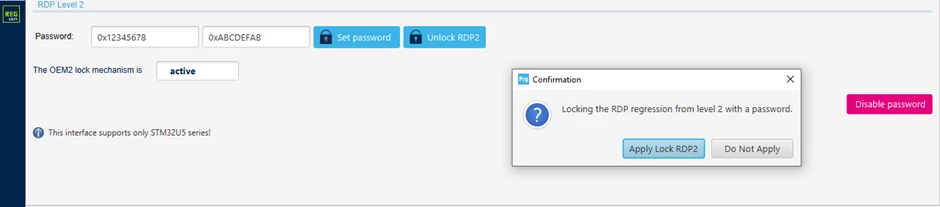
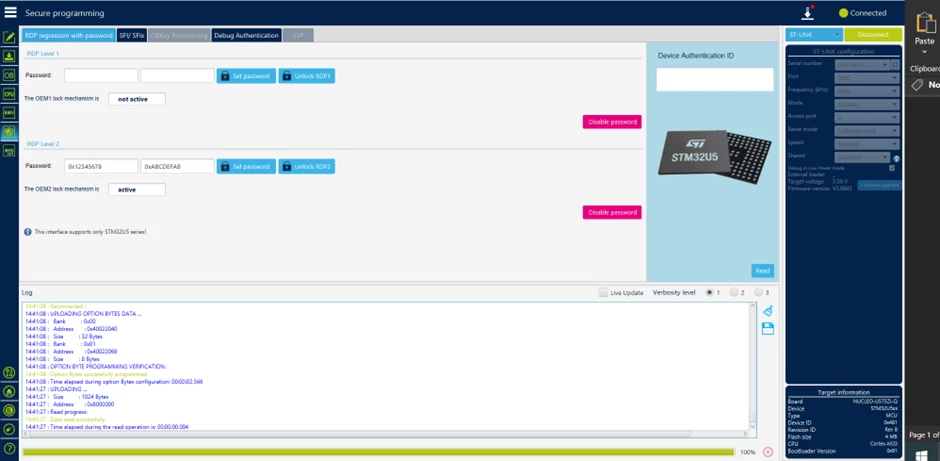
          2. In the "secure programming" menu, define your password.
 
DianePOMABIA_12-1687166411203.png
  3. Click on "set password" and after on "apply lock RDP2."
DianePOMABIA_14-1687166508811.png
 
At this point, you are sure that the OEM2Key is correctly defined.


2. How to take the RDP from level 0 to level 2

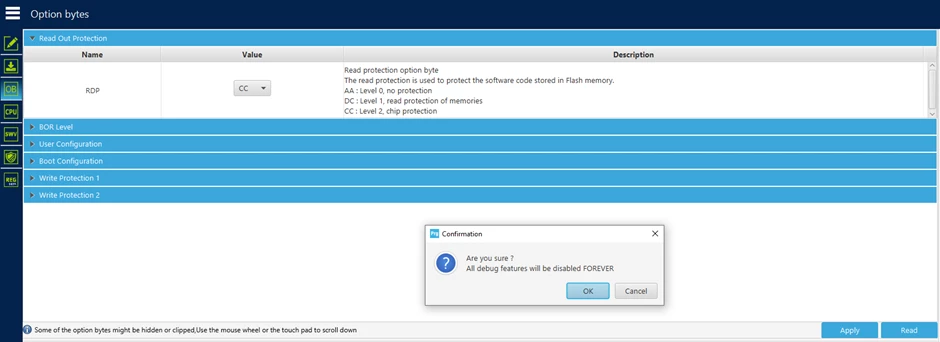
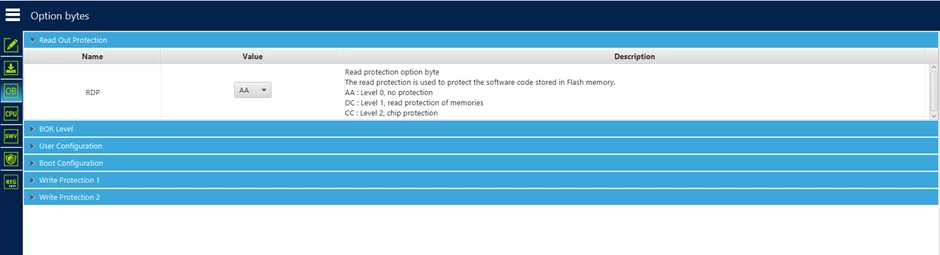
1. In the "read out protection" menu, select the value “CC" then click on apply.
DianePOMABIA_15-1687166557851.png

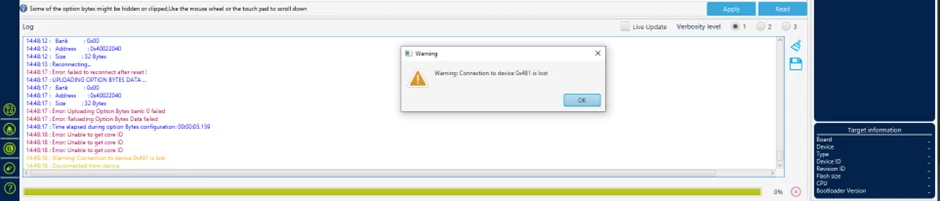
After clicking on "ok" you will lose your connection with STLINK. This is normal behavior.

DianePOMABIA_16-1687166608972.png

3. How to regress from RDP level 2 to level 0

Go back to the "secure programming" menu:

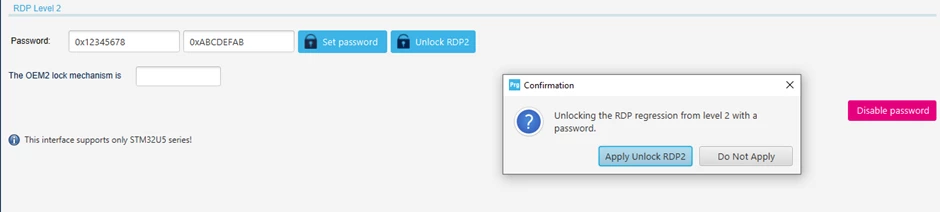
1. Click on "Unlock RDP2" and after on "Apply unlock RDP2."
DianePOMABIA_17-1687166657124.png
 
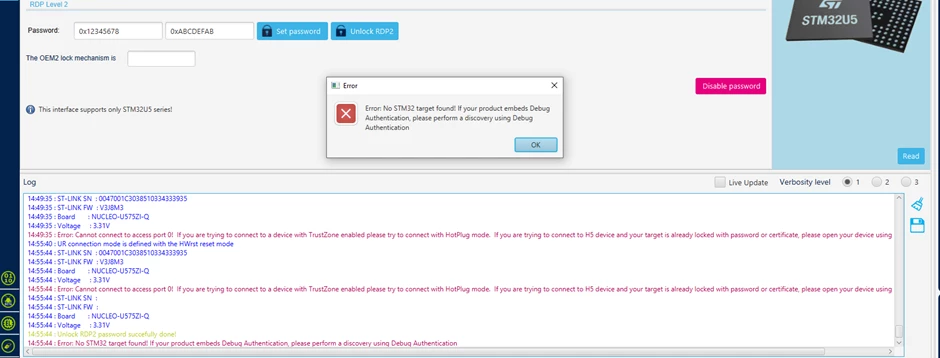
You receive an error message but in your log window, you can read "Unlock RDP2 password successfully done."
 
DianePOMABIA_18-1687166696045.png
 
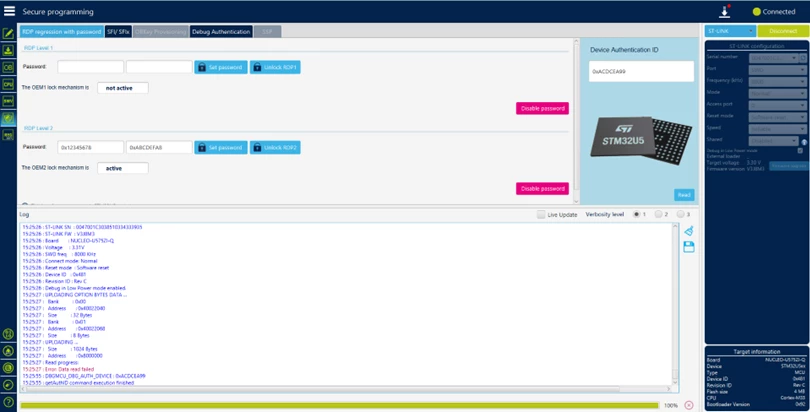
2. After clicking on "ok" reconnect your card with STLINK, then check the device authentication ID by clicking on "Read."
 
DianePOMABIA_20-1687166740110.png
 
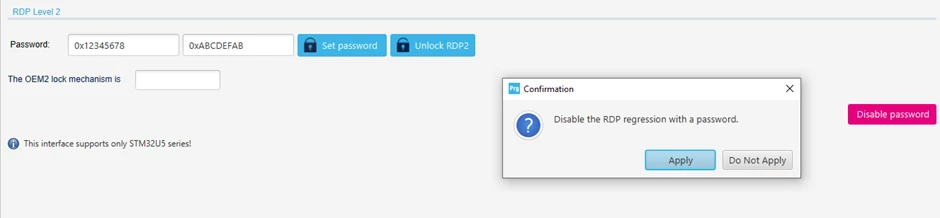
3. Disable the RDP regression with a password.
 
DianePOMABIA_21-1687166775555.png
 
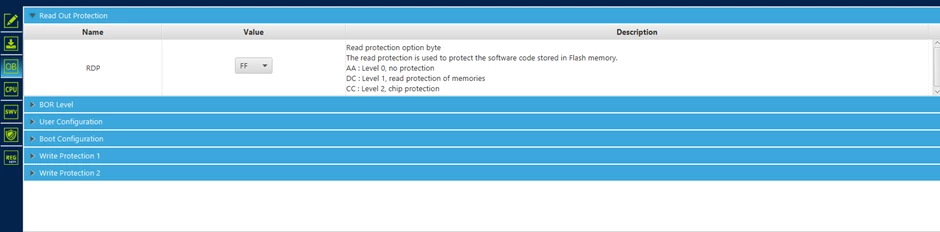
4. Go back to the "Read Out Protection" menu and check the value of the RDP. 
 
DianePOMABIA_22-1687166804803.png
 
5. Change the RDP value to “AA” then click on apply.
 
 
DianePOMABIA_23-1687166831869.png

You have correctly downgraded the RDP from level 2 to level 0.

Comments
RCana.2
Associate

Does this also work with keyed RDP level 1?

Diane POMABIA
ST Employee

Hello @RCana.2,

The process is the same for RDP Level 1.

Just be sure your password has been defined in OEM1KEY.

Regards

DianeP 

Manuel Ferrero
Associate III

<Just be sure your password has been defined in OEM1KEY>

What about if I forget the OEM1KEY? Is there some recovery for that chip (fully erased, of course) or I should throw it in the bin?

Diane POMABIA
ST Employee

Hello @Manuel Ferrero 

By default you can always regress from RDP Level 1 to Level 0. The interest of defining the OEM1KEY is to add additional protection to the part by preventing regression (in the event of an attack for example). This is the difference with level 2 regression where simple regression is blocked if you do not have the key.If you have activated RDP Level 2 without having defined OEM2KEY, you will no longer be able to do the regression because Device Closed.

Regards

Diane

Manuel Ferrero
Associate III

So if I lose the OEM2KEY I can throw the chip in the trash?

Diane POMABIA
ST Employee

@Manuel Ferrero What do you mean by losing the OEM2KEY? you haven't defined it?

Manuel Ferrero
Associate III

I was under the impression I did it, but at the moment I can't unlock the chip, so I assume I did something wrong in the process.

So now I cannot perform the regression and I can't understand if this chip is bricked or there is something I can to to recover it.

I am experimenting on the whole process and it's not a big deal if I have to trash one chip, the important thing for me is to really understand how this works and be able to reproduce a precise list of steps to achive protection after production phase.

Diane POMABIA
ST Employee

@Manuel Ferrero 

I understand. This article gives the procedure to be sure to correctly configure our part in order to be able to do the regression. It was reproduced on our side on several pieces before publication. By following all the steps in order you should be able to have a part that can do the regression.

Regards

Diane

Manuel Ferrero
Associate III

@Diane POMABIA can you confirm that now I don't have any chance to recover the chip? Even by some hardware pin and even by factory restoring the chip?

I don't care to loose all the memory, I would like to recover the whole board without unsoldering the micro and replace it.

Diane POMABIA
ST Employee

@Manuel Ferrero Once your part in RDP 2 without OEM2KEY. you can no longer reprogram or regress either by hardware or software.

Regards

Diane

Manuel Ferrero
Associate III

@Diane POMABIA

In this how-to I read:

"After clicking on "ok" you will lose your connection with STLINK. This is normal behavior."

Then in step 3 I should go back to the "secure programming" menu and Click on "Unlock RDP2" and after on "Apply unlock RDP2."

But I was disconnected, should I connect again before this step? With what configuration: JTAG or SWD? Which mode? Which Reset mode?

I followed the procedure, but I bricked another chip: at the moment if I try to conect to the chip I get the following error:

Error: No STM32 target found! If your product embeds Debug Authentication, please perform a discovery using Debug Authentication

How can I regress from RDP2 to RDP0 if I can't connect to the chip?

Manuel Ferrero
Associate III

Errata: I did connect the STLINK wrong. Now I fixed the connection, but still getting an error, this is the log:

13:10:01:707 : UR connection mode is defined with the HWrst reset mode
13:10:01:935 : ST-LINK SN : REDACTED
13:10:01:936 : ST-LINK FW : V2J40S7
13:10:01:936 : Board : --
13:10:01:936 : Voltage : 3.35V
13:10:01:936 : ST-LINK error (DEV_UNKNOWN_MCU_TARGET)
13:10:01:936 : ST-LINK SN : REDACTED
13:10:01:937 : ST-LINK FW : V2J40S7
13:10:01:937 : Board : --
13:10:01:937 : Voltage : 3.38V
13:10:01:937 : Error: ST-LINK error (DEV_UNKNOWN_MCU_TARGET)
13:10:01:957 : Disconnected
13:10:01:962 : halt ap 0
13:10:01:963 : ST-LINK SN :
13:10:01:964 : ST-LINK FW :
13:10:01:964 : Board : --
13:10:01:965 : Voltage : 3.38V

RCana.2
Associate

@Manuel Ferrero The error (DEV_UNKNOWN_MCU_TARGET) usually goes away if I disconnect the st-link usb connector


Manuel Ferrero
Associate III

@RCana.2 I tried, but no luck

Diane POMABIA
ST Employee

Hello @Manuel Ferrero @RCana.2 

DianePOMABIA_0-1689753479371.png

This is a tool bug where step 1 has to be done twice.
Workaround :

Can you retest on your two boards by doing step 1 <<Gback to the "secure programming" menu and Click on "Unlock RDP2" and after on "Apply unlock RDP2">> 2 times before moving on to step 2?

if you have correctly defined your password, no worries, go back directly from this step, you can regress to level 0.

Internal ticket has been created to solve this bug.

Internal ticket number: 157559 (This is an internal tracking number and is not accessible or usable by customers).

Regards

Diane

Manuel Ferrero
Associate III

Hello Diane.
At the moment the issue is that I cannot connect to the board anymore. If I try to connect I get an error.

This log is when I tried to connect with the following connection settings:
Port: JTAG
Frequencyt: 9000
Mode: Under reset
Reset mode: Hardware reset

09:19:35:487 : UR connection mode is defined with the HWrst reset mode
09:19:35:507 : ST-LINK SN : 53FF71068389505253152567
09:19:35:507 : ST-LINK FW : V2J40S7
09:19:35:507 : Board : --
09:19:35:508 : Voltage : 3.36V
09:19:35:508 : ST-LINK error (DEV_UNKNOWN_MCU_TARGET)
09:19:35:508 : ST-LINK SN : 53FF71068389505253152567
09:19:35:508 : ST-LINK FW : V2J40S7
09:19:35:508 : Board : --
09:19:35:509 : Voltage : 3.39V
09:19:35:509 : Error: ST-LINK error (DEV_UNKNOWN_MCU_TARGET)
09:19:35:526 : Disconnected

I also tried to change Mode and Reset mode to all the available values and I still got the same result.


And this one is with the following settings:
Port: SWD
Frequencyt: 4000
Mode: Under reset
Reset mode: Hardware reset

09:20:23:518 : UR connection mode is defined with the HWrst reset mode
09:20:23:540 : ST-LINK SN : 53FF71068389505253152567
09:20:23:540 : ST-LINK FW : V2J40S7
09:20:23:540 : Board : --
09:20:23:540 : Voltage : 3.35V
09:20:23:540 : Error: No STM32 target found! If your product embeds Debug Authentication, please perform a discovery using Debug Authentication
09:20:23:565 : Disconnected

I tried to change Mode and Reset mode settings with the same result.

If I try to follow your procedure and press "Unlock RDP2" and then "Apply unlock RDP2", I get the same error.

eSenKaa
Associate

@Diane POMABIA , @Jocelyn RICARD  hello, I'm working on a STM32U595 and I encountered the same issue (not being able to do the regression from RDP2 to RDP1 even with my OEMKEY1 and 2 set etc.

First of all I configured OEMKEY1 and 2 : 

eSenKaa_0-1691588050000.png

Then I followed the full process using Reference Manual + a nice tutorial by ST

eSenKaa_1-1691588091483.png


:https://www.youtube.com/watch?v=B3l6iuA7U8Q&list=PLnMKNibPkDnEkeKd_fytwc_9x2Ht2gRUn&index=2&ab_channel=STMicroelectronics

However, it doesn't work, I have two weird behavior :

If I use STM32CubeProgrammer I can read the Auth device ID :

eSenKaa_2-1691588120420.png


But I can't unlock RDP2 (By the way I tried twice as you answered above): 

eSenKaa_4-1691588167278.png


I tried in command line and what a surprise to see " Unlock RDP2 password failed!"

eSenKaa_5-1691588183288.png


At some point, I was like "oh it's me, I typed the wrong password", so I tried on an other STM32U595, we were two doing it, so double check. Same issue happened.

Could you help me regarding this issue. By the way I was using STM32CubeProgrammer 2.14 (last version), I was Under Reset for unlock sequence, and hotplug mode to get auth device. I also tried to save my chip by putting 3.3V on BOOT0 pin, but looks like I can't connect to debugger or do anything more.

Kind regards


Manuel Ferrero
Associate III

@Diane POMABIA 

I am having some progress on this topic using only the command line, but I still have regular issues when trying to make the process repeatable: quite often I have errors in writing the option bytes, typically in the reading back the expected values:  


      -------------------------------------------------------------------
                       STM32CubeProgrammer v2.14.0
      -------------------------------------------------------------------


ST-LINK SN  : 36FF70065648343817460843
ST-LINK FW  : V2J40S7
Board       : --
Voltage     : 3.36V
SWD freq    : 4000 KHz
Connect mode: Hot Plug
Reset mode  : Software reset
Device ID   : 0x482
Revision ID : Rev W
Device name : STM32U575/STM32U585
Flash size  : 2 MBytes (default)
Device type : MCU
Device CPU  : Cortex-M33
BL Version  : 0x0
Debug in Low Power mode enabled


UPLOADING OPTION BYTES DATA ...


  Bank          : 0x00
  Address       : 0x40022040
  Size          : 36 Bytes


▒▒▒▒▒▒▒▒▒▒▒▒▒▒▒▒▒▒▒▒▒▒▒▒▒▒▒▒▒▒▒▒▒▒▒▒▒▒▒▒▒▒▒▒▒▒▒▒▒▒
Error: Uploading Option Bytes bank: 0 failed
Error: Initializing the Option Bytes failed


And right after that I get a connection error:


      -------------------------------------------------------------------
                       STM32CubeProgrammer v2.14.0
      -------------------------------------------------------------------


ST-LINK SN  : REDACTED
ST-LINK FW  : V3J8M3B5S1
Board       : STLINK-V3SET
Voltage     : 3.49V
Error: No STM32 target found! If your product embeds Debug Authentication, please perform a discovery using Debug Authentication
2nd connect tentative with frequency (8MHz)
ST-LINK SN  : REDACTED
ST-LINK FW  : V3J8M3B5S1
Board       : STLINK-V3SET
Voltage     : 3.49V
Error: ST-LINK error (DEV_TARGET_NOT_HALTED)


Please note that those are the output of two different commands sent on the command line by my script.

At this point I cannot write option bytes anymore, via the script or the cube programmer.

Diane POMABIA
ST Employee

Hello @Manuel Ferrero 

Can you try this little test by using STM32_Programmer_CLi and share with me your result ?

@ECHO OFF


SETLOCAL
SET TOOLDIR=c:\Program Files\STMicroelectronics\STM32Cube\CubeProgrammer1.14\bin
SET TOOL=%TOOLDIR%\STM32_Programmer_CLI.exe

SET MY_CURR_DIR=%cd%

@ECHO ON
cd %TOOLDIR%
"%TOOL%" -c port=SWD mode=HOTPLUG -ob displ
"%TOOL%" -c port=SWD mode=HOTPLUG -lockRDP2 0x12345678 0xABCDEFAB
"%TOOL%" -c port=SWD mode=HOTPLUG -lockRDP1 0x12345678 0xABCDEFAB
"%TOOL%" -c port=SWD mode=HOTPLUG -ob RDP=0xCC
"%TOOL%" -c port=SWD mode=UR -unlockRDP2 0x12345678 0xABCDEFAB
"%TOOL%" -c port=SWD mode=UR -unlockRDP1 0x12345678 0xABCDEFAB
"%TOOL%" -c port=SWD mode=UR -ob RDP=0xAA
"%TOOL%" -c port=SWD mode=UR -unlockRDP1 0xFFFFFFFF 0xFFFFFFFF
"%TOOL%" -c port=SWD mode=UR -ob displ
cd %MY_CURR_DIR%

@ENDLOCAL
@PAUSE


Regards

Diane

eSenKaa
Associate

Thanks to @Diane POMABIA  I solved my issue. The problem was just my STLink version not up-to-date, you must have at least V2J38 STLink FW Version to process regression! Now with V2J42S7 everything is fine!

Diane POMABIA
ST Employee

@eSenKaa  as discussed in inbox, your problem was related to your version of STLINK.

To perform a regression, your STLINK FW version Must be at least V2J38 for ST-Link/V2 and V3J8M3 for ST-Link/V3.

We recommend that you always use the latest version of STLINK.

Pleased to be able to help you.

Regards

Diane

Manuel Ferrero
Associate III

Hello @Diane POMABIA.

I run the script after some minor modifications, and these are the results:

C:\Users\mfferrero\Desktop>cd "C:\Program Files\STMicroelectronics\STM32Cube\STM32CubeProgrammer\bin"

C:\Program Files\STMicroelectronics\STM32Cube\STM32CubeProgrammer\bin>STM32_Programmer_CLI.exe -c port=SWD mode=HOTPLUG -ob displ
-------------------------------------------------------------------
STM32CubeProgrammer v2.13.0
-------------------------------------------------------------------

ST-LINK SN : 53FF71068389505253152567
ST-LINK FW : V2J40S7
Board : --
Voltage : 3.39V
SWD freq : 4000 KHz
Connect mode: Hot Plug
Reset mode : Software reset
Device ID : 0x482
Revision ID : Rev W
Device name : STM32U575/STM32U585
Flash size : 2 MBytes
Device type : MCU
Device CPU : Cortex-M33
BL Version : 0x93
Debug in Low Power mode enabled


UPLOADING OPTION BYTES DATA ...

Bank : 0x00
Address : 0x40022040
Size : 36 Bytes

北北北北北北北北北北北北北北北北北北北北北北北北北 0% 圹圹圹圹圹圹圹圹圹圹圹圹圹圹圹圹圹圹圹圹圹圹圹圹圹 100%北北北北北北北北北北北北北北北北北北北北北北北北北 50% 圹圹圹圹圹圹圹圹圹圹圹圹圹圹圹圹圹圹圹圹圹圹圹圹圹 100%

Bank : 0x01
Address : 0x40022068
Size : 8 Bytes


OPTION BYTES BANK: 0

Read Out Protection:

RDP : 0xAA (Level 0, no protection)

BOR Level:

BOR_LEV : 0x0 (BOR Level 0, reset level threshold is around 1.7 V)

User Configuration:

TZEN : 0x0 (Global TrustZone security disabled)
nRST_STOP : 0x1 (No reset generated when entering Stop mode)
nRST_STDBY : 0x1 (No reset generated when entering Standby mode)
nRST_SHDW : 0x1 (No reset generated when entering the Shutdown mode)
SRAM134_RST : 0x1 (SRAM1, SRAM3 and SRAM4 not erased when a system reset occurs)
IWDG_SW : 0x1 (Software independent watchdog)
IWDG_STOP : 0x1 (IWDG counter active in stop mode)
IWDG_STDBY : 0x1 (IWDG counter active in standby mode)
WWDG_SW : 0x1 (Software window watchdog)
SWAP_BANK : 0x0 (Bank 1 and bank 2 address are not swapped)
DBANK : 0x1 (Dual-bank Flash with contiguous addresses)
BKPRAM_ECC : 0x1 (Backup RAM ECC check disabled)
SRAM3_ECC : 0x1 (SRAM3 ECC check disabled)
SRAM2_ECC : 0x1 (SRAM2 ECC check disabled)
SRAM2_RST : 0x0 (SRAM2 erased when a system reset occurs)
nSWBOOT0 : 0x1 (BOOT0 taken from PH3/BOOT0 pin)
nBOOT0 : 0x1 (nBOOT0 = 1)
PA15_PUPEN : 0x1 (USB power delivery dead-battery disabled/ TDI pull-up activated)
IO_VDD_HSLV : 0x0 (High-speed IO at low VDD voltage feature disabled (VDD can exceed 2.5 V))
IO_VDDIO2_HSLV: 0x0 (High-speed IO at low VDDIO2 voltage feature disabled (VDDIO2 can exceed 2.5 V))

Boot Configuration:

NSBOOTADD0 : 0x100000 (0x8000000)
NSBOOTADD1 : 0x17F200 (0xBF90000)

Write Protection 1:

WRP1A_PSTRT : 0x7F (0x80FE000)
WRP1A_PEND : 0x0 (0x8000000)
UNLOCK_1A : 0x1 (WRP1A start and end pages unlocked)
WRP1B_PSTRT : 0x7F (0x80FE000)
WRP1B_PEND : 0x0 (0x8000000)
UNLOCK_1B : 0x1 (WRP1B start and end pages unlocked)
OPTION BYTES BANK: 1

Write Protection 2:

WRP2A_PSTRT : 0x7F (0x81FE000)
WRP2A_PEND : 0x0 (0x8100000)
UNLOCK_2A : 0x1 (WRP2A start and end pages unlocked)
WRP2B_PSTRT : 0x7F (0x81FE000)
WRP2B_PEND : 0x0 (0x8100000)
UNLOCK_2B : 0x1 (WRP2B start and end pages unlocked)

C:\Program Files\STMicroelectronics\STM32Cube\STM32CubeProgrammer\bin>STM32_Programmer_CLI.exe -c port=SWD mode=HOTPLUG -lockRDP2 0x12345678 0xABCDEFAB
-------------------------------------------------------------------
STM32CubeProgrammer v2.13.0
-------------------------------------------------------------------

ST-LINK SN : 53FF71068389505253152567
ST-LINK FW : V2J40S7
Board : --
Voltage : 3.39V
SWD freq : 4000 KHz
Connect mode: Hot Plug
Reset mode : Software reset
Device ID : 0x482
Revision ID : Rev W
Device name : STM32U575/STM32U585
Flash size : 2 MBytes
Device type : MCU
Device CPU : Cortex-M33
BL Version : 0x93
Debug in Low Power mode enabled


Lock RDP2 password successfully done

C:\Program Files\STMicroelectronics\STM32Cube\STM32CubeProgrammer\bin>STM32_Programmer_CLI.exe -c port=SWD mode=HOTPLUG -lockRDP1 0x12345678 0xABCDEFAB
-------------------------------------------------------------------
STM32CubeProgrammer v2.13.0
-------------------------------------------------------------------

ST-LINK SN : 53FF71068389505253152567
ST-LINK FW : V2J40S7
Board : --
Voltage : 3.39V
SWD freq : 4000 KHz
Connect mode: Hot Plug
Reset mode : Software reset
Device ID : 0x482
Revision ID : Rev W
Device name : STM32U575/STM32U585
Flash size : 2 MBytes
Device type : MCU
Device CPU : Cortex-M33
BL Version : 0x93
Debug in Low Power mode enabled


Lock RDP1 password successfully done

C:\Program Files\STMicroelectronics\STM32Cube\STM32CubeProgrammer\bin>STM32_Programmer_CLI.exe -c port=SWD mode=HOTPLUG -ob RDP=0xCC
-------------------------------------------------------------------
STM32CubeProgrammer v2.13.0
-------------------------------------------------------------------

ST-LINK SN : 53FF71068389505253152567
ST-LINK FW : V2J40S7
Board : --
Voltage : 3.39V
SWD freq : 4000 KHz
Connect mode: Hot Plug
Reset mode : Software reset
Device ID : 0x482
Revision ID : Rev W
Device name : STM32U575/STM32U585
Flash size : 2 MBytes
Device type : MCU
Device CPU : Cortex-M33
BL Version : 0x93
Debug in Low Power mode enabled


UPLOADING OPTION BYTES DATA ...

Bank : 0x00
Address : 0x40022040
Size : 36 Bytes

北北北北北北北北北北北北北北北北北北北北北北北北北 0% 圹圹圹圹圹圹圹圹圹圹圹圹圹圹圹圹圹圹圹圹圹圹圹圹圹 100%北北北北北北北北北北北北北北北北北北北北北北北北北 50% 圹圹圹圹圹圹圹圹圹圹圹圹圹圹圹圹圹圹圹圹圹圹圹圹圹 100%

Bank : 0x01
Address : 0x40022068
Size : 8 Bytes


PROGRAMMING OPTION BYTES AREA ...
北北北北北北北北北北北北北北北北北北北北北北北北北 50% 北北北北北北北北北北北北北北北北北北北北北北北北北 0%
Bank : 0x00
Address : 0x40022040
Size : 36 Bytes


Reconnecting...
Error: failed to reconnect after reset !


UPLOADING OPTION BYTES DATA ...

Bank : 0x00
Address : 0x40022040
Size : 36 Bytes


Error: Uploading Option Bytes bank: 0 failed
Error: Reloading Option Bytes Data failed

Time elapsed during option Bytes configuration: 00:00:07.030

C:\Program Files\STMicroelectronics\STM32Cube\STM32CubeProgrammer\bin>STM32_Programmer_CLI.exe -c port=SWD mode=UR -unlockRDP2 0x12345678 0xABCDEFAB
-------------------------------------------------------------------
STM32CubeProgrammer v2.13.0
-------------------------------------------------------------------

ST-LINK SN : 53FF71068389505253152567
ST-LINK FW : V2J40S7
Board : --
Voltage : 3.39V
Unlock RDP2 password succefully done!
Error: Cannot connect to access port 0!
If you are trying to connect to a device with TrustZone enabled please try to connect with HotPlug mode.
If you are trying to connect to H5 device and your target is already locked with password or certificate, please open your device using Debug Authentication.


C:\Program Files\STMicroelectronics\STM32Cube\STM32CubeProgrammer\bin>STM32_Programmer_CLI.exe -c port=SWD mode=UR -unlockRDP1 0x12345678 0xABCDEFAB
-------------------------------------------------------------------
STM32CubeProgrammer v2.13.0
-------------------------------------------------------------------

ST-LINK SN : 53FF71068389505253152567
ST-LINK FW : V2J40S7
Board : --
Voltage : 3.39V
Error: Cannot connect to access port 0
If you are trying to connet to a device with TrustZone enabled please try to connect with HotPlug mode


C:\Program Files\STMicroelectronics\STM32Cube\STM32CubeProgrammer\bin>STM32_Programmer_CLI.exe -c port=SWD mode=UR -ob RDP=0xAA
-------------------------------------------------------------------
STM32CubeProgrammer v2.13.0
-------------------------------------------------------------------

ST-LINK SN : 53FF71068389505253152567
ST-LINK FW : V2J40S7
Board : --
Voltage : 3.39V
Error: Cannot connect to access port 0!
If you are trying to connect to a device with TrustZone enabled please try to connect with HotPlug mode.
If you are trying to connect to H5 device and your target is already locked with password or certificate, please open your device using Debug Authentication.


C:\Program Files\STMicroelectronics\STM32Cube\STM32CubeProgrammer\bin>STM32_Programmer_CLI.exe -c port=SWD mode=UR -unlockRDP1 0xFFFFFFFF 0xFFFFFFFF
-------------------------------------------------------------------
STM32CubeProgrammer v2.13.0
-------------------------------------------------------------------

ST-LINK SN : 53FF71068389505253152567
ST-LINK FW : V2J40S7
Board : --
Voltage : 3.38V
Error: Cannot connect to access port 0
If you are trying to connet to a device with TrustZone enabled please try to connect with HotPlug mode


C:\Program Files\STMicroelectronics\STM32Cube\STM32CubeProgrammer\bin>STM32_Programmer_CLI.exe -c port=SWD mode=UR -ob displ
-------------------------------------------------------------------
STM32CubeProgrammer v2.13.0
-------------------------------------------------------------------

ST-LINK SN : 53FF71068389505253152567
ST-LINK FW : V2J40S7
Board : --
Voltage : 3.39V
Error: Cannot connect to access port 0!
If you are trying to connect to a device with TrustZone enabled please try to connect with HotPlug mode.
If you are trying to connect to H5 device and your target is already locked with password or certificate, please open your device using Debug Authentication.


C:\Program Files\STMicroelectronics\STM32Cube\STM32CubeProgrammer\bin>cd C:\Users\mfferrero\Desktop
Premere un tasto per continuare . . .


Diane POMABIA
ST Employee

great ,  Now can you do power off/on on your board with your modif ? and after that retest this code 

@Echo OFF


SETLOCAL
SET TOOLDIR=c:\Program Files\STMicroelectronics\STM32Cube\CubeProgrammer1.14\bin
SET TOOL=%TOOLDIR%\STM32_Programmer_CLI.exe

SET MY_CURR_DIR=%cd%

@Echo ON
cd %TOOLDIR%
"%TOOL%" -c port=SWD mode=HOTPLUG -ob displ
"%TOOL%" -c port=SWD mode=UR -unlockRDP2 0x12345678 0xABCDEFAB
"%TOOL%" -c port=SWD mode=UR -unlockRDP1 0x12345678 0xABCDEFAB
"%TOOL%" -c port=SWD mode=UR -ob RDP=0xAA
"%TOOL%" -c port=SWD mode=UR -unlockRDP1 0xFFFFFFFF 0xFFFFFFFF
"%TOOL%" -c port=SWD mode=UR -ob displ
cd %MY_CURR_DIR%

@ENDLOCAL
@PAUSE


The aim here is to send the regression command after.

Regards

Diane

mikka80
Associate

Hello

I'm using a STM32U5 on a NUCLEO-U545RE-Q. Trustzone is not enabled.

Thanks to STM32CubeProgrammer and STLINK-V3EC, I set OEM1KEY and OEM2KEY, while the chip was in RDP level 0.

Then I set RDP to level 1, then to level 2. 

I able to regress from RDP level 2 to level 1 by unlocking RDP2 with OEM2Key password with STM32CubeProgrammer.


Thanks to openGDB, a Digilent HS2 JTAG connected to MIPI10, Jumper JP3 set to [7-8] "5V source from ST-LINK in USB charger mode without USB negotiation (CN1)", Jumper JP1 set to [1-2] " An external debugger can be used on the MIPI10 connector (CN4). The level shifter (U2) is in high-Z. STLINK-V3EC no longer drives the embedded STM32", I also able to switch from RDP level 0 to level 1, then to go back to RDP level1 with OEM1KEY.

I can switch from RDP level 1 to RDP level 2, but I didn't succeed to regress from RDP level 2 to level 1 or level0 through openOCD.

Is it possible to regress from RDP level 2 to RDP level 0 ou level 1 without using neither STLINK-V3EC nor STM32CubeProgrammer?

Indeed, on our production board, we will have only JTAG connector, but not STLINK-V3EC connector. And I would find a way to shift the OEM2KEY through JTAG HS2 connected on MIPI10.


Below are the confif files used with OpenOCD :

stm32_u5x.cfg

# SPDX-License-Identifier: GPL-2.0-or-later

# script for stm32u5x family
# stm32u5x devices support both JTAG and SWD transports.

source [find target/swj-dp.tcl]
source [find mem_helper.tcl]

if { [info exists CHIPNAME] } {
set _CHIPNAME $CHIPNAME
} else {
set _CHIPNAME stm32u5x
}

source [find /data/to_be_installed/install_openocd/OpenOCD/tcl/target/stm32x5x_common.cfg]

proc stm32u5x_clock_config {} {
set offset [expr {[stm32x5x_is_secure] ? 0x10000000 : 0}]
# MCU clock is at MSI 4MHz after reset, set MCU freq at 160 MHz with PLL

# Enable voltage range 1 for frequency above 100 Mhz
# RCC_AHB3ENR = PWREN
mww [expr {0x46020C94 + $offset}] 0x00000004
# delay for register clock enable (read back reg)
mrw [expr {0x46020C94 + $offset}]
# PWR_VOSR : VOS Range 1
mmw [expr {0x4602080C + $offset}] 0x00030000 0
# while !(PWR_VOSR & VOSRDY)
while {!([mrw [expr {0x4602080C + $offset}]] & 0x00008000)} {}
# FLASH_ACR : 4 WS for 160 MHz HCLK
mww [expr {0x40022000 + $offset}] 0x00000004
# RCC_PLL1CFGR => PLL1MBOOST=0, PLL1M=0=/1, PLL1FRACEN=0, PLL1src=MSI 4MHz
# PLL1REN=1, PLL1RGE => VCOInputRange=PLLInputRange_4_8
mww [expr {0x46020C28 + $offset}] 0x00040009
# Enable EPOD Booster
mmw [expr {0x4602080C + $offset}] 0x00040000 0
# while !(PWR_VOSR & BOOSTRDY)
while {!([mrw [expr {0x4602080C + $offset}]] & 0x00004000)} {}
# RCC_PLL1DIVR => PLL1P=PLL1Q=PLL1R=000001=/2, PLL1N=0x4F=80
# fVCO = 4 x 80 /1 = 320
# SYSCLOCK = fVCO/PLL1R = 320/2 = 160 MHz
mww [expr {0x46020C34 + $offset}] 0x0101024F
# RCC_CR |= PLL1ON
mmw [expr {0x46020C00 + $offset}] 0x01000000 0
# while !(RCC_CR & PLL1RDY)
while {!([mrw [expr {0x46020C00 + $offset}]] & 0x02000000)} {}
# RCC_CFGR1 |= SW_PLL
mmw [expr {0x46020C1C + $offset}] 0x00000003 0
# while ((RCC_CFGR1 & SWS) != PLL)
while {([mrw [expr {0x46020C1C + $offset}]] & 0x0C) != 0x0C} {}
}

$_TARGETNAME configure -event reset-init {
echo "event reset-init ----------------"
# FIXME check PLL config for STM32U59/U5Axx and STM32U5F/U5Gxx devices
# stm32u5x_clock_config
# Boost JTAG frequency
# adapter speed 4000
}

digiletn-hs2.cfg


# this supports JTAG-HS2 (and apparently Nexys4 as well)

adapter driver ftdi
ftdi device_desc "Digilent USB Device"
ftdi vid_pid 0x0403 0x6014
transport select jtag
ftdi channel 0
ftdi_layout_init 0x00e8 0x60eb


adapter speed 50
reset_config srst_only srst_nogate


stm32x5x_common.cfg


# SPDX-License-Identifier: GPL-2.0-or-later
# common script for stm32l5x and stm32u5x families

set _TARGETNAME $_CHIPNAME.cpu

# Work-area is a space in RAM used for flash programming

# By default use 64kB at address 0x20000000

if { [info exists WORKAREASIZE] } {

set $_TARGETNAME.workarea_size $WORKAREASIZE


} else {

set $_TARGETNAME.workarea_size 0x10000

}


if { [info exists WORKAREAADDR] } {

set _WORKAREAADDR $WORKAREAADDR

} else {

set _WORKAREAADDR 0x20000000

}


# When RDP = 0x55, only a part of the RAM is set as non-secure by the secure
# application using the Secure Attribution Unit (SAU).


# This non-secure RAM cannot be auto-detected by the debugger, so to avoid
# programming issues, by default do not use the work-area and fall back to flash
# programming without flash loader (slower).
# If the user knows about the current SAU partitioning, he can provide
# the work-area address and size then force the usage of the loader by setting
# USE_LOADER_IN_RDP_05 to 1


# By default do not use the flash loader in RDP 0.5

if { [info exists USE_LOADER_IN_RDP_05] } {

set $_TARGETNAME.use_loader_in_rdp_05 $USE_LOADER_IN_RDP_05

} else {

set $_TARGETNAME.use_loader_in_rdp_05 0

}


#jtag scan chain

if { [info exists CPUTAPID] } {

set _CPUTAPID $CPUTAPID

} else {

if { [using_jtag] } {

# STM32L5x: RM0438 Rev5, Section 52.2.8 JTAG debug port - Table 425. JTAG-DP data registers
# STM32U5x: RM0456 Rev1, Section 65.2.8 JTAG debug port - Table 661. JTAG-DP data registers
# Corresponds to Cortex®-M33 JTAG debug port ID code
set _CPUTAPID 0x0ba04477

} {

# SWD IDCODE (single drop, arm)
set _CPUTAPID 0x0be12477

}

}


swj_newdap $_CHIPNAME cpu -irlen 4 -ircapture 0x1 -irmask 0xf -expected-id $_CPUTAPID
dap create $_CHIPNAME.dap -chain-position $_CHIPNAME.cpu

if {[using_jtag]} {

jtag newtap $_CHIPNAME bs -irlen 5

}


target create $_TARGETNAME cortex_m -endian little -dap $_CHIPNAME.dap

# use non-secure RAM by default
$_TARGETNAME configure -work-area-phys $_WORKAREAADDR -work-area-size [set $_TARGETNAME.workarea_size] -work-area-backup 0

# create sec/ns flash and otp memories (sizes will be probed)
flash bank $_CHIPNAME.flash_ns      stm32l4x 0x08000000 0 0 0 $_TARGETNAME
flash bank $_CHIPNAME.flash_alias_s stm32l4x 0x0C000000 0 0 0 $_TARGETNAME
flash bank $_CHIPNAME.otp           stm32l4x 0x0BFA0000 0 0 0 $_TARGETNAME


# Common knowledge tells JTAG speed should be <= F_CPU/6.
# F_CPU after reset is MSI 4MHz, so use F_JTAG = 500 kHz to stay on
# the safe side.
#
# Note that there is a pretty wide band where things are
# more or less stable, see http://review.openocd.org/3366
adapter speed 500


adapter srst delay 100
if {[using_jtag]} {

jtag_ntrst_delay 100

}

reset_config srst_nogate


if {[using_hla]} {

echo "Warn : The selected adapter does not support debugging this device in secure mode"

} else {

# if srst is not fitted use SYSRESETREQ to
# perform a soft reset
cortex_m reset_config sysresetreq

}


proc stm32x5x_is_secure {} {

# read Debug Security Control and Status Register (DSCSR) and check CDS (bit 16)
set DSCSR [mrw 0xE000EE08]
return [expr {($DSCSR & (1 << 16)) != 0}]

}


proc stm32x5x_ahb_ap_non_secure_access {} {

# in HLA mode, non-secure debugging is possible without changing the AP CSW
if {![using_hla]} {

# SPROT=1=Non Secure access, Priv=1
[[target current] cget -dap] apcsw 0x4B000000 0x4F000000

}

}


proc stm32x5x_ahb_ap_secure_access {} {

if {![using_hla]} {

# SPROT=0=Secure access, Priv=1
[[target current] cget -dap] apcsw 0x0B000000 0x4F000000

}

}


proc unlock_nscr {} {

echo "unlock_nscr"
# read FLASH_NSCR
set nscr [mrw 0x40022028]
echo [format  "NSCR before unlock = 0x%08X" $nscr]


#Write KEY1 = 0x45670123 in FLASH_NSKEYR.
echo "write KEY1"
mww 0x40022008 0x45670123
sleep 1000


# Write KEY2 = 0xCDEF89AB in FLASH_NSKEYR
echo "write KEY2"
mww 0x40022008 0xCDEF89AB

# read FLASH_NSCR
set nscr [mrw 0x40022028]
echo [format  "NSCR after unlock = 0x%08X" $nscr]

}


proc unlock_optr {} {
echo "unlock_optr"

# read FLASH_NSCR
set nscr [mrw 0x40022028]
echo [format  "NSCR before unlock = 0x%08X" $nscr]

#Write OPTKEY1 = 0x08192A3B in FLASH_OPTKEYR.
echo "write KEY1"
mww 0x40022010 0x08192A3B
sleep 1000

# Write OPTKEY2 = 0x4C5D6E7F in FLASH_OPTKEYR.
echo "write KEY2"
mww 0x40022010 0x4C5D6E7F

# read FLASH_NSCR
set nscr [mrw 0x40022028]
echo [format  "NSCR after unlock = 0x%08X" $nscr]

#TODO test si le NSCR = 0x00000000
}

proc update_optr_rdp1 {} {

echo "update_optr_rdp_1"

unlock_nscr
unlock_optr

# Write the desired options value in options registers.
echo "Set 0xDC in RDP"
mmw 0x40022040 0x000000DC 0x00000023

set optr [mrw 0x40022040]
set rdp [expr {$optr & 0xFF}]
echo [format  "RDP = 0x%02X" $rdp]

# Set OPTSTRT(17) in FLASH_NSCR
echo "Set OPTSTRT in FLASH_NSCR"
mmw 0x40022028 0x00020000 0

# TODO Wait for BSY bit to be cleared
sleep 1000

set nssr [mrw 0x40022020]
echo [format  "NSSR = 0x%08X" $nssr]

# Set OBL_LAUNCH(27) option bit to start option-byte loading FLASH_NSCR
echo "Set OBL_LAUNCH in FLASH_NSCR"
mmw 0x40022028 0x08000000 0


# TOODO check FLASH_NSCRis locked
sleep 1000
set nssr [mrw 0x40022020]
echo [format  "NSSR = 0x%08X" $nssr]

}


proc shift_OEM1 {} {

echo "shift_OEM1"
mww 0xE0044100  0x01234567
sleep 500
mww 0xE0044100  0x89ABCDEF
sleep 500

}


proc update_optr_rdp0 {} {

echo "update_optr_rdp_0"
shift_OEM1

unlock_nscr
unlock_optr

# Write the desired options value in options registers.
echo "Set 0xAA in RDP"
mmw 0x40022040 0x000000AA 0x00000055
set optr [mrw 0x40022040]
set rdp [expr {$optr & 0xFF}]
echo [format  "RDP = 0x%02X" $rdp]

# Set OPTSTRT(17) in FLASH_NSCR
echo "Set OPTSTRT in FLASH_NSCR"
mmw 0x40022028 0x00020000 0

# TODO Wait for BSY bit to be cleared.
sleep 1000

set nssr [mrw 0x40022020]
echo [format  " NSSR = 0x%08X" $nssr]

# Set OBL_LAUNCH(27) option bit to start option-byte loading FLASH_NSCR
echo "Set OBL_LAUNCH in FLASH_NSCR"
mmw 0x40022028 0x08000000 0

# TOODO check FLASH_NSCR is locked
sleep 1000

set nssr [mrw 0x40022020]
echo [format  "NSSR = 0x%08X" $nssr]

}


proc stm32x5x_enter_debug {} {

echo "enter_debug"
set _TARGETNAME [target current]

# check security status
set secure [stm32x5x_is_secure]


# check flash options, from FLASH_OPTR register
set optr [mrw 0x40022040]
set nssr [mrw 0x40022020]
set nscr [mrw 0x40022028]
set tzen [expr {$optr & 0x80000000}]
set rdp [expr {$optr & 0xFF}]

echo [format  "RDP = 0x%02X" $rdp]
echo [format  "NSSR = 0x%08X" $nssr]
echo [format  "NSCR = 0x%08X" $nscr]


if {$secure || $tzen} {

stm32x5x_ahb_ap_secure_access

} else {

stm32x5x_ahb_ap_non_secure_access

}


# print the secure state only when it changes
global $_TARGETNAME.secure
set initialized [info exists $_TARGETNAME.secure]


if {!$initialized || $secure != [set $_TARGETNAME.secure]} {

# update saved security state
set $_TARGETNAME.secure $secure

echo [format "$_TARGETNAME in %s state" [expr {$secure ? "Secure" : "Non-Secure"}]]

}

# avoid some noise, when reset is asserted OPTR is read as zero
if {$optr == 0} { return }

# ensure that workarea is correctly configured if there is a change in tzen or rdp
global $_TARGETNAME.tzen $_TARGETNAME.rdp
set initialized [expr {[info exists $_TARGETNAME.tzen] && [info exists $_TARGETNAME.rdp]}]


if {!$initialized || $tzen != [set $_TARGETNAME.tzen] || $rdp != [set $_TARGETNAME.rdp]} {
# update saved tzen and rdp state
set $_TARGETNAME.tzen $tzen
set $_TARGETNAME.rdp $rdp

echo [format "$_TARGETNAME TrustZone %s" [expr {$tzen ? "enabled" : "disabled"}]]

# use secure workarea only when TZEN=1 and RDP!=0x55
set workarea_addr [$_TARGETNAME cget -work-area-phys]
if {$tzen && ($rdp != 0x55)} {

set workarea_addr [expr {$workarea_addr | 0x10000000}]

} else {

set workarea_addr [expr {$workarea_addr & ~0x10000000}]

}


echo [format "$_TARGETNAME work-area address is set to 0x%08X" $workarea_addr]
$_TARGETNAME configure -work-area-phys $workarea_addr

# when RDP=0x55 (TZEN=1), only non-secure flash could be programmed
# but workarea is not accessible since the RAM is secure.
# to fall back to programming without loader set the workarea size to zero
global $_TARGETNAME.use_loader_in_rdp_05
if {$rdp == 0x55 && ![set $_TARGETNAME.use_loader_in_rdp_05]} {

$_TARGETNAME configure -work-area-size 0

echo "$_TARGETNAME work-area is disabled"

} elseif {[$_TARGETNAME cget -work-area-size] == 0} {

# restore the work-area size only if it was set previously to zero

global $_TARGETNAME.workarea_size


if {[set $_TARGETNAME.workarea_size] != 0} {

    $_TARGETNAME configure -work-area-size [set $_TARGETNAME.workarea_size]

    echo "$_TARGETNAME work-area is enabled"

}

}

}

}


$_TARGETNAME configure -event reset-start {
echo "event reset-start ----------------"
# Reset clock is MSI (4 MHz)
adapter speed 480

}


$_TARGETNAME configure -event examine-end {
echo "event examine-end ----------------"
stm32x5x_enter_debug


# DBGMCU_CR |= DBG_STANDBY | DBG_STOP
mmw 0xE0044004 0x00000006 0


# Stop watchdog counters during halt
# DBGMCU_APB1_FZ |= DBG_IWDG_STOP | DBG_WWDG_STOP
mmw 0xE0044008 0x00001800 0


}


$_TARGETNAME configure -event halted {

echo "event halted ----------------"
stm32x5x_enter_debug

}

tpiu create $_CHIPNAME.tpiu -dap $_CHIPNAME.dap -ap-num 0 -baseaddr 0xE0040000


lappend _telnet_autocomplete_skip _proc_pre_enable_$_CHIPNAME.tpiu

proc _proc_pre_enable_$_CHIPNAME.tpiu {_targetname} {

targets $_targetname
# Set TRACE_EN and TRACE_IOEN in DBGMCU_CR
# Leave TRACE_MODE untouched (defaults to async).
# When using sync change this value accordingly to configure trace pins
# assignment
mmw 0xE0044004 0x00000030 0

}


$_CHIPNAME.tpiu configure -event pre-enable "_proc_pre_enable_$_CHIPNAME.tpiu $_TARGETNAME"


janeska75
Associate

hello!

STM32F429 RDP Level 2 unlocking – help

Message:
Hello!

I have an STM32F429 microcontroller (VCDS USB cable) accidentally locked to RDP2 due to a bad firmware (FLY firmware). Since then:

DFU / bootloader does not appear on USB

ST-Link does not connect

Even Connect under reset does not work

Only two LEDs flash briefly

I know that RDP2 is “final”, but I would like to know if there is any realistic or documented way to reset the chip (hardware tricks, ST tools, ROM commands, etc.), or is it really just a matter of replacing the MCU.

Details:

MCU type: STM32F429VET6

unfortunately I loaded a different firmware: FLY !! / VCDS clone cable

I put it in DFU mode but the system still doesn't see it :(

Is there any way to unlock RDP2?

Is there an ST internal tool / command for this?

Can hardware methods (e.g. glitch) help?

Can ST service help with this?

Thanks in advance for all your answers!


stm dfu mod (1).png599330129_1657031645259236_3994392804458917239_n.jpgf923d7bd-f03d-4c35-9d55-4fc5cbac79f1.jpg

Version history
Last update:
‎2025-11-25 2:50 AM
Updated by:
Contributors