2025-12-19 7:30 AM - edited 2026-01-05 5:05 AM
I like my digits to be monospaced so they don't dance, but I want letters to be proportional. I want to use 1 font for this. There are fonts that support this. These are called tabular fonts. They have monospaced digits and support figure space (0x2007) for alignment.
There are fonts that support this that are also available in TouchGFX Designer:
This works. I wrote some code that replaces leading spaces before digits with digit spaces if the font supports it. This works really well and numbers no longer dance. Alternatively you can right-align a text field. But then you cannot have any text before it or you have to split the text in parts (so printf is not possible anymore and you might as well use two different fonts).
Another way is to modify a font (make digits same width and remove kerning for digits, and add figure space). I've done this, but this is a lot of work. And this is not allowed for many fonts (our customer allowed us to do this).
There are other fonts that also have tabular digits as an option via "tnum" (Tabular Figures) such as Arial. Example of such a font:
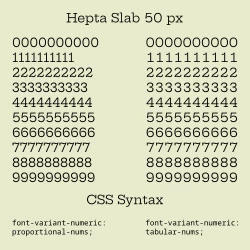
Is there a way to enable it for Arial in TouchGFX? If not will be be supported in the future?

2025-12-22 1:00 AM
I would like to leave the answer to your question to the TouchGFX specialists, but I would like to point out an important aspect of your question:
TouchGFX can use all fonts installed on the Windows system – but that does not imply that you are allowed to use them in your embedded system! Like other creative works, fonts are subject to copyright and must be licensed for use in embedded systems.
A conflict-free approach, on the other hand, would be to use open-source fonts, which can be found at Google Fonts, among other places, but you must then also observe the terms of the licence text.
You have to be extremely careful not to end up with a very expensive lawsuit from a solicitor.
Regards
/Peter
2026-01-05 5:03 AM
I am aware of licensing of fonts. I assumed that the fonts that fonts that came with TouchGFX are licensed to work with products that run TouchGFX. Is this not true? If that's the case I think it's appropriate to have TouchGFX issue a warning when using an unlicensed font.
I looked up the following fonts:
Segoe UI needs licensing from Monotype. https://learn.microsoft.com/en-us/typography/fonts/font-faq
Selawik is an alternative that's free for commercial use. Though that doesn't come with Windows.
Same for Calibri. Aptos is an alternative, but that one is not free for commercial use.
Tahoma is not free either. There is an open source alternative: "Wine Tahoma" which is licensed under LGPL 2.1.
Arial is not commercial either.
This is a problem.
We might already have shipped some products with non-commercial fonts that came with TouchGFX without realizing it.
2026-01-05 5:39 AM
The fonts do not come with TouchGFX, but are part of the operating system. No application programme of any operating system known to me can check the fonts used for licence freedom; this is always the responsibility of the user.
However, an attentive programmer would also notice that the fonts are not accessed relatively (via link), but are copied to the Assets folder and then converted to different sizes (usually to bitmaps). In the case of open source fonts, the licence terms should then be placed in this folder and made available to the end user in a suitable manner.
I know that this is a nasty trap, which is why I have explicitly pointed it out here.
I would consider replacing the fonts with open source versions or purchasing licences as part of firmware updates. Legal disputes in court or injunctions can be very expensive.
Regards
/Peter
2026-01-05 6:07 AM
@Peter BENSCH wrote:The fonts do not come with TouchGFX, but are part of the operating system.
This isn't obvious. There is a drop down menu in TouchGFX that shows a list of fonts. It doesn't show all fonts that are installed on my system. So I thought they must be fonts that came with TouchGFX.
@Peter BENSCH wrote:No application programme of any operating system known to me can check the fonts used for licence freedom; this is always the responsibility of the user.
A lookup table for common fonts can be implemented in TouchGFX. License restrictions can in theory only be loosened but not made more strict. So if the table is out of date that is not a serous problem. Unknown fonts can be assumed to be non-commercial only. How this would be communicated to the developer I don't know. But adding a license file and printing a warning message would be a good idea in my opinion.
2026-01-05 6:29 AM
Hello @unsigned_char_array.
Just to clarify, TouchGFX does not come with any fonts. The fonts available in TouchGFX Designer are those installed on the Windows system plus those manually added to the fonts folder.
In regards to your question, it is not possible to enable such a feature in TouchGFX. However, you can use a tool such as e.g. FontForge to modify the width of the digits. I have not tested it myself, but I hope it will be fairly straightforward. Note that font licenses might not permit modification of the font.
Best regards,
Johan
2026-01-08 6:27 AM
Hello again.
I did a small test to verify that it works. It is quite simple to modify the digits to be monospaced with FontForge. I have attached a small simulator project demonstrating the original font at the top and the modified font at the bottom. As far as I read the license terms, you are allowed to do this modification to fonts from Google Fonts.
My procedure:
Best regards,
Johan
2026-01-08 11:09 AM
You can modify with a python script. FFPython.
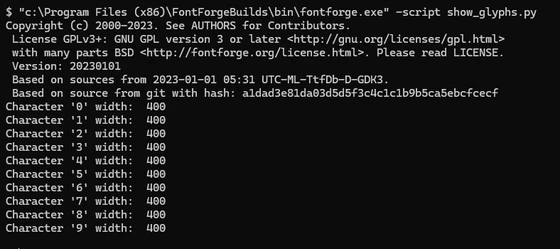
CLI>> "c:\Program Files (x86)\FontForgeBuilds\bin\fontforge.exe" -script show_glyphs.pyimport fontforge
def print_width_digits ():
# Numbers '0' - '9' ie 48-58
for digit in range ( 48, 58 ):
glyph = font[digit] # Get glyph by character
if glyph.unicode != -1: # -1 means the glyph has no Unicode mapping
char = chr(glyph.unicode)
print ( f"Character '{char}' width: {glyph.width}" )
else:
print(f"Glyph name: {glyph.glyphname}, Unicode: None")
# Open the font file
font = fontforge.open("font.ttf") # Replace with your font file
print_width_digits ()