

USB CDC packet loss at high data rates
When using a USB CDC device, especially at high data rates, there is a possibility for packet loss. This post illustrates the issue with what I consider convincing evidence. This isn't a STM32 bug, but it's something you may encounter when interfacing with an STM32 device so I felt it is relevant here.
As a bonus, this also shows the achievable speeds with USB FS CDC to be ~9.2 Mbps under ideal circumstances (fast, good code on both sides of the connection).
Here's the setup to illustrate the issue:
On the STM32, I'm initializing a USB FS CDC device (sometimes also called a VCP) and sending out packets as fast as possible. The bus speed of USB FS is 12 MHz.
- Buffers of 16 kB are sent which contain increasing uint64_t values (e.g. 0x0000000000000000 0x0000000000000001, etc...)
- When one buffer finishes, the next one is sent out.
- (I used STM32CubeMX to do the initialization code and it worked perfectly.)
On the PC side, I'm opening the serial port in Python and reading data. When data comes in, I ensure no data has been missed by verifying the uint64_t values are increasing. If data is missed, I print that out. Every second, I give a summary of what happened in the last second, including the effective bitrate and the maximum number of bytes read from the port.
If I poll the port continuously and let the cpu spin wild, this functions as intended and I get about 9.2 Mbps without any loss of data. Side note: this is about the max you will ever get on USB FS. If you use a hub, it will be slower. It would be interesting to know the theoretical maximum speed after all required USB overhead.
...
Received 1146624 bytes over the last 1 second (9.17 Mbps) (n=151, minread=4096, maxread=16384)
Received 1150976 bytes over the last 1 second (9.21 Mbps) (n=164, minread=4096, maxread=12288)
Received 1138688 bytes over the last 1 second (9.11 Mbps) (n=155, minread=4096, maxread=12288)
Received 1155072 bytes over the last 1 second (9.24 Mbps) (n=149, minread=4096, maxread=12288)
Received 1146880 bytes over the last 1 second (9.18 Mbps) (n=153, minread=4096, maxread=16384)
...
You can also see that the maxread is 16 kB which I suspect is the internal (Windows) buffer size of the serial port. If I put a larger delay, the effective bitrate slows down but the maxread doesn't increase past 16 kB, as expected.
To get the issue to occur, I put a small delay after polling. This lets the internal buffer fill up. When this happens, I see a packet loss of a multiple of 64 bytes. Here's an example:
...
Received 1134464 bytes over the last 1 second (9.08 Mbps) (n=154, minread=3968, maxread=16384)
dropped 128 bytes of data (values 0x2BCE00-0x2BCE0F)
Received 1146752 bytes over the last 1 second (9.17 Mbps) (n=146, minread=4096, maxread=16384)
...
dropped 64 bytes of data (values 0x358600-0x358607)
Received 1134528 bytes over the last 1 second (9.08 Mbps) (n=146, minread=4096, maxread=16384)
The data loss as a percentage is around 0.01% which makes it hard to find if you're not expecting it.
I'm also using WireShark to capture the USB packets as they're received. Looking at these, I can see the packet with 0x2BCE00 was received by the PC but never made it to the Python serial port interface. In this case, the missing packet had 128 bytes of payload and they were all missed.
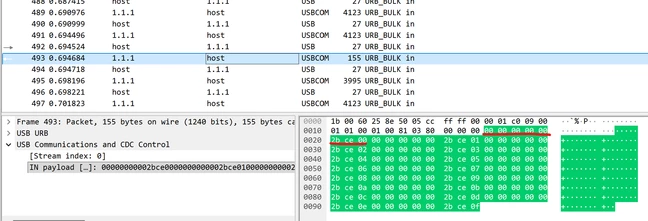
In other cases, only 64 bytes were lost. Always a multiple of 64 bytes.
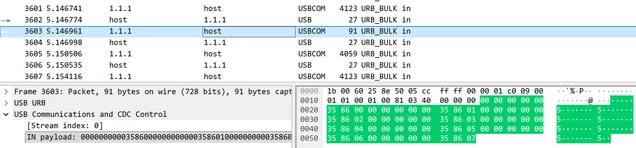
So where is the bug?
- Not on the STM32 device side. It's working as intended, at least as far as I can tell. It sent out the packets that went missing somewhere.
- Python is just wrapping the Windows serial port, but maybe there's something there? Seems unlikely.
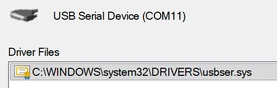
- Some internal Windows driver issue? Internally, usbser.sys is used for this serial port. To me, this seems the most likely. I don't have the tools or knowledge to look deeper.
- I suspect this bug is due to a race condition where the "i'm full" message from the driver doesn't make it to the USB port in time and results in a race condition. Data accepted while full is silently discarded somewhere in the process. At least that explanation fits the symptoms.
- Something else?
Notes:
- Frustratingly, this packet loss should be entirely avoidable. The USB protocol has methods to stall the bus when more data cannot be accepted. This happens correctly most of the time.
-
Nothing changes the internal 16 kB buffer size. Trying set_buffer_size has no impact. Adjusting the sliders in the Control Panel serial port advanced controls has no impact. It is always 16384 bytes.
-
I'm using an NUCLEO-F429ZI to demonstrate this, but the issue is not specific to this board or this family. It happens on other chips and other chip families as well.
- This happens with USB HS as well where the data loss is always a multiple of 512 bytes but otherwise presents identically.
Workarounds:
- Poll the port as fast as possible. Since Windows is not a real time OS and has random delays for tasks and drivers, this will not be a complete workaround. The issue will occur more when CPU load is high.
- Consider implementing a two-way scheme to ensure the buffer never has more than 16 kB will avoid this issue. Naturally, this slows down communication a bit. Consider using a "credit" system where the one side acknowledges each 1kB or 4kB received so the other side can send out more data.
I've attached my main.c file with the relevant user code.
I've also attached my python code (rename extension to py).